Combination Chart
Combination Chart
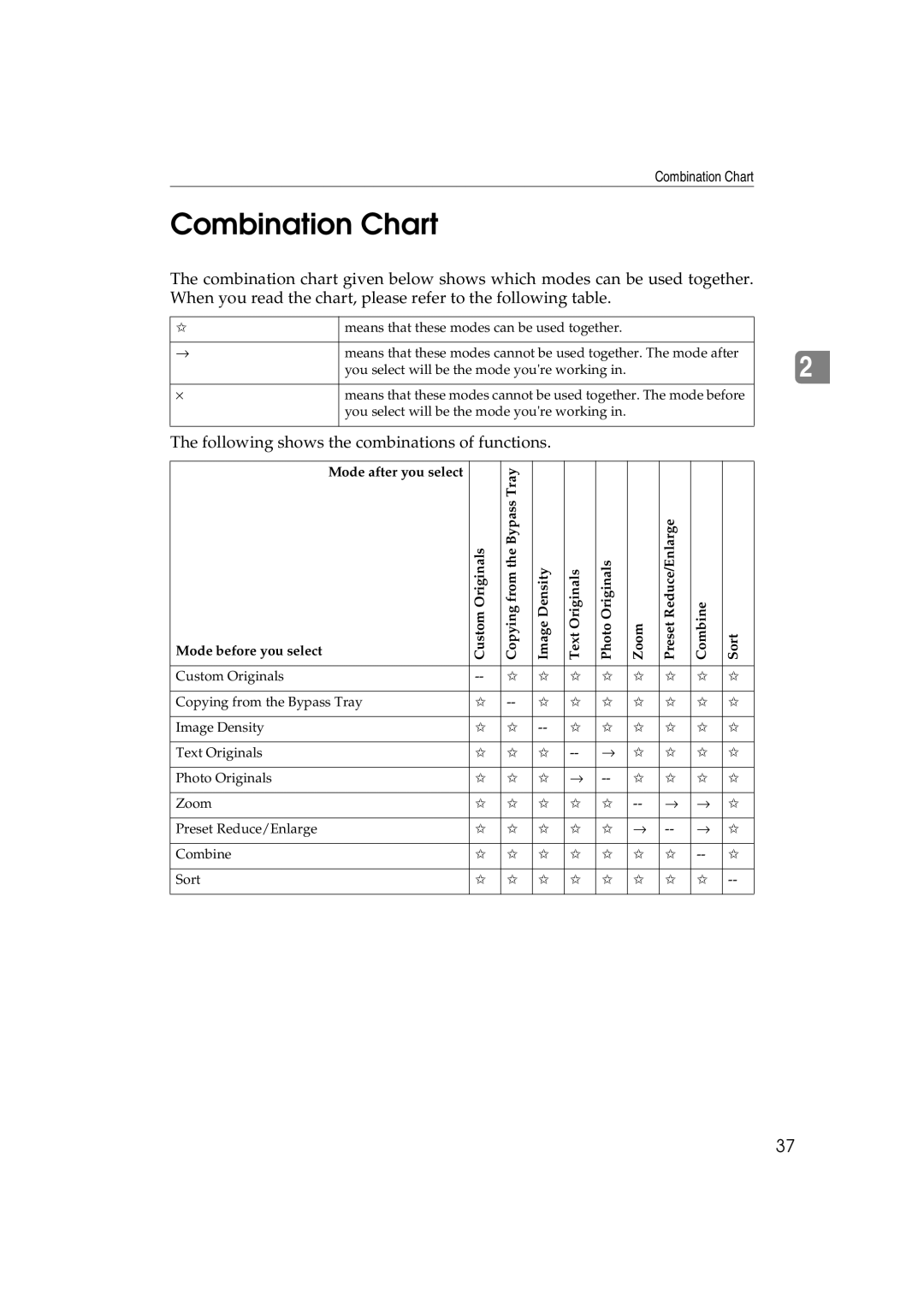
The combination chart given below shows which modes can be used together. When you read the chart, please refer to the following table.
✩ | means that these modes can be used together. |
|
|
→ | means that these modes cannot be used together. The mode after |
| you select will be the mode you're working in. |
|
|
⋅ | means that these modes cannot be used together. The mode before |
| you select will be the mode you're working in. |
|
|
The following shows the combinations of functions.
Mode after you select |
| Copying from the Bypass Tray |
|
|
|
|
|
|
|
Mode before you select | Custom Originals | Image Density | Text Originals | Photo Originals | Zoom | Preset Reduce/Enlarge | Combine | Sort | |
|
|
|
|
|
|
|
|
|
|
Custom Originals | ✩ | ✩ | ✩ | ✩ | ✩ | ✩ | ✩ | ✩ | |
|
|
|
|
|
|
|
|
|
|
Copying from the Bypass Tray | ✩ | ✩ | ✩ | ✩ | ✩ | ✩ | ✩ | ✩ | |
|
|
|
|
|
|
|
|
|
|
Image Density | ✩ | ✩ | ✩ | ✩ | ✩ | ✩ | ✩ | ✩ | |
|
|
|
|
|
|
|
|
|
|
Text Originals | ✩ | ✩ | ✩ | → | ✩ | ✩ | ✩ | ✩ | |
|
|
|
|
|
|
|
|
|
|
Photo Originals | ✩ | ✩ | ✩ | → | ✩ | ✩ | ✩ | ✩ | |
|
|
|
|
|
|
|
|
|
|
Zoom | ✩ | ✩ | ✩ | ✩ | ✩ | → | → | ✩ | |
|
|
|
|
|
|
|
|
|
|
Preset Reduce/Enlarge | ✩ | ✩ | ✩ | ✩ | ✩ | → | → | ✩ | |
|
|
|
|
|
|
|
|
|
|
Combine | ✩ | ✩ | ✩ | ✩ | ✩ | ✩ | ✩ | ✩ | |
|
|
|
|
|
|
|
|
|
|
Sort | ✩ | ✩ | ✩ | ✩ | ✩ | ✩ | ✩ | ✩ | |
|
|
|
|
|
|
|
|
|
|
2
37