Troubleshooting
hChanging the Toner Cartridge
3
When h is displayed, it is time to supply toner.
RWARNING:
•Do not incinerate used toner or toner containers. Toner dust might ig- nite when exposed to an open flame. Dispose of used toner containers in accordance with local regulations for plastics.
RCAUTION:
•Keep toner (used or unused) and toner containers out of reach of children.
RCAUTION:
•Our products are engineered to meet high standards of quality and function- ality, and we recommend that you only use the expendable supplies avail- able at an authorized dealer.
 Important
❒If you use toner other than that recommended, a fault might occur.
❒When adding toner, do not turn off the power switch. If you do, your settings are cleared.
❒Always add toner after the machine instructs you to add toner.

 Note
Note
❒You can still make about 50 copies after the hsymbol is lit and “Toner is Al- most Empty” is displayed, but replace the toner early to prevent poor copy quality.

 Reference
Regarding toner storage, see p.15 “Toner Storage”.
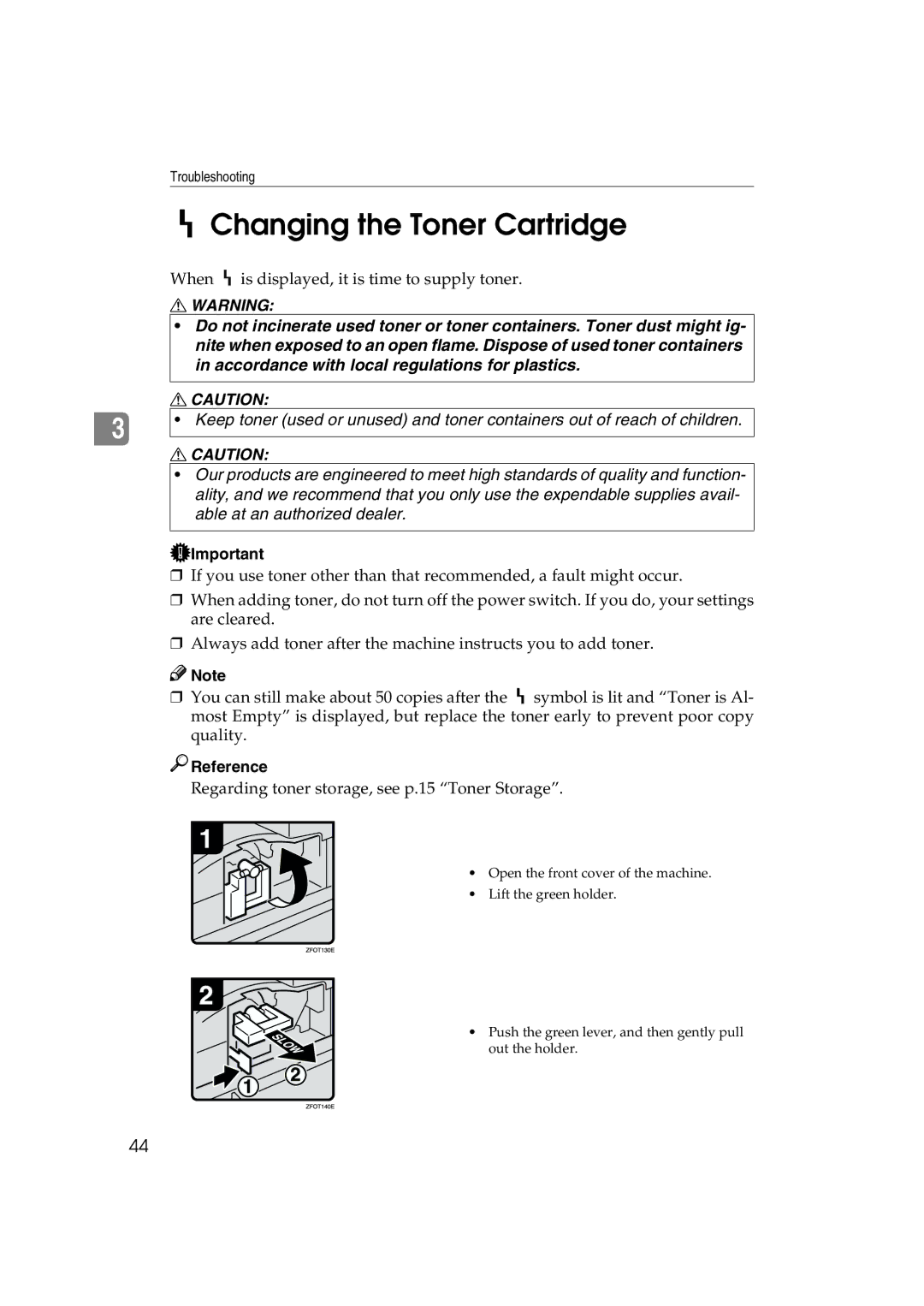
• Open the front cover of the machine.
• Lift the green holder.
• Push the green lever, and then gently pull out the holder.
44