Chapter 5 Preparation |
|
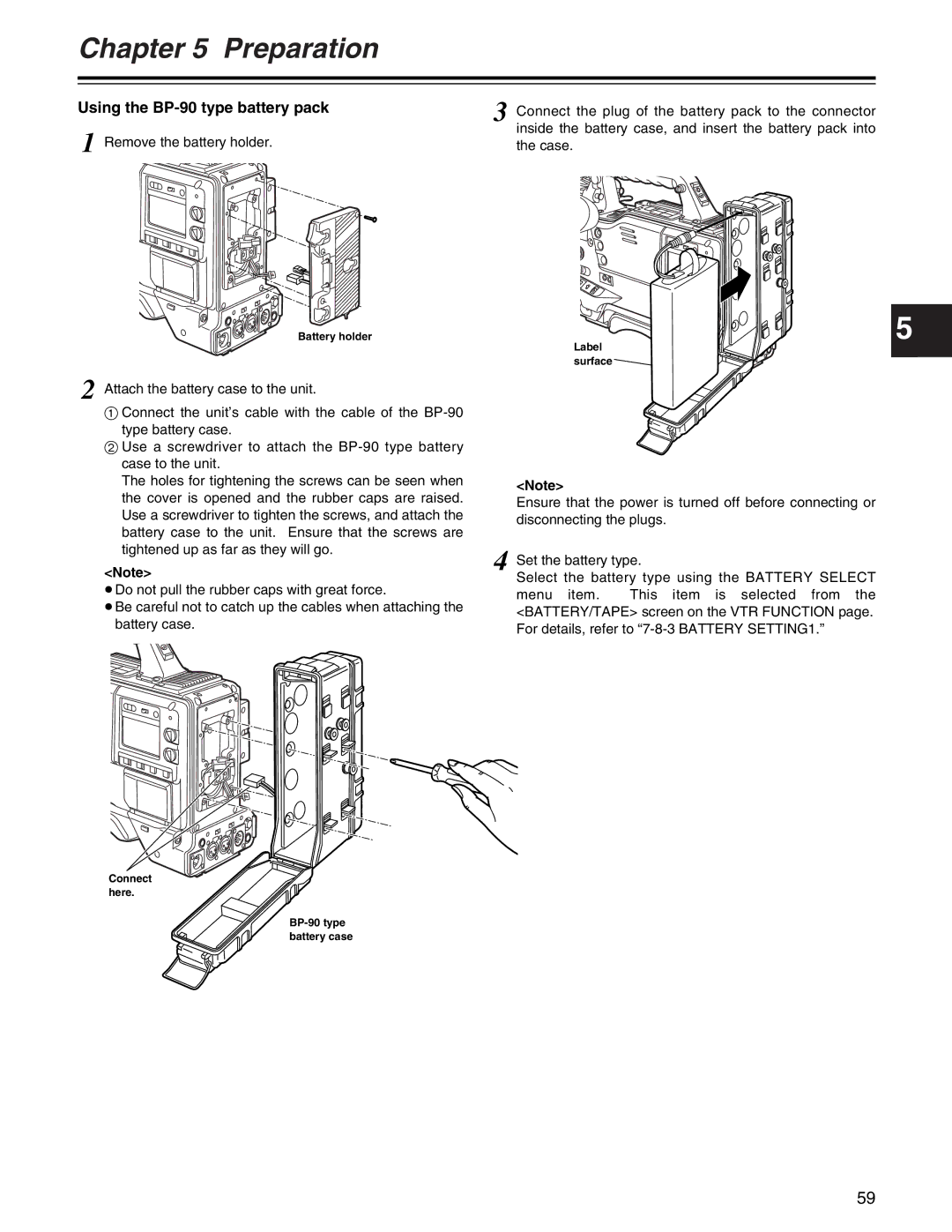
Using the | 3 Connect the plug of the battery pack to the connector |
| |
1 Remove the battery holder. | inside the battery case, and insert the battery pack into |
the case. |
Battery holder | 5 |
| Label |
| surface |
2 Attach the battery case to the unit.
1Connect the unit’s cable with the cable of the
2Use a screwdriver to attach the
The holes for tightening the screws can be seen when | <Note> |
| |
the cover is opened and the rubber caps are raised. |
| ||
Ensure that the power is turned off before connecting or | |||
Use a screwdriver to tighten the screws, and attach the | |||
disconnecting the plugs. | |||
battery case to the unit. Ensure that the screws are | |||
|
| ||
tightened up as far as they will go. | 4 Set the battery type. | ||
<Note> | |||
Select the battery type using the BATTERY SELECT | |||
≥Do not pull the rubber caps with great force. | |||
menu item. | This item is selected from the | ||
| |||
≥Be careful not to catch up the cables when attaching the | <BATTERY/TAPE> screen on the VTR FUNCTION page. | |
battery case. | ||
For details, refer to | ||
|
Connect here.
BP-90 type battery case
59