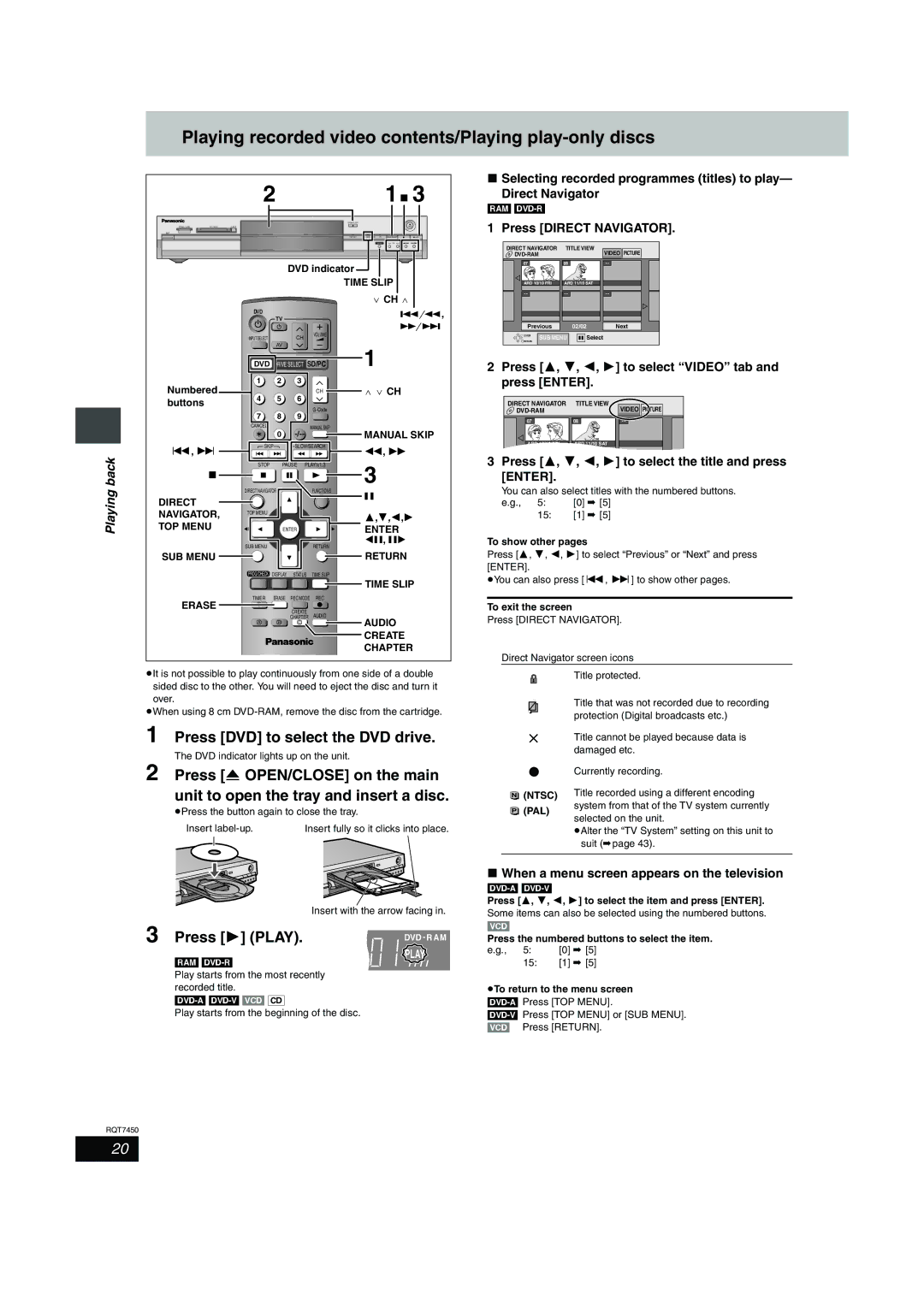
Playing recorded video contents/Playing play-only discs
|
| 2 |
| 1∫ 3 | |
|
| OPEN/CLOSE |
|
|
|
SD CARD | PC CARD | EJECT |
|
| REC |
|
| TIME SLIP | DVD SD PC | DRIVE SELECT | /x1.3 |
|
|
| TIME SLIP | CH |
|
|
| DVD indicator |
|
|
|
|
| TIME SLIP |
| ||
|
|
|
|
|
|
| X CH W |
|
| DVD |
|
|
|
| D, |
|
|
| TV |
|
| ||
|
|
|
|
|
| ||
|
|
|
|
|
|
| E |
|
| INPUT SELECT |
|
| CH | VOLUME |
|
|
|
|
|
|
| ||
|
|
| AV |
|
|
| 1 |
|
| DVD DRIVE SELECT | SD/PC | ||||
| Numbered | 1 | 2 |
| 3 |
|
|
| 4 | 5 |
| 6 | CH | W X CH | |
| buttons |
|
|
| |||
|
|
|
|
|
| ||
|
| 7 | 8 |
| 9 |
| |
|
|
|
|
| |||
|
| CANCEL |
|
|
| MANUAL SKIP |
|
|
|
| 0 |
| MANUAL SKIP | ||
|
|
|
|
| |||
| :, 9 | SKIP |
| SLOW/SEARCH | 6, 5 | ||
back |
|
|
|
|
| ||
| STOP |
| PAUSE | PLAY/x1.3 | 3 | ||
∫ |
|
|
|
|
| ||
|
|
|
|
|
| ||
Playing |
| DIRECT NAVIGATOR |
|
| FUNCTIONS | ; | |
DIRECT |
|
|
|
|
| ||
|
|
|
|
|
| ||
NAVIGATOR, | TOP MENU |
|
|
|
| 3,4,2,1 | |
|
|
|
|
| |||
TOP MENU |
|
|
|
|
| ||
|
| ENTER |
| ENTER | |||
|
| SUB MENU |
|
|
| RETURN | 2;, ;1 |
|
|
|
|
|
| ||
| SUB MENU |
|
|
|
|
| RETURN |
|
| PROG/CHECK | DISPLAY | STATUS TIME SLIP |
| ||
TIME SLIP
TIMER ERASE REC MODE REC
ERASE F
CREATE
CHAPTER AUDIO
A B C | AUDIO |
| CREATE |
| CHAPTER |
≥It is not possible to play continuously from one side of a double sided disc to the other. You will need to eject the disc and turn it over.
≥When using 8 cm
∫Selecting recorded programmes (titles) to play—
Direct Navigator
[RAM] [DVD-R]
1 Press [DIRECT NAVIGATOR].
DIRECT NAVIGATOR | TITLE VIEW | VIDEO | PICTURE | ||
|
|
| |||
07 |
| 08 |
| - - |
|
ARD 10/10 FRI | ARD 11/10 SAT |
|
| ||
- - |
| - - |
| - - |
|
Previous |
| 02/02 | Next | ||
ENTER | SUB MENU | Select |
|
| |
RETURN |
|
| |||
|
|
|
|
| |
2Press [3, 4, 2, 1] to select “VIDEO” tab and press [ENTER].
DIRECT NAVIGATOR | TITLE VIEW | VIDEO | PICTURE |
| |||
07 | 08 | - - |
|
ARD 10/10 FRI | ARD 11/10 SAT |
|
|
3 Press [3, 4, 2, 1] to select the title and press [ENTER].
You can also select titles with the numbered buttons. | |
e.g., 5: | [0] ➡ [5] |
15:[1] ➡ [5]
To show other pages
Press [3, 4, 2, 1] to select “Previous” or “Next” and press [ENTER].
≥You can also press [:, 9] to show other pages.
To exit the screen
Press [DIRECT NAVIGATOR].
Direct Navigator screen icons
Title protected.
Title that was not recorded due to recording protection (Digital broadcasts etc.)
1
2
Press [DVD] to select the DVD drive.
The DVD indicator lights up on the unit.
Press [< OPEN/CLOSE] on the main unit to open the tray and insert a disc.
tTitle cannot be played because data is damaged etc.
[Currently recording.
 (NTSC) Title recorded using a different encoding
≥Press the button again to close the tray.
Insert | Insert fully so it clicks into place. |
(PAL)
system from that of the TV system currently selected on the unit.
≥Alter the “TV System” setting on this unit to suit (➡page 43).
3
| Insert with the arrow facing in. |
Press [1] (PLAY). | DVD - R AM |
∫When a menu screen appears on the television
Press [3, 4, 2, 1] to select the item and press [ENTER].
Some items can also be selected using the numbered buttons.
[VCD]
Press the numbered buttons to select the item.
[RAM] [DVD-R]
PLAY
e.g., | 5: | [0] ➡ [5] |
| 15: | [1] ➡ [5] |
Play starts from the most recently recorded title.
Play starts from the beginning of the disc.
≥To return to the menu screen
RQT7450
20