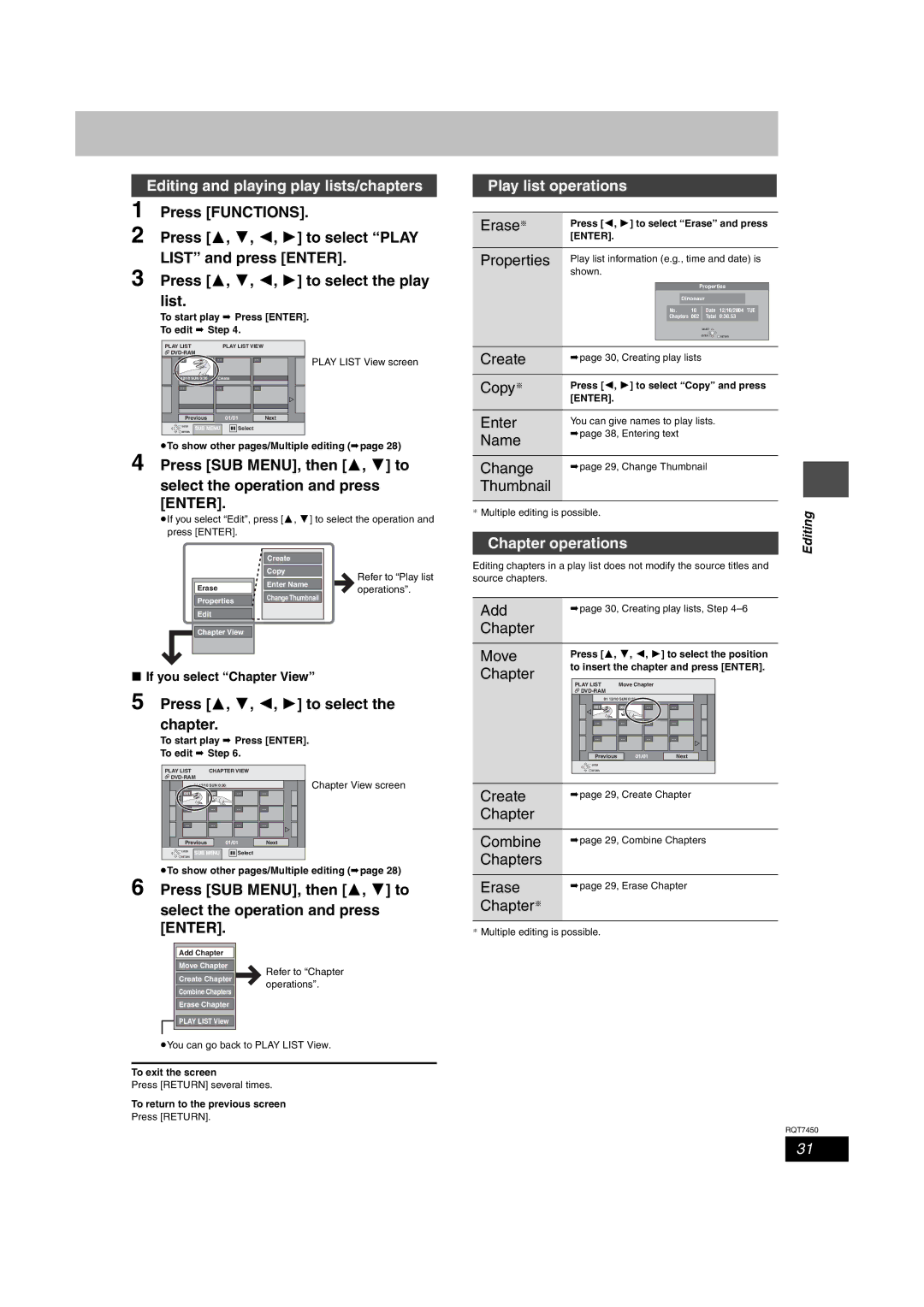
Editing and playing play lists/chapters
1 Press [FUNCTIONS].
2 Press [3, 4, 2, 1] to select “PLAY
LIST” and press [ENTER].
3 Press [3, 4, 2, 1] to select the play list.
To start play ➡ Press [ENTER].
To edit ➡ Step 4.
PLAY LIST | PLAY LIST VIEW |

01 | - - | - - | PLAY LIST View screen |
12/10 SUN 0:30 | Create |
|
|
- - | - - | - - |
|
Previous | 01/01 |
| Next |
ENTER | SUB MENU | Select |
RETURN |
≥To show other pages/Multiple editing (➡page 28)
4 Press [SUB MENU], then [3, 4] to
select the operation and press [ENTER].
≥If you select “Edit”, press [3, 4] to select the operation and press [ENTER].
|
|
|
|
|
|
|
|
|
|
|
| Create |
|
|
|
|
|
|
| Copy |
|
| Refer to “Play list |
|
|
|
| Enter Name |
|
|
|
|
| Erase |
|
|
| operations”. | |
|
|
| Change Thumbnail |
|
| ||
|
| Properties |
|
|
|
| |
|
|
|
|
|
|
|
|
|
| Edit |
|
|
|
|
|
|
|
|
|
|
|
|
|
|
| Chapter View |
|
|
|
|
|
|
|
|
|
|
|
|
|
|
|
|
|
|
|
|
|
∫If you select “Chapter View”
5 Press [3, 4, 2, 1] to select the chapter.
To start play ➡ Press [ENTER].
To edit ➡ Step 6.
PLAY LIST | CHAPTER VIEW |
| ||
|
| Chapter View screen | ||
| 01 12/10 SUN 0:30 |
| ||
001 | 002 |
Previous | 01/01 | Next | |
ENTER | SUB MENU | Select |
|
RETURN |
| ||
|
|
| |
≥To show other pages/Multiple editing (➡page 28)
6 Press [SUB MENU], then [3, 4] to
select the operation and press [ENTER].
Add Chapter |
|
|
|
|
|
Move Chapter |
| Refer to “Chapter |
|
| |
Create Chapter |
| |
| operations”. | |
|
| |
Combine Chapters |
|
|
|
|
|
Erase Chapter |
|
|

 PLAY LIST View
≥You can go back to PLAY LIST View.
To exit the screen
Press [RETURN] several times.
To return to the previous screen
Press [RETURN].
Play list operations
Erase§ | Press [2, 1] to select “Erase” and press |
| ||||||||
| [ENTER]. |
|
|
|
|
|
| |||
|
|
|
|
|
|
|
|
| ||
Properties | Play list information (e.g., time and date) is | |||||||||
| shown. |
|
|
|
|
|
| |||
|
|
|
|
|
|
|
|
| ||
|
|
|
|
| Properties |
|
|
| ||
|
|
|
| Dinosaur |
|
|
|
|
| |
|
|
| No. 10 | Date 12/10/2004 TUE |
|
|
|
| ||
|
|
| Chapters 002 | Total 0:30.53 |
|
| ||||
|
|
|
|
| SELECT |
|
|
| ||
|
|
|
|
| ENTER RETURN |
| ||||
|
|
|
|
|
|
|
|
|
|
|
Create | ➡page 30, Creating play lists | |||||||||
|
|
|
|
|
|
|
|
| ||
Copy§ | Press [2, 1] to select “Copy” and press | |||||||||
| [ENTER]. |
|
|
|
|
|
| |||
Enter | You can give names to play lists. |
| ||||||||
Name | ➡page 38, Entering text |
|
|
|
|
|
| |||
|
|
|
|
|
|
|
|
|
| |
|
|
|
|
|
|
|
|
|
| |
Change | ➡page 29, Change Thumbnail |
| ||||||||
| ||||||||||
Thumbnail |
|
|
|
|
|
|
|
|
|
|
§ Multiple editing is possible. |
|
|
|
| Editing | |||||
|
|
|
|
|
|
|
|
| ||
Chapter operations |
|
|
|
| ||||||
|
|
|
|
|
| |||||
|
|
|
|
|
|
|
|
|
|
|
Editing chapters in a play list does not modify the source titles and source chapters.
Add | ➡page 30, Creating play lists, Step | ||
Chapter |
|
|
|
|
|
|
|
Move | Press [3, 4, 2, 1] to select the position | ||
Chapter | to insert the chapter and press [ENTER]. | ||
|
|
| |
|
| PLAY LIST Move Chapter |
|
|
|
| |
01 12/10 SUN 0:30
001 | 002 |
Previous | 01/01 | Next |
 ENTER
ENTER
 RETURN
Create | ➡page 29, Create Chapter |
Chapter |
|
|
|
Combine | ➡page 29, Combine Chapters |
Chapters |
|
|
|
Erase | ➡page 29, Erase Chapter |
Chapter§ |
|
§Multiple editing is possible.
RQT7450
31