Control reference guide
Remote control
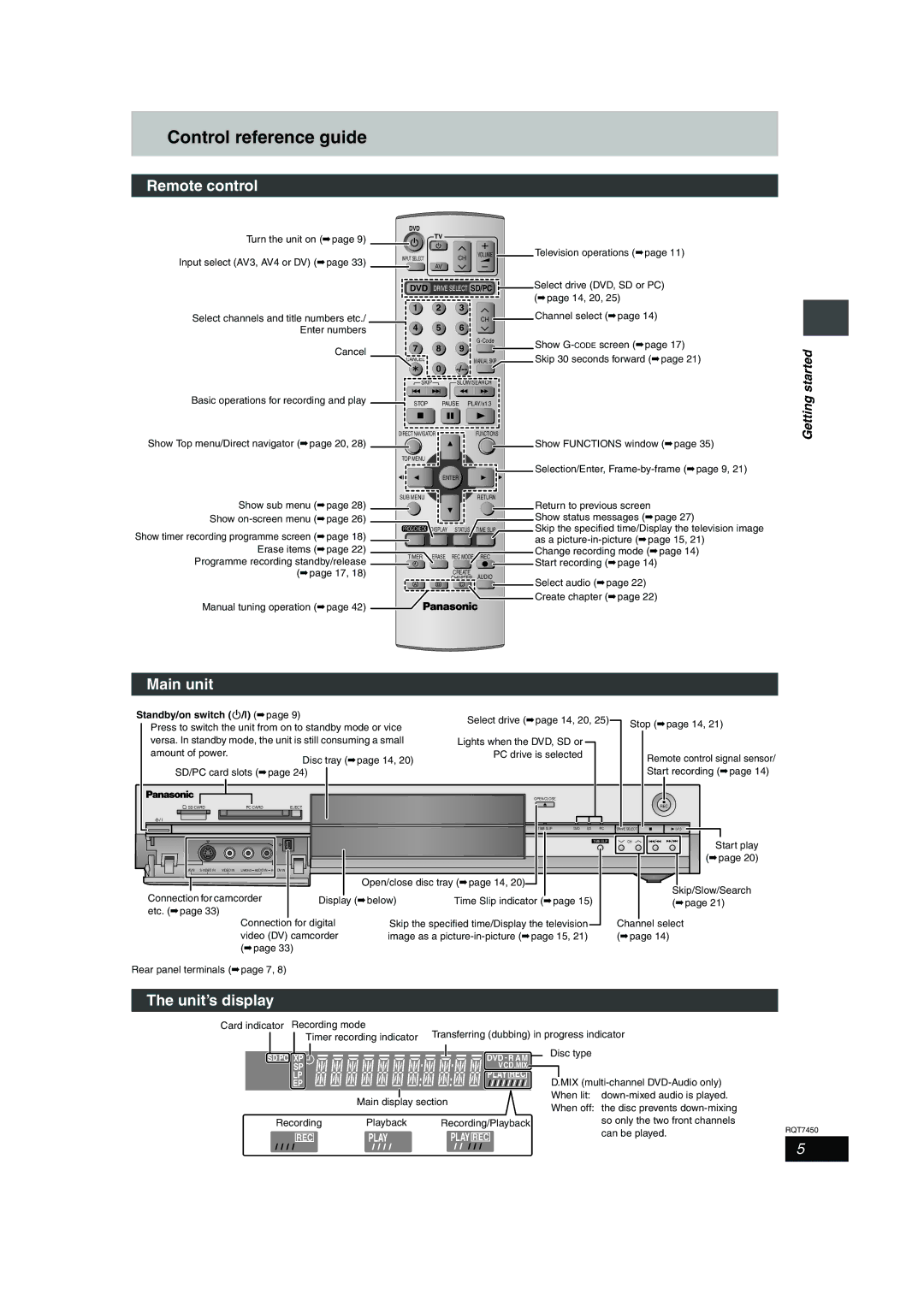
Turn the unit on (➡page 9)
Input select (AV3, AV4 or DV) (➡page 33)
Select channels and title numbers etc./ Enter numbers
Cancel
Basic operations for recording and play
Show Top menu/Direct navigator (➡page 20, 28)
DVD
TV
INPUT SELECT | CH | VOLUME | Television operations (➡page 11) |
|
|
| AV |
|
|
|
DVD | DRIVE SELECT SD/PC | Select drive (DVD, SD or PC) | ||
1 | 2 | 3 |
| (➡page 14, 20, 25) |
| Channel select (➡page 14) | |||
4 | 5 | 6 | CH | |
|
| |||
7 | 8 | 9 | Show | |
| ||||
| Skip 30 seconds forward (➡page 21) | |||
CANCEL | 0 | MANUAL SKIP | ||
|
|
| ||
SKIP |
| SLOW/SEARCH |
| |
STOP |
| PAUSE | PLAY/x1.3 |
|
DIRECT NAVIGATOR |
| FUNCTIONS |
| |
 Show FUNCTIONS window (➡page 35)
TOP MENU


 Selection/Enter,
ENTER
Getting started
Show sub menu (➡page 28)
Show on-screen menu (➡page 26)
Show timer recording programme screen (➡page 18) Erase items (➡page 22)
Programme recording standby/release (➡page 17, 18)
Manual tuning operation (➡page 42)
SUB MENU
PROG/CHECK DISPLAY STATUS
TIMER ERASE REC MODE
 F
F
CREATE
CHAPTER
A B C
RETURN
| Return to previous screen | |
| Show status messages (➡page 27) | |
TIME SLIP | Skip the specified time/Display the television image | |
| as a | |
REC | Change recording mode (➡page 14) | |
Start recording (➡page 14) | ||
| ||
AUDIO | Select audio (➡page 22) | |
| ||
| Create chapter (➡page 22) |
Main unit
Standby/on switch (Í/I) (➡page 9)
Press to switch the unit from on to standby mode or vice versa. In standby mode, the unit is still consuming a small
amount of power.
Disc tray (➡page 14, 20)
SD/PC card slots (➡page 24)
| SD CARD | PC CARD | EJECT | ||
|
|
|
|
|
|
|
|
|
|
|
|
Select drive (➡page 14, 20, 25)
Lights when the DVD, SD or PC drive is selected
OPEN/CLOSE
TIME SLIP | DVD | SD | PC |
Stop (➡page 14, 21)
Remote control signal sensor/ Start recording (➡page 14)
REC
DRIVE SELECT | /x1.3 |
|
|
AV3 | VIDEO IN | L/MONO | AUDIO IN | R | DV IN |
Connection for camcorder etc. (➡page 33)
TIME SLIP |
Open/close disc tray (➡page 14, 20)
Display (➡below) | Time Slip indicator (➡page 15) |
CH
Start play (➡page 20)
Skip/Slow/Search (➡page 21)
Connection for digital video (DV) camcorder (➡page 33)
Rear panel terminals (➡page 7, 8)
Skip the specified time/Display the television | Channel select |
image as a | (➡page 14) |
The unit’s display
Card indicator Recording mode | Transferring (dubbing) in progress indicator | |
Timer recording indicator | ||
|
|
|
|
|
|
|
SD PC XP |
|
|
|
| DVD - R AM |
|
|
|
| ||
SP |
|
|
| VCD.MIX | |
LP |
|
|
| PLAY REC | |
EP |
|
|
|
| |
|
|
|
|
| |
|
| Main display section | |||
Recording | Playback | Recording/Playback | |||
REC | PLAY |
| PLAY REC | ||
Disc type |
|
|
D.MIX |
| |
When lit: |
| |
When off: the disc prevents |
| |
| so only the two front channels | RQT7450 |
| can be played. | |
5