Using menus to play MP3
DVD
|
| TV |
|
|
| INPUT SELECT |
| CH | VOLUME |
|
|
| ||
|
| AV |
|
|
| DVD DRIVE SELECT SD/PC | |||
Numbered | 1 | 2 | 3 |
|
4 | 5 | 6 | CH | |
buttons |
| |||
|
|
| ||
| 7 | 8 | 9 | |
|
| |||
| CANCEL |
|
| MANUAL SKIP |
|
| 0 | ||
|
|
| ||
| SKIP |
| SLOW/SEARCH | |
Using the tree screen to find a group
While the file list is displayed
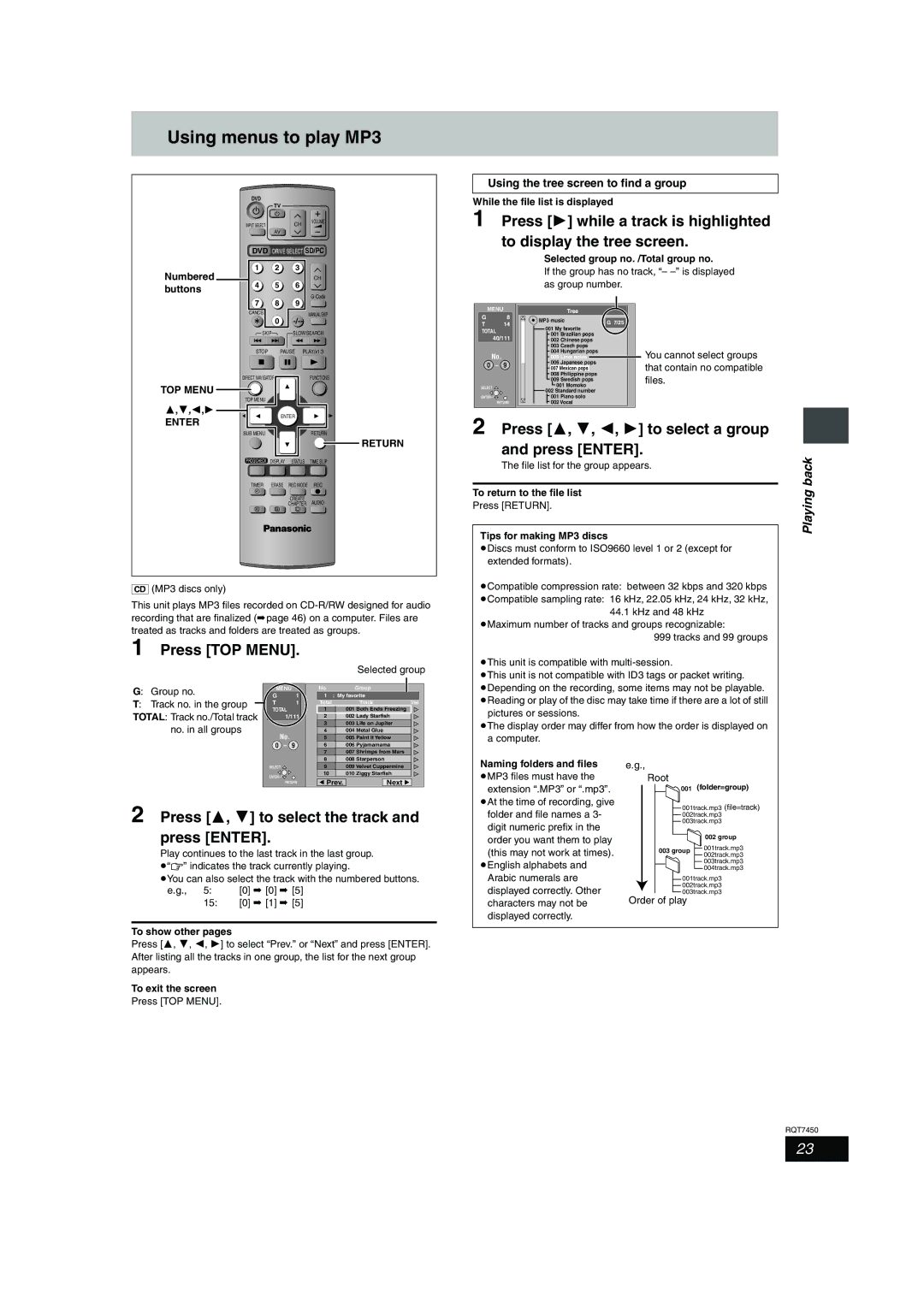
1 Press [1] while a track is highlighted to display the tree screen.
Selected group no. /Total group no.
If the group has no track, “–
| MENU | Tree |
| |
G | 8 | MP3 music | G 7/25 | |
T | 14 | |||
001 My favorite | ||||
TOTAL |
| |||
001 Brazilian pops |
| |||
| 40/111 |
| ||
| 002 Chinese pops |
| ||
|
| 003 Czech pops |
| |
TOP MENU
3,4,2,1
ENTER
STOP | PAUSE | PLAY/x1.3 | ||
DIRECT NAVIGATOR |
|
| FUNCTIONS | |
TOP MENU |
|
|
|
|
| ENTER |
|
| |
SUB MENU |
|
|
| RETURN |
|
|
|
| RETURN |
PROG/CHECK | DISPLAY | STATUS | TIME SLIP | |
TIMER | ERASE | REC MODE | REC | |
F |
|
|
|
|
|
| CREATE | AUDIO | |
|
| CHAPTER | ||
A | B |
| C |
|
| No. |
|
|
| 004 Hungarian pops |
| You cannot select groups | ||
|
|
|
| 005 Liner notes |
|
| |||
| 0 – 9 |
|
|
| 006 Japanese pops |
| that contain no compatible | ||
|
|
|
| 007 Mexican pops |
| ||||
|
|
|
|
| 008 Philippine pops |
| files. | ||
|
|
|
|
| 009 Swedish pops |
| |||
| SELECT |
|
|
| 001 Momoko |
| |||
|
|
|
|
|
| ||||
|
|
| 002 Standard number |
|
| ||||
|
|
|
|
|
| ||||
| ENTER |
|
|
| 001 Piano solo |
|
| ||
| RETURN |
|
|
| 002 Vocal |
|
| ||
|
|
|
|
|
| ||||
|
|
|
|
|
|
|
|
|
|
2 Press [3, 4, 2, 1] to select a group | |||||||||
and press [ENTER].
The file list for the group appears.
To return to the file list
Press [RETURN].
Tips for making MP3 discs
≥Discs must conform to ISO9660 level 1 or 2 (except for extended formats).
Playing back
[CD] (MP3 discs only)
This unit plays MP3 files recorded on
1 Press [TOP MENU].
Selected group
≥Compatible compression rate: between 32 kbps and 320 kbps
≥Compatible sampling rate: 16 kHz, 22.05 kHz, 24 kHz, 32 kHz, 44.1 kHz and 48 kHz
≥Maximum number of tracks and groups recognizable:
999 tracks and 99 groups
≥This unit is compatible with
≥This unit is not compatible with ID3 tags or packet writing.
G: Group no.
T: Track no. in the group
TOTAL: Track no./Total track no. in all groups
MENU | No |
| Group |
| ||
G |
| 1 | 1 | : My favorite |
| |
T |
| 1 | Total |
| Track | Tree |
TOTAL |
| 1 | 001 | Both Ends Freezing |
| |
| 1/111 | 2 | 002 | Lady Starfish |
| |
|
|
| 3 | 003 | Life on Jupiter |
|
| No. |
| 4 | 004 | Metal Glue |
|
|
| 5 | 005 | Paint It Yellow |
| |
0 | – | 9 | 6 | 006 Pyjamamama |
| |
|
|
| 7 | 007 Shrimps from Mars |
| |
|
|
| 8 | 008 | Starperson |
|
≥Depending on the recording, some items may not be playable. ≥Reading or play of the disc may take time if there are a lot of still
pictures or sessions.
≥The display order may differ from how the order is displayed on a computer.
SELECT | 9 | 009 Velvet Cuppermine | |
ENTER | 10 | 010 Ziggy Starfish | |
Prev. | Next | ||
RETURN |
Naming folders and files
≥MP3 files must have the extension “.MP3” or “.mp3”.
e.g.,
Root
001 (folder=group)
2 Press [3, 4] to select the track and press [ENTER].
Play continues to the last track in the last group. ≥“0” indicates the track currently playing.
≥You can also select the track with the numbered buttons.
e.g., 5: | [0] ➡ [0] ➡ [5] |
15: | [0] ➡ [1] ➡ [5] |
To show other pages
Press [3, 4, 2, 1] to select “Prev.” or “Next” and press [ENTER]. After listing all the tracks in one group, the list for the next group appears.
To exit the screen
Press [TOP MENU].
≥At the time of recording, give folder and file names a 3- digit numeric prefix in the order you want them to play (this may not work at times).
≥English alphabets and Arabic numerals are displayed correctly. Other characters may not be displayed correctly.
001track.mp3 (file=track) 002track.mp3 003track.mp3
| 002 group | |
003 group | 001track.mp3 | |
002track.mp3 | ||
| ||
| 003track.mp3 | |
| 004track.mp3 |
001track.mp3
002track.mp3
003track.mp3
Order of play
RQT7450
23