Model No. DMR-E65
RQT7450-L
Example
This Unit is Intended for USE in Moderate Climates
Getting started
Accessories
Table of contents
Remote control
Useful features
Unit’s display
Remote control
Control reference guide
Main unit
When the unit is not to be used for a long time
Do not connect the unit through a video cassette recorder
Before moving the unit, ensure the disc tray is empty
Component video output
Connecting to a television with 21-pin Scart Terminal
Connecting to a VCR with 21-pin Scart terminal
Started
Connection to a stereo amplifier
Connecting an amplifier or system component
Connection
To enjoy multi-channel surround sound on DVD-Video
Auto-Setup
Press Functions
Press 3, 4, 2, 1 to select Setup and press Enter
To enjoy progressive video
Selecting television type and aspect
Television operation
When the following indicator appears on the unit’s display
Point the remote control at the television
To change the code on the remote control
Discs that cannot be played
Disc and card information
Discs you can use for recording and play 12 cm/8 cm
Play-only discs 12 cm/8 cm
Structure of folders displayed by this unit
Accessory discs
Cards useable on this unit
Types of disc for the type of connected
Press ¥ REC to start recording
Recording television programmes
Press DVD to select the DVD drive
Press W X CH to select the channel
Playing while you are recording
Recording modes and approximate recording times
Flexible Recording
Press 3, 4, 2, 1 to select Start and press Enter
Refer to the control reference on
Press G-Code
Timer recording
Press F Timer
Using G-CODEsystem to make timer recordings
Manually programming timer recordings
To change a programme
To exit the timer recording list
To put the unit on timer recording standby
Check, change or delete a programme
Playing recorded video contents/Playing play-only discs
Manual Skip
Operations during play
Skipping the specified
Time Time Slip
Changing audio
Editing operations during play
Erase
Create chapter
Press TOP Menu
Using menus to play MP3
Using the tree screen to find a group
Press 3, 4, 2, 1 to select a group
Inserting/Removing the SD/PC card
Playing still pictures
SD card slot
PC card slot
Rotate
Press DVD or SD/PC to select the drive
Press Direct Navigator
Useful functions during still picture play
Press Display
Using on-screen menus and Status messages
Disc menu-Setting the disc content
On-screen menus
Picture menu-Change the picture quality
Status messages
Press Status
Play menu-Change the play sequence
Editing
Editing titles/chapters
Editing titles/chapters and playing chapters
Press 3, 4, 2, 1 to select the chapter
Enter Name
Set up Protection§
Cancel Protection§ Press 2, 1 to select Yes and press Enter
Properties
Press Return
Creating, editing and playing play lists
Creating play lists
Press 3, 4, 2, 1 to select Play List and press Enter
Play list operations
Editing and playing play lists/chapters
Press 2, 1 to select number of print 0 to
Set up Protection §
Editing still pictures
Picture and folder operation
Manual recording
Recording from a video cassette recorder
Start play on the other equipment
Press ¥ REC
Transferring dubbing still pictures
Transferring dubbing using the transferring dubbing list
To exit the Functions window
Functions window
Press Functions
Press 3, 4, 2, 1 to select an item and press Enter
Press 3, 4 to select Disc Protection and press Enter
Setting the protection
Disc and card management
Press Functions Press 3, 4, 2, 1 to select Disc
Enabling DVD-R to be played on other equipment-Finalize
Erasing all the contents of a disc or card-Format
Character and press Enter
Entering text
Show Enter Name screen
Press 3, 4, 2, 1 to select a
Functions
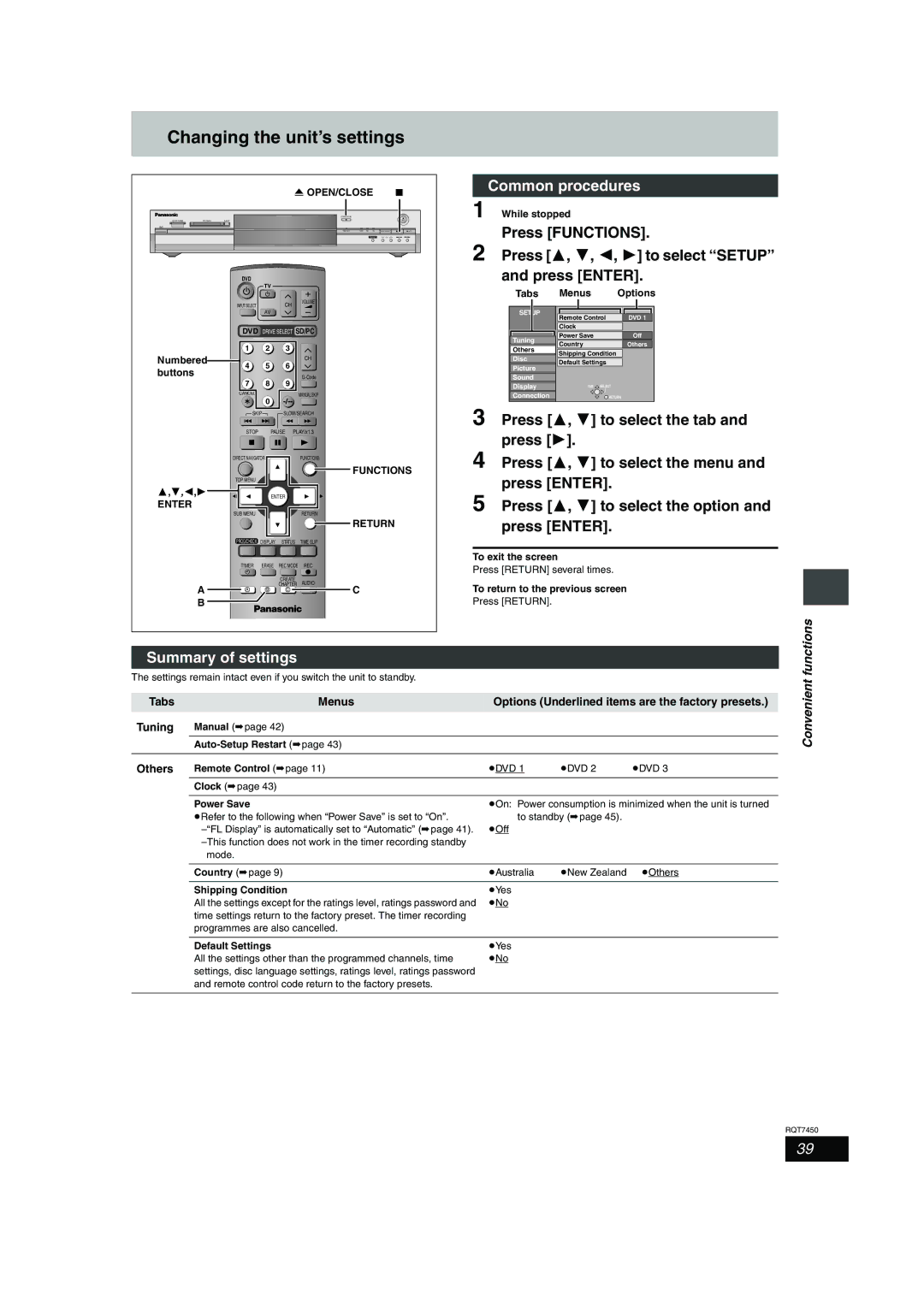
Changing the unit’s settings
Summary of settings
Common procedures
Changing the unit’s settings
Tabs Menus Options Underlined items are the factory presets
Picture
Mpeg
Convenient
Connection TV Aspect
DTS
Tuning
Press 3, 4 to select Manual and press Enter
Manual
TV System
Clock settings
Disc and card handling
Maintenance/Disc and card handling
Child Lock
Unit care
Safety precautions
Specifications
Glossary
Recording
Frequently asked questions
Set upPage
Cover
Error messages
On the television
On the unit’s display
Troubleshooting guide
Troubleshooting guide
Play starts but then stops
Ratings password
Play Play fails to start even when
Play is pressed
Index