Using the SuperStack NETBuilder SI Bridge/Router
Electromagnetic Compatibility Information
Avis Canadien
Canadian Certification Notice
CE Notice
Page
Contents
Isdn U
Mounting Kit Installing on a Tabletop
Configuring Serial Ports with DTEs Where to Go From Here
Setting Up Security
Paths, Ports, and Virtual Ports Paths and Ports
Multiple Static Paths per Port Virtual Ports
Configuring X.25 Scenario 1 Multiple Destinations, Nonmeshed
Configuring Bridging and Routing
113 Dialing the Same Phone Number Multiple Times
Using the Monitor Utility 121 Boot Configure Flash Load 122
116
122 Display Files Dump
Reloading the Software Load Errors
148 Verifying the Memory Dump Procedure 149
125 LAN LEDs
143
178
177
179
180
194
Ordering Dutch Isdn BRI Services 195
RS-530 DTE Cable Pinouts
Conventions
About this Guide
List conventions that are used throughout this guide
Icon Alerts you to
Compliance
Year
3Com Year 2000 Web
Text Conventions
Features
Features and Specifications
Features of the SuperStack II NETBuilder SI Bridge/Router
Feature Description
Panels
Back and Front
Model
Front panel and are for 3Com use only
DIP Switches
Requirements
Reset Button
Serial Device
Features and Specifications
Using Ethernet LAN
Using the BRIDGE/ROUTER Your Network
Overview
Ports
Using the BRIDGE/ROUTER in Your Network
Telco Services
Packet-Switched Services
Using PPP on Dial-Up and Leased Lines
Using Packet-Switched Network Services
Telco Services
Using the BRIDGE/ROUTER in Your Network
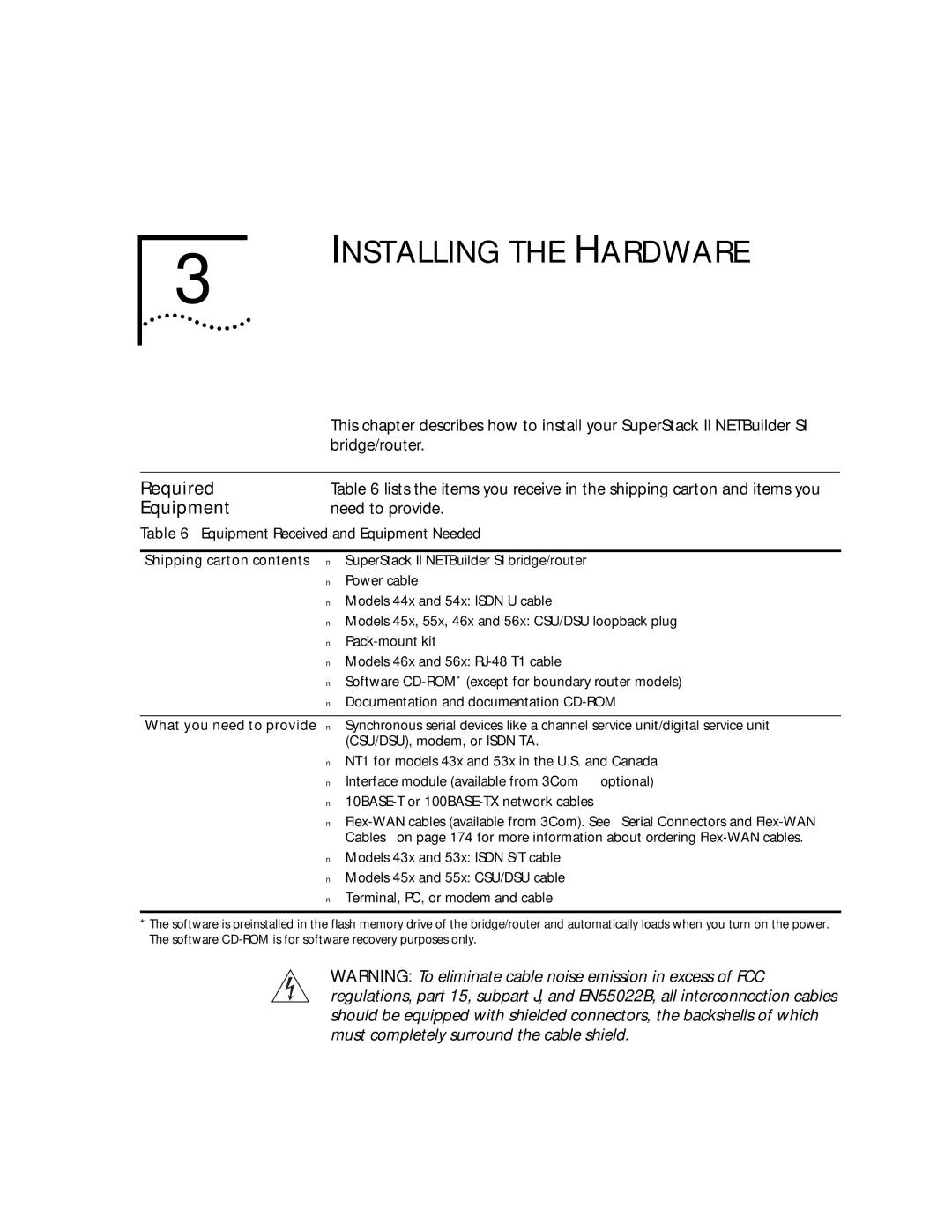
Required
Installing the Hardware
Equipment
Bridge/router
For more information on cables, see Appendix D
Environmental
Provides the environmental requirements of the SuperStack
Bridge/routers
Brackets, or mount the bridge/router in a rack
Mounting
Bridge/Router
Stacking Bridge/Routers
Brackets
Mounting the Bridge/Router
Cabling
Connectors
Following WAN ports Isdn S/T 43x and 53x, Isdn U 44x
Functional
Model 44x and 54x Isdn U
Connector Model 43x and 53x Isdn S/T
Models 44x and 54x bridge/routers have an Isdn U connector
Model 46x and 56x T1/FT1
T1/FT1 Telco port uses an RJ-48 connector
Model 45x and 54x 56/64K CSU/DSU
Model
Redundant Power System RPS
Redundant Power
Attaching a
System
Characteristic Setting
Power switch
Shutting Down
Turn on the device
Installing the Hardware
Cover
Installing or Removing AN Interface Module
Removing
Remove the cover
Existing Module
Removing an
Model
These steps
Reinstall the cover and the cover screws
Remove the screw from the standoff if necessary
Move the jumper to the right-hand set of pins
Module Model
Insert the new module
Removing an
Front panel Move the jumper to Left-hand set of pins
5xx
Installing a New
Steps
Remove the screw from the standoff if necessary
Front panel Connectors
Installing a New Module Model 5xx
Installing or Removing AN Interface Module
Administrative Task Summary
Logging on and Performing Administrative Tasks
Turning on
Other end to the RPS
Status
LED Status at Successful Startup
Logging on to
Attaching a Console
Logging on and Performing Administrative Tasks
To use the command-line interface, follow these steps
If you have not selected a particular service, enter
To use the menu-driven interface, follow these steps
Interface
For more information on syntax, see Appendix C
Accessing and executing software commands and parameters
Password
Changing the Root
Return key
Changing
Default Console
Port Baud Rate
Adding User
Information
Setting the Time and Date
Setting System
DELete -SNMP COMmunity anycom ADD -SNMP COMmunity anycom RO
Relationship Between Physical Paths and Logical Ports
Basic Configuration of Ports Paths
Option Description
Port and Path Options
Node That Virtual Ports
Topologies that Require Virtual Ports
Virtual Ports over Frame Relay
Protocol Technique
Virtual Ports over PPP
Connectivity in Partially Meshed and Nonmeshed Topologies
Parent Ports for Frame Relay
Numbering
Path and Port
SuperStack II bridge/router
Path and Port Numbering for Model 43x , 44x, 53x,
Configuring Isdn
Configuring Ethernet Paths Ports
On the WAN Port
43x, 44x, 53x,
Configuring Isdn Europe, Australia Asia
SwitchType Setting Country or Region
Isdn Switch Types Supported
Toggle the respective paths by entering
Example
Configuring the T1/FT1 RJ-48 Telco Port Model 46x
Re-enable the path by entering
Configuring the 56/64 Kbps CSU/DSU WAN Port Model 45x
Re-enable the path using
Set the baud rate 56 or 64 kbps for the DS0 channel using
Set the path clock using
Line type leased
Set the owner of the serial port using
Here
Where to Go From
Routing
Port and path configuration
Basic Configuration of Ports and Paths
Bandwidth Management Feature Description
Advanced Configuration Ports and Paths
Bandwidth Management Features for Dial-Up Lines
Isdn on the WAN Port 43x, 44x, 53x
Start here
Scenario 1 Using Each B Channel Separately
Scenario 3 Connecting to Multiple Destinations
Scenario 2 Using Both B Channels Together
Call
Berkeley
Multiple destinations connect with a dial pool
Scenario 1 Single Destination per Port
128 K 28.8 K
Scenario 2 Multiple Destinations
PaloAlto
Andover Princeton
Set the normal bandwidth if required using
Management for PPP Setting Normal Bandwidth
Kbps. Show the normal bandwidth for a port using
Enabling Dial-On-Demand
Using Manual Dial
Place the call using
Configuring Bandwidth-On-Demand
Enable disaster recovery using
Configuring Disaster Recovery
Configure the back-up line for disaster recovery only using
Configure the dial number list for the back-up line using
Configuring Frame Relay
Site B Site C
Port !5 path
Traffic from one site to another over the same parent port
Site a
Configuring X.25
311041501111
See to configure bridging, IP routing, and IPX routing. To
Configure other protocols, see Using Enterprise OS Software
Advanced Configuration of Ports and Paths
Configuring Bridging Routing
Configuring IP Routing
To enable bridging, enter
IP Routing
Enable IP routing by entering
Routing Between Gateways
To delete a static route, use
Adding a Route Statically in a Subnet Masked Environment
Subnet Masks
Override Option
To enable Ospf on a specified port, use
Ospf over Dial-On-Demand Dial-Up Lines
Using a Static Route
Using Ospf
SHow -IP NETaddr
Routing
Configuring IPX
Defining a Default Route
To provide a name for your path and port, use
Customizing Your Software
Naming Paths and Ports
Module Autobaud Feature
Number Lists
Working with Dial
Phone number is case-sensitive and must be matched exactly
56/64 Kbps
Using Statistics on
CSU/DSU Port
45x
Network Statistics
Using Statistics on the T1/FT1 RJ-48 Telco Port 46x
Displays similar to the following will appear
Display similar to the following appears
Displays similar to the following appear when you enter
Statistics
Configuring Data
Show all T1/FT1 parameters configured using
Compression
T1/FT1 Parameter
Customizing Your Software
Using the Monitor
Troubleshooting
Boot
Utility
Clear Eeprom
Configure Flash Load
Display Files
Dump
Reset
Repeat Last Command
Flash Load
Help
Meanings
Normal LED
Bridge/router LEDs
System LEDs The following figure describes the system LEDs
LAN LEDs The following figure describes the LAN LEDs
WAN
Meaning
Meaning file system is empty Action
Action Reload the software. See Appendix B
Reload the software. See Appendix B
Image names do not match
Default path is
Action Follow these steps At the monitor prompt, enter
Meaning File too large Action
Meaning Unspecified fatal error Action
Meaning File read or decompression error Action
Meaning File checksum error Action
Configuration and verify the media access control MAC
Meaning Unable to transmit Bootp request Action
Connected correctly to the Ethernet network
Be present or is incorrectly configured
Be incorrectly configured
Power off and then on again to retry the system software
Configured
Load. If the load is unsuccessful, contact your network
Contact your network supplier
Phase
Eeprom checksum test failed
WAN
Loopback Tests
Performing
To dial path 3.1 from path 3.2, enter
Configure the ports for loopback testing by entering
Stop the DLTest by entering
Start the DLtest using
Disconnect the call by entering
Change the port owner from loopback to PPP by entering
To stop the loopback test, enter
To disable V.54 detection, enter
Start the loopback test by entering
CSU/DSU Port 55x bridge/router 45x
Select the loopback test mode by entering
Performed
Set the owner of the WAN port to loopback by entering
Stop the loopback test by entering
Specify the number of seconds that the test should run using
To turn on autobaud, enter
Enable the port by entering
To start the remote CSU loopback test on path 2, enter
Start remote loopback test using
To start the remote DSU loopback test on path 2, enter
To view the status of the loopback test in progress, enter
46x
T1/FT1 Port 56x bridge/router
Enable V.54 signal detection by entering
Reenable the WAN port by entering
T1/FT1 Port
Supports ATT
On the T1/FT1 Port
Start the serial loopback test by entering
Performing a Loopback Test on a Serial Port
Stop the serial loopback test by entering
Memory Dump
Select Dump Destination Following options are available
SysInfo
To create a memory dump file, follow these steps
See the Unix system documentation if you have any problems
System responds with the following information
Appendix a Troubleshooting
Software
Reloading the System B Software
Reloading
Load Errors
Full Form Syntax
Syntax Conventions
Command syntax. These symbols are summarized in Table
Symbols
Command Syntax Symbols
SymbolDescription
Examples
Full
Abbreviated Syntax
Variations
Command Syntax
Service Names
Using Aliases
Command Lines
Entering
Substitution
Command History
ISDN-Related
Privilege Level
Syntax Variation
Models 43x
Asterisk, for example
Getting Help
With different options as described in Table
Online Help Syntax Summary
SYS?
Appendix C Syntax Conventions
Console Connector
Connectors and Cables
Cables
PC Cable
Pin to 25-pin Terminal Cable Null Modem-Type
Ethernet Connector
LAN Connector
Either 10BASE-T or 100BASE-TX cabling
To full router software, the second port will be functional
Creating a Valid Network
Cabling Standards
Cable Support and Emissions Compliance
Emissions Compliance
Shows examples of collision domain diameters
Collision Domain Diameter with No Repeater
For expanded guidelines, refer to the Ieee Standard
Collision Domain Diameter with Two Repeaters
Maximum Cable Length in Example Collision Domain Diameters
Shows the pin assignments of the Isdn S/T cable
Shows the pinouts of the Isdn U cable
CSU/DSU Cable
RJ-48S male shielded Name Abbr
Serial Connectors Flex-WAN Cables
Connecting the Bridge/Router to a DTE Using a DCE Cable
10 ft
Flex-WAN Cables
Cable Length Cable Type Part Number Pinouts
RS-232 DTE Cable Pinouts
Pinouts
Flex-WAN Connector Signal Pin Direction Twisted Pair
Flex-WAN and RS-232 DCE Connectors
35 DTE Cable Pinouts
Flex-WAN and V.35 DTE Connectors
35 DCE Cable Pinouts
Flex-WAN and V.35 DCE Connectors
21 DTE Cable Pinouts
Flex-WAN and X.21 DTE Connectors
21 DCE Cable Pinouts
Flex-WAN and X.21 DCE Connectors
RS-449 DTE Cable Pinouts
Flex-WAN and RS-449 DTE Connectors
Flex-WAN and RS-449 DCE Connectors
RS-449 DCE Cable Pinouts
Flex-WAN and RS-530 DTE Connectors
Flex-WAN Connector RS-530 DTE Connector Signal Pin Direction
Provisioning Your Isdn Line
Canadian Isdn BRI Services
AT&T 5ESS NI1
Isdn Switch Type
Ordering Isdn Service for an AT&T 5ESS Switch
AT&T 5ESS Switch
AT&T 5ESS Custom DMS 100 and National Isdn Siemens Ewsd
189
DN must be set as follows Parameter Setting
AT&T 5ESS Custom Switch
Required Information Specification
191
Ordering Isdn Service for a DMS 100 Switch
DMS 100 and National Isdn
Ordering Isdn Service for a Siemens Ewsd Switch
Siemens Ewsd Switch
NT1s and Power Supplies
Isdn BRI Services
Ordering Dutch
Appendix E Provisioning Your Isdn Line
3Com FTP Site
Technical Support
Online Technical
Access by Digital Modem
Access by Analog Modem
Hours a day, 7 days a week
847 262
Support from 3Com
Support from Your
Network Supplier
North America
Country Telephone Number Fax Number
Page
Numerics
Index
Isdn
Index
Ipxwan 109 Isdn
Index
Snmp
DCE connector described
Index
3Com Corporation Limited Warranty