TravelMate 4730/4730G Series Service Guide
Revision History
III
Copyright
Conventions
Preface
Page
Table of Contents
Table of Contents
Microsoft Windows Vista Environment Test
TravelMate 4730/4730G Series
Table of Contents
Chapter
Features
Privacy control
Dimensions and Weight
Power subsystem
Communication
Environment
System Block Diagram
Icon Description
Your Acer Notebook tour
Front View
Closed Front View
Hdmi
Left View
Rear View
Right View
Bottom View
Wlan
Indicators
Easy-Launch Buttons
Icon Function Description
Function Left Button Right Button Main touchpad
Touchpad Basics with fingerprint reader
Lock Keys and embedded numeric keypad
Using the Keyboard
Key Description
Windows Keys
Hotkey Icon Function Description
Hot Keys
US dollar sign
Euro symbol
Special Key
Acer GridVista dual-display compatible
Using the System Utilities
Page
2MB
Hardware Specifications and Configurations
Processor Specification
Cache Specification
0MB
System Memory Specification
Memory Combinations Slot Total Memory
WiFi/WiMAX Combo Module Specification
LAN Interface Specification
Bluetooth Interface Specification
Wireless Module 802.11b/g Specification
USB Interface Specification
Combo Drive Module Specification
Audio Interface Specification
Video Memory Specification
ENE KB926
Keyboard Specification
Battery Specification
LCD Specification
System Power Management Specification
LCD Camera Specification
LCD Inverter Specification
AC Adapter Specification
Chapter
Navigating the Bios Utility
Bios Setup Utility
Parameter Description
Information
Parameter Description Format/Option
Main
Aspm
Advanced
Parameter Description Submenu Items
IDE
CER
URR
FER
Nfer
Clear or Set
Enabled or
Security
Parameter Description Option
Removing a Password
Setting a Password
Changing a Password
DTS
Power
Emttm
Acpi S3
USB HDD
Boot
Exit Saving Changes
Exit
Bios Flash Utility
Chapter
Remove HDD Password
Remove HDD/BIOS Utility
Remove Bios Password
Key in biospw 14452
Dimm
Intermittent Problems
Undetermined Problems
SNP
Post Codes Tables
Port 80 Post Codes
Driver Name Port Code
Driver Name Port80 Code
Cpuid
Post Keys and Messages
Key Function
Before press function key
Location Description
Top View
Bottom View
Hardware Open Gap Description
Clearing Password Check and Bios Recovery
Clearing Password Check
Steps for Clearing Bios Password Check
Steps for Bios Recovery by Crisis Disk
Bios Recovery by Crisis Disk
Bios Recovery Boot Block
Bios Recovery Hotkey
FRU Field Replaceable Unit List
CPU TBD
TravelMate 4730/4730G Exploded Diagrams
Main Module
TBD
LCD Module
TravelMate 4730/4730G FRU List
Half Mini Card 512ANHMWG-INTEL
VGA BOARD-NB9MGS256MB
Hdmi BOARD-UMA
Half Mini Card 533ANHMWG-INTEL
Power Cord UK 3 PIN
Power Cord US 3 PIN
Power Cord EU 3 PIN
Power Cord AUS 3 PIN
Pcmcia Dummy Card
RAM Door
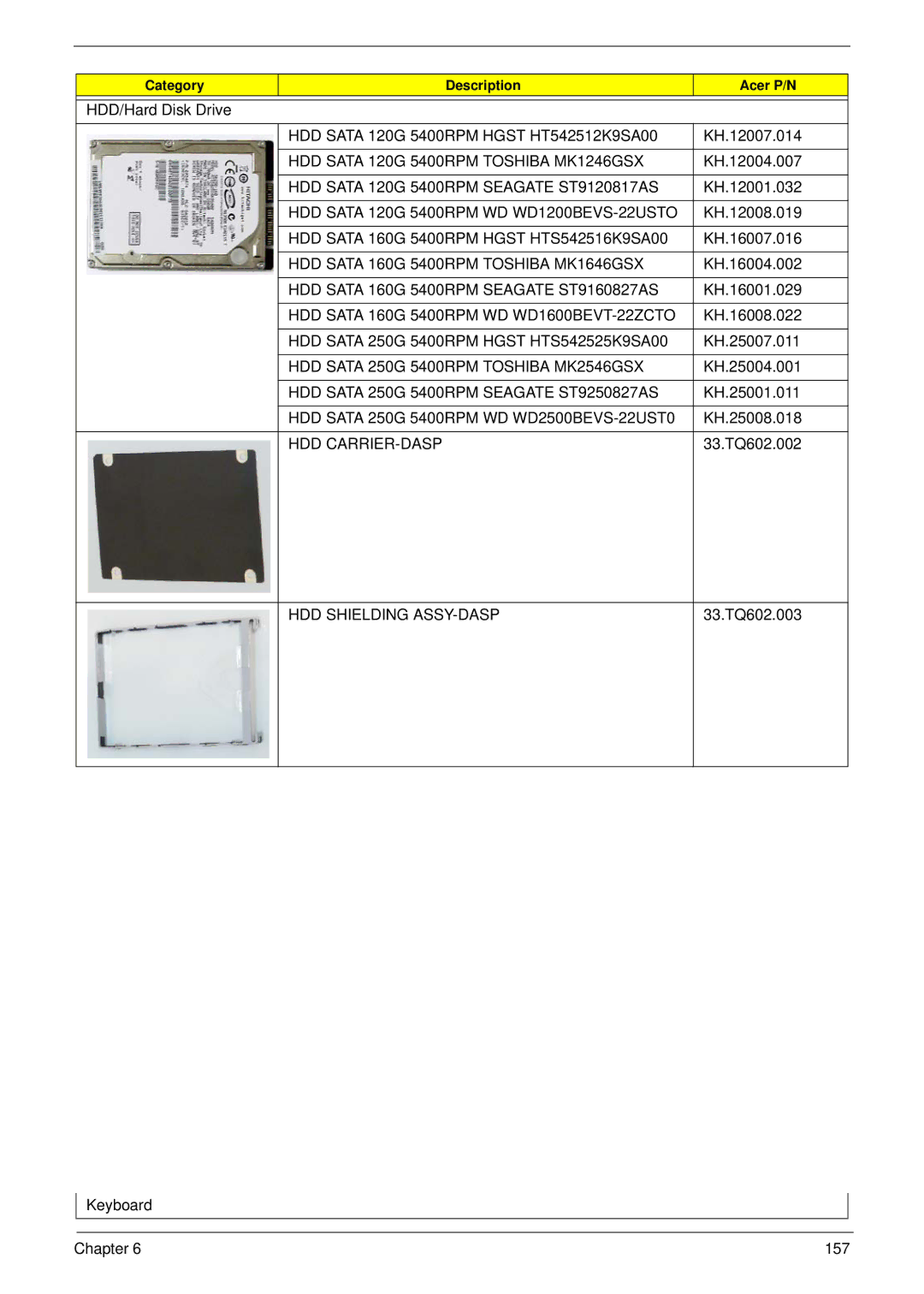
HDD Door for Dasp
Mini Door
ODD Bracket
DVD/CDRW Combo Drive Toshiba TS-L463A
DVD/CDRW Combo Drive Sony CRX890S
ODD BEZEL-COMBO
HDD Sata 160G 5400RPM Toshiba MK1646GSX
HDD Sata 120G 5400RPM Toshiba MK1246GSX
HDD Sata 120G 5400RPM Seagate ST9120817AS
HDD Sata 120G 5400RPM WD WD1200BEVS-22USTO
Keyboard Brazilian Black TM
Keyboard Inteui Black TM
Keyboard Arabic Black TM
Keyboard Belgian Black TM
LCD BRACKET-L
LCD Cover ASSY-PLASTIC
LCD Bezel for CCD
LCD BRACKET-R
LCD Panel G 14.1 Wxga SAM LTN141W3-L01-J L6 LF
LCD Cover ASSY-MG
LCD Panel G 14.1 Wxga AUO B141EW04-V4 LF
Inverter
MB ASSY-UMA TBD MB ASSY-DIS CPU Support Bridge
RAM 1GB Ddrii 667 Nanya NT1GT64U8HB0BN-3C
RAM 512MB Ddrii 667 Nanya NT512T64UH8B0FN-3C
RAM 512MB Ddrii 667 Samsung M470T6464QZ3
CE6 RAM 512MB Ddrii 667 Hynix HYMP164S64CP6-Y5
Screw DIS-THE-SCREW
Screw List
Screw
Chapter 165
TravelMate 4730/4730G Series
Appendix a
Appendix a
Appendix a 168
Appendix a
Appendix a 170
NSM8XS TCS4E
Appendix a 172
942G25Mn
Appendix a 174
Appendix B
Test Compatible Components
Microsoft Windows Vista Environment Test
Modem Test
Vendor Type Description LAN Test
LCD Test
Memory Test
178
Appendix C
Online Support Information
180
Index
182
Wireless Function Failure 136 Wlan Board
184