External Sata port supports external Serial ATA
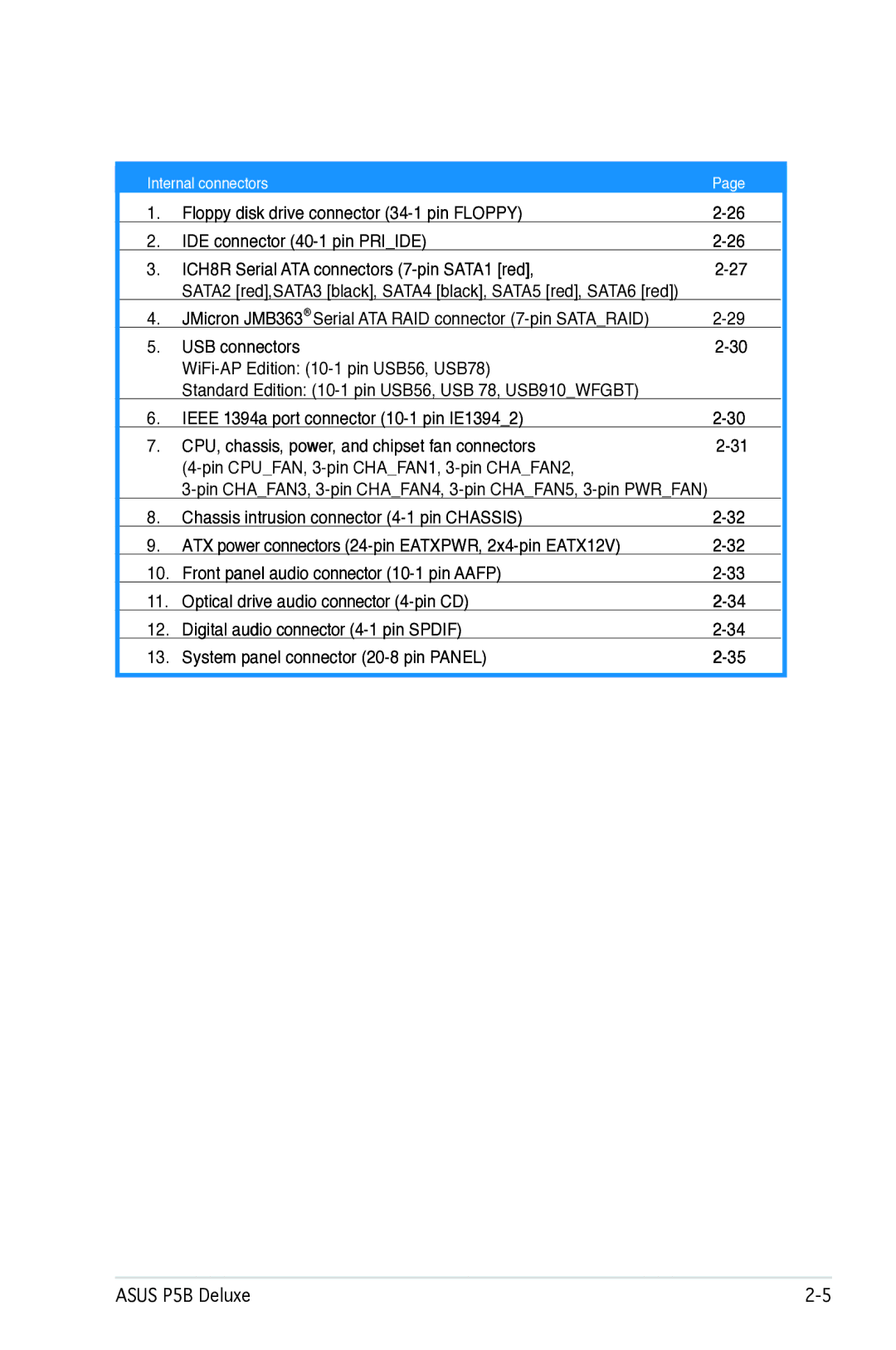
Floppy disk drive connector 34-1 pin Floppy
Internal connectors
IDE connector 40-1 pin Priide
P5B Deluxe IDE connector
Right angle side
Serial ATA hard disk drive connection
P5B Deluxe Sataraid connector
JMicron JMB363 Serial ATA RAID connector 7-pin Sataraid
P5B Deluxe USB 2.0 connectors
Ieee 1394a port connector 10-1 pin IE13942
P5B Deluxe Fan connectors
CPU, chassis, power, and chipset fan connectors
ATX power connectors Pin EATXPWR, 2x4-pin EATX12V
Chassis intrusion connector 4-1 pin Chassis
Aafp
Front panel audio connector 10-1 pin Aafp
Digital audio connector 4-1 pin Spdif
Optical drive audio connector 4-pin CD
Black
Reset button 2-pin Reset
System panel connector 20-8 pin Panel
System power LED 2-pin Pled
ATX power button/soft-off button 2-pin PWR
Connector system panel
Fit the grooved edge to the heatsink
Installing the optional fan
Hardware information
Powering up
Starting up for the first time Turning off the computer
Starting up for the first time
AMI Bios beep codes
Using the dual function power switch
Using the OS shut down function
Turning off the computer
Bios setup
Chapter summary
Asus Update utility
Managing and updating your Bios
Installing Asus Update
Updating the Bios through the Internet
Updating the Bios through a Bios file
\bootdisk\makeboot a
Creating a bootable floppy disk
Asus EZ Flash 2 utility
ASUSTek EZ Flash 2 Bios ROM Utility
To update the Bios file using the Afudos utility
Copying the current Bios
Updating the Bios file
To copy the current Bios file using the Afudos utility
Utility verifies the file and starts updating the Bios
Recovering the Bios from the support CD
Asus CrashFree Bios 3 utility
Recovering the Bios from the USB flash disk
Bios setup program
Menu bar
Bios menu screen
Configuration
Settings
Pop-up window
Configuration fields
Menu items
Sub-menu items
Legacy Diskette a 1.44M, 3.5
Main menu
System Time
System Date Day xx/xx/xxxx
Type Auto
LBA/Large Mode Auto
PIO Mode Auto
Sata
IDE Configuration
Processor
Hard Disk Write Protect Disabled
System Information
IDE Detect Time Out Sec
AI Tuning Auto
JumperFree Configuration
Advanced menu
PCI Express Frequency Auto
PCI Clock Synchronization Mode Auto
CPU Frequency
Dram Frequency Auto
NB VCore Auto
Memory Voltage Auto
CPU VCore Voltage Auto
FSB Termination Voltage Auto
Post Check LAN cable Disabled
Post Check LAN Cable Disabled
LAN Cable Status
USB Configuration
CPU Configuration
North Bridge Chipset Configuration
Execute Disable Bit Enabled
Hyper Threading Technology Enabled
InterR SpeedStep tm Tech. Disabled
PCIEX162/PCIEX11 Force
South Bridge Chipset Configuration
Configuration options Enabled Disabled
Configuration options Auto Slow Normal Fast Faster
OnBoard Devices Configuration
PCI PnP
Acpi 2.0 Support Enabled
Power menu
Suspend Mode Auto
Repost Video on S3 Resume Disabled
APM Configuration
Hardware Monitor
Chassis Fan 1/2/3 Speed xxxxRPM or Ignored / N/A
Chassis Q-Fan Control Disabled
Power Fan Speed RPM xxxxRPM or Ignored / N/A
CPU Q-Fan Profile Performance
Boot Device Priority
Boot menu
1st ~ xxth Boot Device xxx Drive
Boot Settings Configuration
Hit ‘DEL’ Message Display Enabled
Wait for ‘F1’ If Error Enabled
Interrupt 19 Capture Disabled
Change Supervisor Password
Change Supervisor Password
Security
Password Check Setup
User Access Level Full Access
Change User Password
Clear User Password
Tools menu
Main Advanced Power Boot
Asus EZ Flash
Start O.C. Profile
Asus O.C. Profile
Save to Profle 1/2
Load from Profile 1/2
Exit & Discard Changes
Load Setup Defaults
Exit menu
Exit & Save Changes
Bios setup
Software5 support
Installing an operating system
Support CD information
Installing an operating system
Running the support CD
Drivers menu
Utilities menu
Make JMicron JMB36X 32/64bit RAID/AHCI Driver
Make Disk menu
Adobe Acrobat Reader Marvell Yukon VCT Application
Make Intel ICH8 32/64bit RAID/AHCI Driver Disk
Manuals menu Asus Contact information
Motherboard Info
Displays the general specifications of the motherboard
Displays the support CD contents in graphical format
Other information
Technical support Form
Displays the contents of the support CD in text format
Filelist
Asus MyLogo2
Software information
Asus P5B Deluxe
AI NET2
Using the Virtual Cable Tester
Launching PC Probe
Installing PC Probe
Using PC Probe
Asus PC Probe
Preferences
Changing the monitor panels position
Hardware monitor panels
DMI browser
WMI browser
Usage
PCI browser
Memory usage
Configuring PC Probe
Launching Ai Suite
Installing Ai Suite
Using Ai Suite
Asus Ai Suite
Other feature buttons Click
Asus Ai Gear
Asus Ai Nap
Asus Ai N.O.S
Click Apply at the bottom to save the configuration
Drop-down list
Enablebutton Fan box
Click Apply at the bottom to save the setup
Asus Q-Fan
Asus Ai Booster
SoundMAX High Definition Audio utility
Audio Setup Wizard
Jack configuration
Audio preferences
Various audio settings
Microphone options
RAID configurations
Intel RAID configurations
Installing Serial ATA hard disks
↑↓-Select ESC-Exit ENTER-Select Menu
Delete RAID Volume
XX.XGB Non-RAID Disk
RAID0Stripe Select Disks 128KB Create Volume
Disks
Port Drive Model Serial # Size Status
Are you sure you want to create this volume? Y/N
RAID1Mirror Select Disks
Creating a RAID 1 set mirrored
Creating a RAID 10 set RAID 0+1
RAID5Parity Select Disks 64KB
Name RAID Level Disks
Xxxxxxxxxxxx
Before creating a RAID set
JMicron RAID Configuration
164 Non-RAID
Entering the JMB363 RAID Bios utility
Press Ctrl-J to enter RAID Setup Utility
Creating a RAID set
Disks Select Disk Block N/A Size 159 GB
Selected HDD shows a sign before it
164 Non-RAID Disks Select Disk
Level 0-Stripe
RAID Disk Create RAID on the selected HDD Y/N? Y
Deleting a RAID set
RDD0 TAB-Switch Window ↑↓-Select Item ENTER-Action ESC-Exit
164 RAID Inside
Resetting disks to non-RAID
Mirror
Solving a Mirror conflict
Rebuild Rebuilding.. %, please wait
Rebuilding a Mirror Drive
Saving the settings and exiting setup
Creating a RAID driver disk without entering the OS
Creating a RAID driver disk
Creating a RAID driver disk in Windows
Asus P5B Deluxe
Software support
CPU features
Intel EM64T
System requirements
Using the Intel EM64T feature
Intel EM64T
Enhanced Intel SpeedStep Technology Eist
Using the Eist
Intel Hyper-Threading Technology
Using the Hyper-Threading Technology
Appendix CPU features