P5B Deluxe |
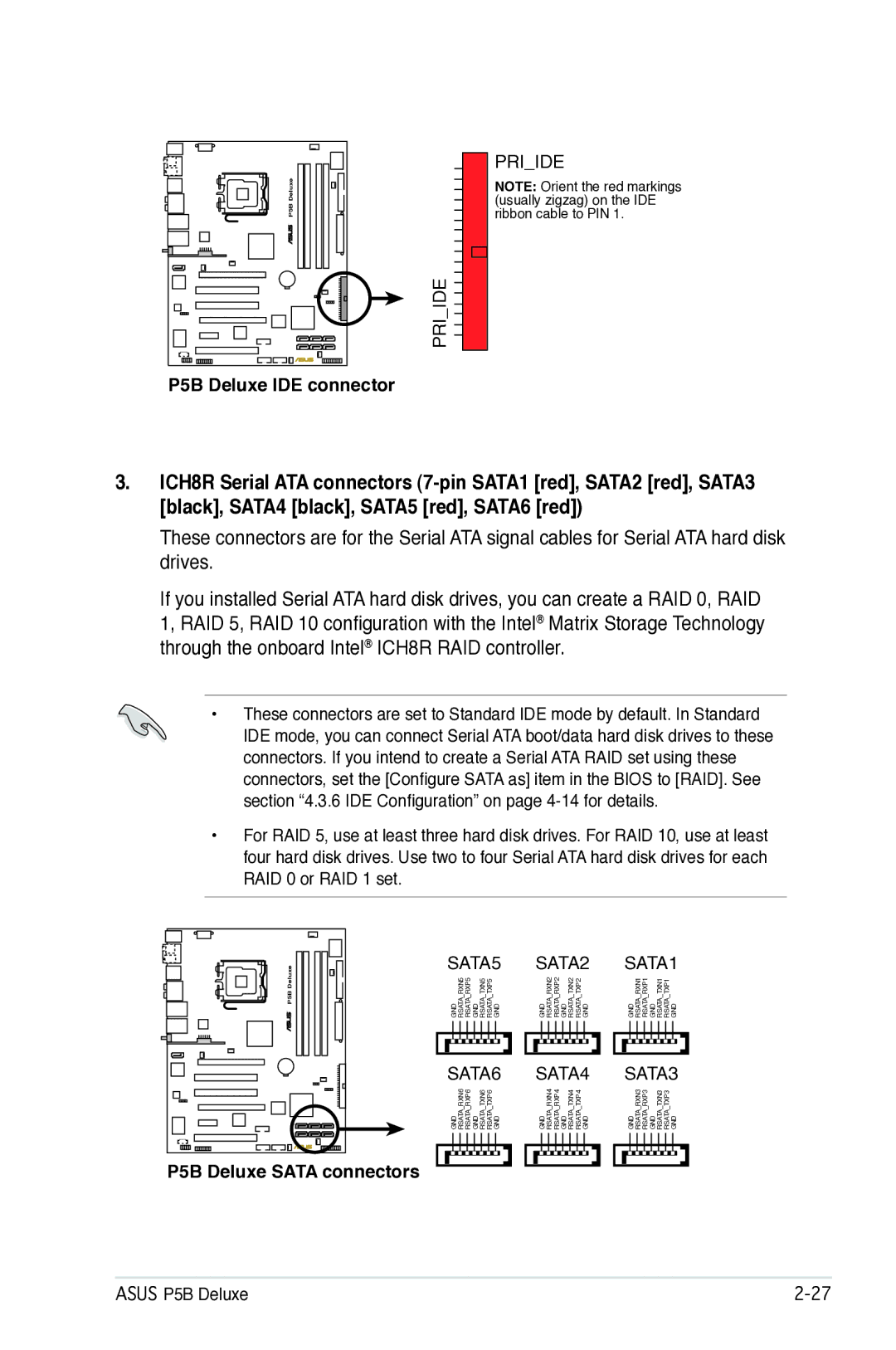
PRI�IDE
PRI�IDE
NOTE: Orient the red markings (usually zigzag) on the IDE ribbon cable to PIN 1.
P5B Deluxe IDE connector
3.ICH8R Serial ATA connectors
These connectors are for the Serial ATA signal cables for Serial ATA hard disk drives.
If you installed Serial ATA hard disk drives, you can create a RAID 0, RAID
1, RAID 5, RAID 10 configuration with the Intel® Matrix Storage Technology through the onboard Intel® ICH8R RAID controller.
•These connectors are set to Standard IDE mode by default. In Standard
IDE mode, you can connect Serial ATA boot/data hard disk drives to these connectors. If you intend to create a Serial ATA RAID set using these connectors, set the [Configure SATA as] item in the BIOS to [RAID]. See section “4.3.6 IDE Configuration” on page
•For RAID 5, use at least three hard disk drives. For RAID 10, use at least four hard disk drives. Use two to four Serial ATA hard disk drives for each RAID 0 or RAID 1 set.
P5B Deluxe |
| SATA5 |
| SATA2 |
| SATA1 | ||||||||||||||||||||||||||
| GND RSATA�RXN5 RSATA�RXP5 GND RSATA�TXN5 RSATA�TXP5 GND |
| GND RSATA�RXN2 RSATA�RXP2 GND RSATA�TXN2 RSATA�TXP2 GND |
| GND RSATA�RXN1 RSATA�RXP1 GND RSATA�TXN1 RSATA�TXP1 GND | ||||||||||||||||||||||||||
|
|
|
|
|
|
|
|
|
|
|
|
|
|
|
|
|
|
|
|
|
|
|
|
|
|
|
|
|
|
|
|
|
|
|
|
|
|
|
|
|
|
|
|
|
|
|
|
|
|
|
|
|
|
|
|
|
|
|
|
|
|
|
|
|
|
|
|
|
|
|
|
|
|
|
|
|
|
|
|
|
|
|
|
|
|
|
|
|
|
|
|
|
|
|
|
| SATA6 |
| SATA4 |
| SATA3 | ||||||||||||||||||||||||||
| GND RSATA�RXN6 RSATA�RXP6 GND RSATA�TXN6 RSATA�TXP6 GND |
| GND RSATA�RXN4 RSATA�RXP4 GND RSATA�TXN4 RSATA�TXP4 GND |
| GND RSATA�RXN3 RSATA�RXP3 GND RSATA�TXN3 RSATA�TXP3 GND | ||||||||||||||||||||||||||
P5B Deluxe SATA connectors
ASUS P5B Deluxe |