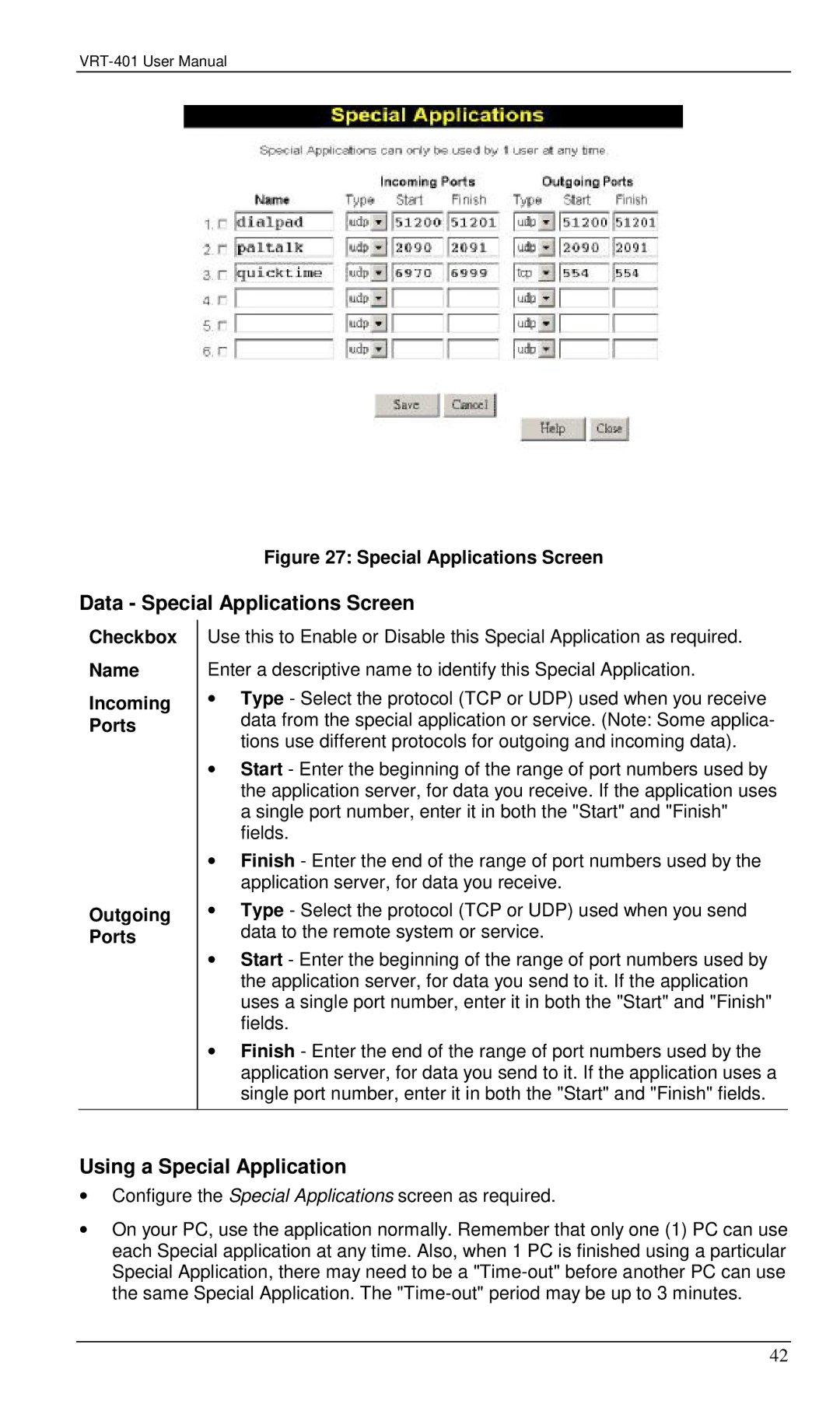
Figure 27: Special Applications Screen
Data - Special Applications Screen
Checkbox
Name
Incoming
Ports
Outgoing Ports
Use this to Enable or Disable this Special Application as required. Enter a descriptive name to identify this Special Application.
∙Type - Select the protocol (TCP or UDP) used when you receive data from the special application or service. (Note: Some applica- tions use different protocols for outgoing and incoming data).
∙Start - Enter the beginning of the range of port numbers used by the application server, for data you receive. If the application uses a single port number, enter it in both the "Start" and "Finish" fields.
∙Finish - Enter the end of the range of port numbers used by the application server, for data you receive.
∙Type - Select the protocol (TCP or UDP) used when you send data to the remote system or service.
∙Start - Enter the beginning of the range of port numbers used by the application server, for data you send to it. If the application uses a single port number, enter it in both the "Start" and "Finish" fields.
∙Finish - Enter the end of the range of port numbers used by the application server, for data you send to it. If the application uses a single port number, enter it in both the "Start" and "Finish" fields.
Using a Special Application
∙Configure the Special Applications screen as required.
∙On your PC, use the application normally. Remember that only one (1) PC can use each Special application at any time. Also, when 1 PC is finished using a particular Special Application, there may need to be a
42