AR-C250
For Your Records
Easily accessible
Color Copy Samples
Color Copying with Special Features
Neg./Pos. Reverse See
Multi-page Enlargement See
Photo
Adjustments for Color Copying
RGB Adjust See
Sharpness See
Brightness/intensity/contrast See
Color Balance
Contents
Introduction
Using this Manual
Chapter
How to use the touch panel
Installation Requirements
Getting Started Cautions
Safety Precautions
Become possible
Power on and OFF
Preheat mode
Power on and OFF
Power save modes
Sleep mode
Press the Information key in the standby mode
Information Function
Screen for the information categories will appear
Using the Touch Panel
How to use the touch panel
Selection of function
Function setting icons
Using the Touch Panel
Page
Special Papers manual feed
Making Copies
Copy Start key is pressed
Auditing Accounts
Making Copies Copying from
Sided copies of 1-sided originals
Close the document cover
Use the 10-key pad to enter the desired number Copies
Copying from the Document Glass
Sided copies from 1-sided originals
Press the Color Copy Start key or Black
Number will be changed to 1 when a Start key is pressed
Copy the reminder of the originals in reverse order
Copy the originals in reverse order
Stream feeding mode
Using the Radf
Using the Radf
Adjust the original guides to the size of the originals
Set the originals face up in the document feeder tray
Auto
Sided copies from 2-sided originals
Adjust the original guides to the size of the originals
Original 2-sided Copies 1-sided
Automatic selection
REDUCTION/ENLARGEMENT/ZOOM
Manual selection
REDUCTION/ENLARGEMENT/ZOOM
Clear
Special Papers manual feed
Two-sided copying with bypass tray
Exposure Adjustments
Automatic
Original image type
Exposure Adjustments
Printed PHOTO, PHOTO, or MAP depending on the original
Press the Exposure key on the touch panel
Press the STORE/DELETE key on the touch panel
JOB Memory
Storing a job program
Press the Program key
JOB Memory
Deleting a stored job program
Recalling a job program
Interrupting a Copy RUN
Special Functions
Following screen will appear
XY Zoom
Press the XY Zoom key
Press the Copy Ratio key on the touch panel
XY Zoom
Press the Y key
Copy ratio in the vertical Y direction will be highlighted
Margin Shift
Press the Special Modes key
Special Modes screen will appear
Select the shift direction
Select the desired shift amounts using
Margin Shift
Press the Margin Shift key on the touch panel
Press the Erase key on the touch panel
Setting screen for Erase will appear
Erase
Edge + center erase
Highlighted
Select the desired erase mode
Erase on the touch panel. The selected erase mode will be
Erase
Dual page Copying
Dual page Copying
Information 4 Press the OK key
Ensure that the desired tray is selected
Bottom direction
Centering
Centering
Press the Centering key on the touch panel
Centering key will be highlighted
Panel
Press the Transparency Inserts key on the touch
Transparency Inserts key will be highlighted
Key or Black Copy Start key
Transparency Film with Insert Sheets
Infor 4 Press the OK key
Load transparency film into the bypass tray
Covers
Press the 2-SIDED Copy key and select the desired
Duplex selection window
Press the upper OK key
Select cover placement
Covers
Not
Color Adjustments menu will appear
Color Adjustments
Key to weaken the color
Color Adjustments
Press the RGB Adjust key on the touch panel
Select a color to be adjusted
Press the Sharpness key on the touch panel
Setting screen for Sharpness will appear
Press the upper OK key.SPECIALFUNCTIONS Coloradjustments
Press the Suppress Background key on the touch
Setting screen for Suppress Background will appear
Suppression level
Use the and + keys to select the desired background
Level
Brightness /INTENSITY /CONTRAST
Select BRIGHTNESS, Intensity or Contrast on
Select the desired item to be adjusted
Use the and + keys to adjust the level
Selected item
Image Editing Functions
Press the Image Edit key on the touch panel
Image Edit menu will appear
Selected color key will be highlighted
Image Editing Functions
Press the Single Color key on the touch panel
Select the desired color
Relation to the NEG./POS. Reverse
Press the Image Edit key on the touch panel
Press the NEG./POS. Reverse key on the touch
Mode, the black and white areas will be reversed
Reverse
C D
Mirror Image key will be highlighted
Press the Mirror Image key on the touch panel
Optional document feeder cannot be used with this function
Place the original on the document glass
Select the copy paper size depending on the original size
Setting screen for Photo Repeat will appear
Press the Photo Repeat key on the touch panel
Select the desired repeat type
To 100% when this function is selected
11 x 17 FULL-BLEED
Original will be copied onto 12 x 18 size copy paper
11 x 17 FULL-BLEED key will be highlighted
Press the 11 x 17 FULL-BLEED key on the touch panel
Panel
Setting screen for MULTI-PAGE Enlargement will appear
Press the MULTI-PAGE Enlargement key on Touch panel
Select the desired enlargement size
Select the original size
Cancel OK Original Size & Orientation
Either one or both can be set
Setting screen for Image Edit selections will appear
Adjust the original size on the Original Size tab
Press the upper OK key on the touch panel
Press the Auto Image key on the touch panel
Refer to page 2-11 for the Auto Image function
Types and sizes of copy paper
Supplies
For best results, use only Sharp recommended paper
Paper
Types and sizes of copy paper
Loading copy paper
Tray holds 500 sheets of 20 lb. bond paper
Paper
Loading paper in the paper trays
Push the paper tray firmly back into the copier
Changing the copy paper size in the tray
Load copy paper into the tray
Place the paper size card in the front of the paper tray
Open the front cover
Adding Toner
Adding Toner
Left example shows the toner hopper of black toner
It will take about 40 seconds for the cartridge to empty
Supplies Adding toner
Push once on the door to unlatch and open it
Used Toner Disposal
Disengage and remove the container from the copier
Open the toner collecting container cover
Store copy paper in the wrapper and lying flat
Storage of Supplies
Proper storage
Store the supplies in a location that is
Page
Copier TROUBLE?
When a misfeed occurs, the copier will stop
Misfeed Removal
Misfeed in the optional Radf
Open the exit roller cover and gently pull the original out
Misfeed Removal
Misfeed in the bypass tray
Open the feeding roller cover and pull the original gently
Do not pull out the paper transport in this step
Turn the transport lever to the left
If the paper cannot be seen from the side, pull out
Misfeed in the paper trays
Close the front cover
Open the right side covers
Close the paper tray and the side covers
Misfeed in the transport area, exit area and fusing area
Open the front cover Turn the transport lever to the left
Check to see if any paper is misfed in the exit area
Gently close the upper right side cover
Remove the misfed paper
Misfeed in the optional duplex module
Slide the paper guide if needed
Push the duplex module back into the copier
When the message Ready to COPY. Maintenance Required
Maintenance Required
Toner Collecting Container of Transfer Unit
Troubleshooting
Troubleshooting
Self-diagnostic function
Example
General Information
Part Names and Functions
Part Names and Functions
LCD touch panel
Interrupt key and indicator p
Color Copy Start key and indicator
Black Copy Start key and indicator
Sided Copy key
Custom Settings key
Initial settings
Information key p
Document glass and document cover
User Maintenance
Contrast
Contrast of the touch panel can be adjusted as below
Copier
Specifications
Specifications
Reversing Automatic Document Feeder optional
Duplex Module optional
Page
Optional Equipment
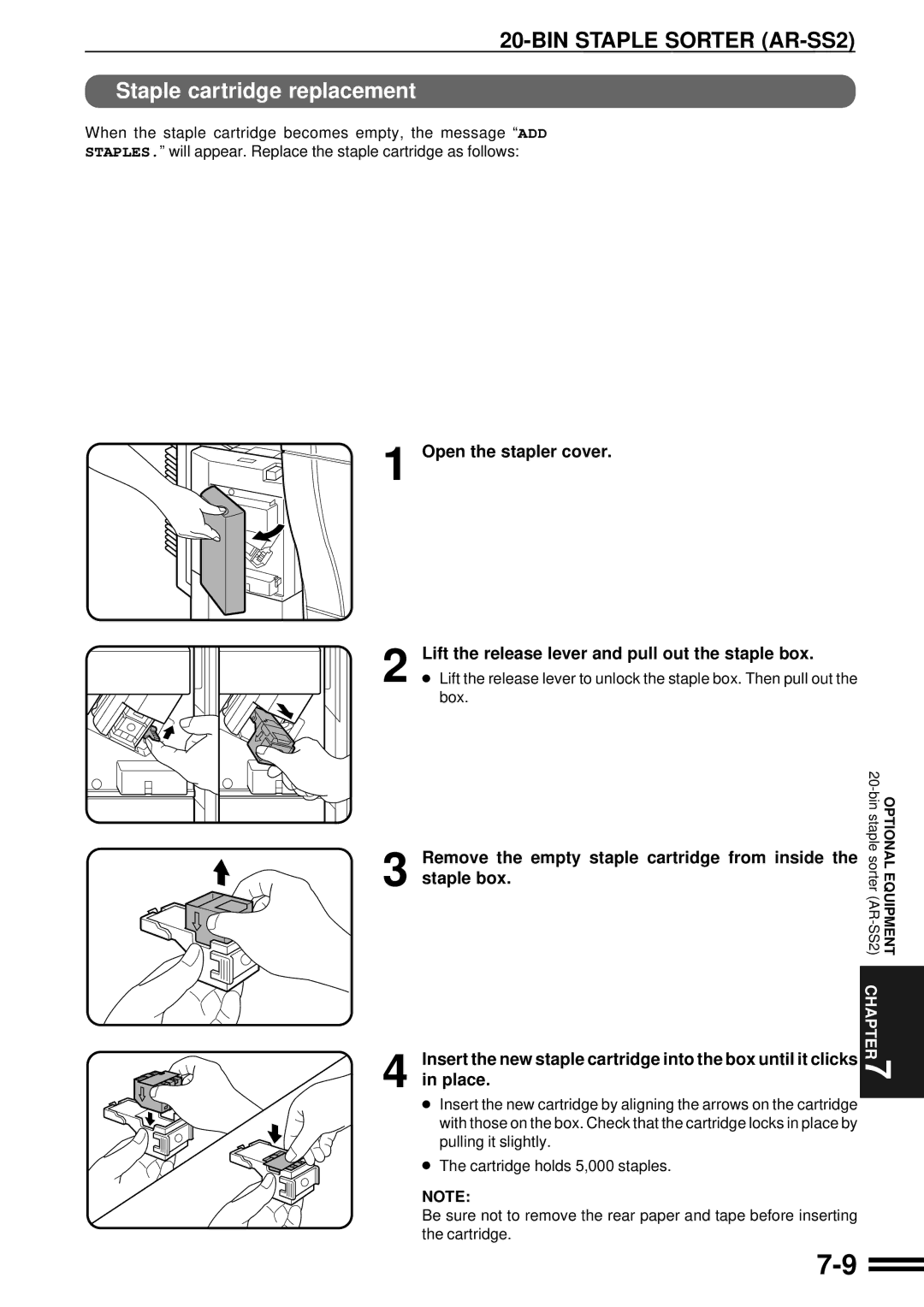
Staple cartridge replacement
System Configuration
Part Names
BIN Staple Sorter AR-SS2
BIN Staple Sorter AR-SS2
Using the staple sorter
Sorter Capacity
Staple sort
Using the document glass
Up to 20 sets can be made
Using the optional Radf
Press the manual staple key when it lights up
Manual stapling
Set of copies will be stapled
Remove the empty staple cartridge from inside Staple box
Staple cartridge replacement
Remove the rear paper and tape from the cartridge
Return the lever to its original position
Staple jam removal
BIN Staple Sorter AR-SS2
Copier will stop when a misfeed occurs
Misfeed removal
Slide the sorter back toward the copier and latch it into
11 x 12 x
Specifications
Paper Weight 13 ~ 28 lbs
17 ~ 28 lbs 2 x
Large Capacity Tray AR-LC2
Paper size 2 x Paper weight 15 lbs. to 28 lbs
Load the paper onto the feed table
When the button lamp goes out, pull the paper tray out
Large Capacity Tray AR-LC2
Fan the copy paper
Capacity tray
Remove any misfed paper from the copier and the large
Be sure not to tear the misfed paper during removal
Remove the misfed paper Gently push the tray back into place
Finisher AR-FN4
Offset stack
Offset mode
NON Offset mode
Finisher AR-FN4
Printed output will be stapled
Staple print
Replace the staple as follows
When the staple cartridge is empty, the message Slide
Optionalequipment
Staple jam removal
FN4
Misfeed removal
Finisher AR-FN4
Page
Offset stack
Staple print
Staple cartridge replacement
Remove the rear paper and tape from the cartridge
Staple jam removal
FN4
Misfeed removal
Finisher AR-FN4
Page
Staple print
Optional EQUIPMENT7
Optionalequipment
Staple jam removal
Finisher AR-FN4
Misfeed removal
Finisher AR-FN4
Page
Page
Sharp Corporation