Gigaset 2011 Comfort
Gigaset
Your guide to this manual
Overview Gigaset
Overview keys
Base station keys Display keys assignments
@, and #
Overview display symbols
Symbol Explanation
Safety precautions
Installation instructions
Only use rechargeable bat
As shown
Approval and conformity
Contents
Contents
Short cuts
Step by step guide to putting into service
Step by step guide to putting into service
Observe the safety precautions
Check the contents of the package
Underside of base station housing
Power cord
Telephone cord
Charge the batteries
Checking your own telephone’s signalling method
Setting dial pulsing
@33x
Menu-driven operation
Menu-driven operation
Menu structure
Menu structure is hierarchical
Moving to higher menu levels and exiting a menu
Activating the additional menu
Handset Settings Beeps Confirm Beep
Displays in the operating instructions
Abbreviated presentation
XW t New Entry
Handset Volume
Menu-driven operation On-line menu
Example of menu operation during a telephone call
Following is displayed
Menu-driven operation Principal menus
Main menu Handset Lock
Directory menu
Redial menu
Settings
Beeps Key Beeps
Range Beep Language
On/off/protected mode
You can switch your handset To protected mode Off On again
Switching the handset to protected mode
Operating modes
When the handset is switched off
Switching off the handset
Operating modes Signalling method
Incoming calls
Incoming calls
Call number display
When the handset is in the base station or charging unit
Accepting calls
Internal call
Following example shows a call from mobile unit
Incoming calls External call-waiting during internal calls
Ending a call
Deactivating the microphone mute function
External outgoing calls
External outgoing calls
Calling external parties
Suppressing secret numbers for redial
Suppressing call number display at the called party
No answer or line busy
Manually inserting a pause
External outgoing calls Redial
Dialling with the directory
Repeating the last number dialled
Repeating one of the last five call numbers T Dial Number
Dialling from the call list
Dial Number
When a caller is selected, Current date, time, number
White Peter
Activating the call list
Selecting and calling back a caller
Deleting a callback party from the call list
Gigaset 2000S
Searching for and dialling a callback number
Gigaset 1000C
Switch to Tone
Search for a call number in the list Delete the entry
External outgoing calls Ending a call
Collective ringing and internal calls
Collective ringing and internal calls
Making collective calls from one handset to all handsets
Making internal calls
Ending an internal call
Internal consultation calls and transferring calls
Internal consultation calls and transferring calls
Consultation calls
Either
Disconnect the internal party
Creating and managing the directory
Creating and managing the directory
UW t e.g. New Entry
Saving an entry or cancelling an operation
Save Entry Cancel Inserting a pause
New Entry
U W t New Entry
Copying numbers
Deleting the directory
Delete Entry T Delete Entry Processing and saving an entry
XW t Delete Directory
Creating and managing the directory Available memory
Copying an entry/directory
XW t Available Memory
T Copy Entry
Administering the redial memory
Administering the redial memory
Copying a redial number to the directory
You can copy a selected call number to the directory
Copy Number Displaying the call number T Display Number
Contents input field
Input function
Input function
Entering names and numbers
Moving from the Name field to the Content field
Exception
Inserting, deleting, and moving characters
Deleting
Example making a new directory entry
Examples changing an entry
Making changes in the Name field
Procedure
Making changes in the Contents field
Entering letters, special characters, and digits
Example field boundaries
123 789
Character set
Key Press x
Important basic settings
Important basic settings
Changing the base code/PIN
Changing the handset PIN
If you forget your base code or PIN
Reset the base station to the factory default
Backlighting Baby alarm level Language setting
Isdn configuration Select Services
DSS number, redial
Handset PIN stored page 44 is not delet- ed
Important basic settings Operating in a telephone system
Possible signalling method settings
@37x Dual-tone multifrequency signalling DTMF/Flash
@33x Set dial pulsing DP
Entering the analog trunk and the MSI Service
Analog trunks
Modify the pause length after the analog trunk/MSI
@24 x SET @2% x SET @2@ x SET @21 x SET
Deleting the analog trunk/MSI
Redial 2%3 u SET
Individual base station settings
Individual base station settings
Switch the ringer off and save the setting
Setting the base station ringer tone
Redial 411x SET Redial 41@x SET
Individual handset settings
Individual handset settings
Setting the handset volume
Settings t Handset Volume
Individual handset settings Ringer settings
OK or
Isdn configuration
Settings Handset Settings Auto Backlight
Save. Symbol for on =
Automatic call acceptance
Handset Settings Beeps Key Beeps
Activating/deactivating the battery low beep
Activating/deactivating the key beep
Quit the menu without saving any changes
Handset Settings Beeps Range Warning
Handset Settings Beeps
Activating/deactivating the error beep
Activating/deactivating the range warning beep
Baby alarm
Individual handset settings Baby alarm level
Selecting a language
German
English French
Individual handset settings Select services
Select services list
Activating and deactivating select services
Loading the select services list provided
Call duration display is activated by default
Displaying call duration
Displaying call duration
Activating/deactivating call duration display
Emergency calls when the system is locked
Gigaset 2011 lock functions
Gigaset 2011 lock functions
Activating/deactivating the lock for outgoing calls
Number stored
Example emergency
Number 110 stored
Deleting all emergency numbers
Service #8 %
Gigaset 2011 lock functions Barred numbers for handsets
Deleting all barred numbers Service
Extensions, are shown on the display
Example handsets 1, 2, and 3 are registered
1u SET @u SET
Set Outward-restricted trunk access
Lock functions on the handset
Lock functions on the handset
Activating/deactivating the handset lock
Barred numbers for handsets
Handset lock is switched on
66, an error tone is output
Display with locked handset
Display with system lock
Settings t Register
Registering a Gigaset 2000C handset at a base station
X OK
Prepare the base station
De-registering a handset from a base station
Switching between collective call and ring priority Service
Operating more than one handset
Operating more than one handset
Call allocation for incoming calls
Excluding or including a handset from/into collective call
Selecting a handset for ring priority
Confirm
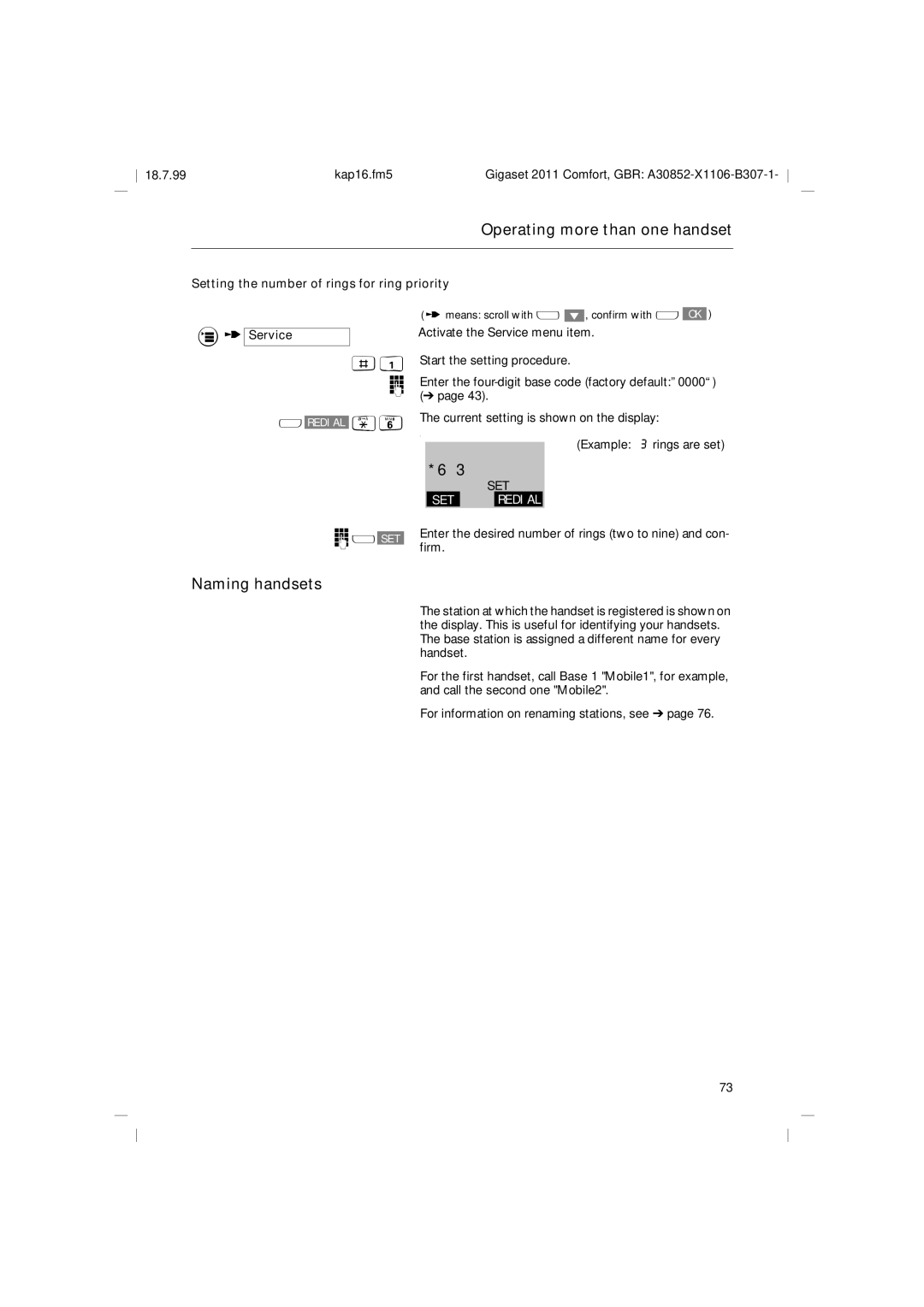
Setting the number of rings for ring priority Service
Naming handsets
Example 3 rings are set
Firm
Operating at more than one base station
Operating at more than one base station
Setting the preferred or fixed station
Select Base
Select Best Base and press OK to confirm
Select the base station
Operating at more than one base station Base station names
De-registering a base station
Short cuts
Short cuts
Descriptions with example
Short cut menu
Short cuts New entry
T New Entry
Function list
Insert Function
Insert Function SET Key
Insert Function Base Prompt SET Key
Displaying a function
T Show Function Saving a short cut
Cancelling a procedure
Cancel Checking for double entries T Check Duplicate
Editing an entry
Deleting an entry
Short cuts Displaying an entry
Deleting all entries
T Display Entry
Short Cut u W t Delete Memory
Short cuts Copying an entry/memory
T Copy Memory
Default short cuts
T DefaultShortCuts
Short cuts Starting a short cut
T Start
Short cuts Short cut list
For handset and base functions
Important notes on putting into service and operation
Important notes on putting into service and operation
Installing the base station
Installation site/installation area
For users who wear hearing aids
Nickel-cadmium Nickel-metal-hydride
Important notes on putting into service and operation
Handset battery life
Battery charging times
Fitting the carrying clip on the handset
Maintenance
Gigaset 1000C Or a Service
Differences in operation Gigaset 2000C
Free
Standard
Most manufacturers for Dect radio transmission
Stand-by approx W
Use approx W
Warranty
Symptom Cause Remedy
Contact person
Base code entered does not
Ring tone Tuuuuut
Recall Tuuuuut
Internal dial tone Tuuut
Almost empty
Special accessories
Special accessories
Gigaset 1000TAE
Gigaset 2000L
Special accessories Gigaset 2000S
Gigaset 2000T
Headset
Quick reference guide handset Gigaset 2000C
Quick reference guide handset Gigaset 2000C
Index
100
101
Warranty
Users Calling external parties Making internal calls
102
Issued by Private Communication System Group
Hofmannstraße 51, D-81359 München
Siemens AG