Zebra TTP
P1003636-002 TTP 7030 Technical Manual 10/05/2009
Contents
Programming
Interface
P1003636-002 TTP 7030 Technical Manual 10/05/2009
About This Manual
Introduction
Updating
Contacts
Mail address emb@zebra.com Subject line Emaillist
Product Presentation
Printer Exterior, Rear View
Printer Exterior, Side View
Status Indicator
Indicators
Control Board Indicators
Feed Button
Installation
Installation Considerations
Top view
Electrostatic Discharges, and Earth Currents
Ambient Light
Using a Serial Adapter
Connecting To The Computer
Connect the TTP
Fitting a serial adapter to the printer
Connecting the Power
GND
Is a power button available for the printer?
Making a Test Printout
Installing a Printer Driver
Paper Level Sensor Indicators on Roll Holder
Paper Level Sensors
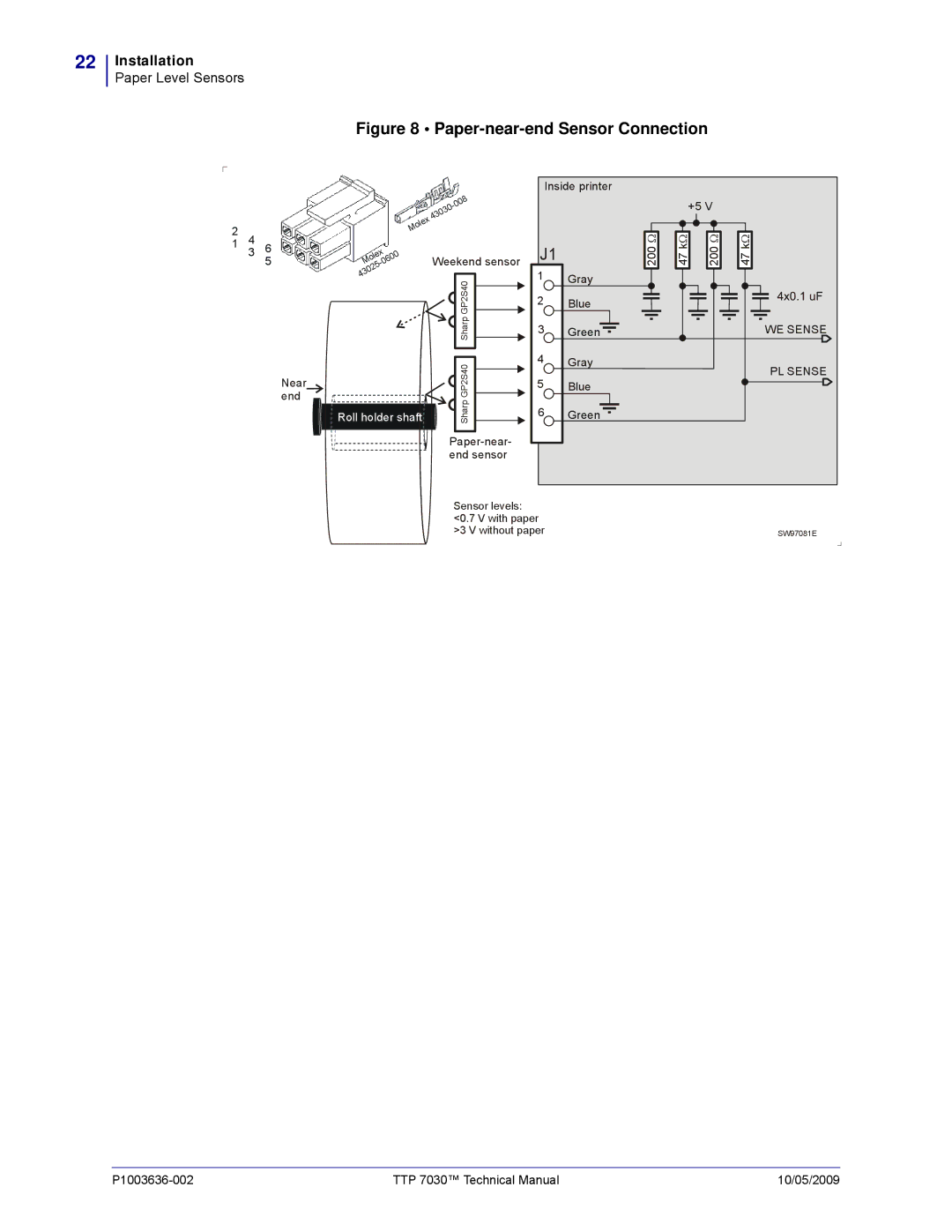
Paper-near-end Sensor Connection
Operation
Installing a Paper Roll
Make sure the printer is turned on
Angle
Cut the paper in a suitable angle. See Figure
Clearing Paper Jams
Open the Print Module
Programming
Cursor will retain its last position on the ticket
Text text
How The Commands Are Described
Two-Byte Character Definitions
Therefore, the two-byte representation of 731 is
Summary Of Control Codes & Escape Sequences
50 n1 27 5 80 n1 Parameter-setting data Enquiry
27 5 Head temperature Enquiry
27 5 Bootware version Enquiry
27 5 Device ID Enquiry
Software Command Syntax
Black Mark Top-Of-Form Commands
Changes the alignment of text and logotypes
Text Commands
Left Center Right
Selects font
Selects normal font font ESC ! 4 selects font
Selects font ESC ! 5 selects font
Turns OFF Italics Normal Turns on Italics
ESC T n1 Reversed/Inversed Text
ESC w n1
Commands, are not cancelled
Overprint the O
ESC d n1 Make n Linefeeds
Barcode Commands
Samples of barcodes
UPC
Add-on. Two of five characters are allowed of the add-on
Must be placed at the end of the bar code data
Columns
Error level, 0=auto, 1=Level0, 2=Level1, etc
Dot Height, sets mow many pixel lines each row consists
Graphics Commands
Determines the number of bytes. Range
ESCr000000000000001193000024003
ESC g n1 Print Logotype
Run presenter
Print Commands
Form feed Clear presenter
Print buffer full Press on FF-button
ESC j n1 Paper Reverse
To auto
Cut And Present Commands
You can also use RS together with the paper advance command
Gives a cut & eject after the last text line