W . d e l l . c o m s u p p o r t . d e l l . c o m
Dell Precision M2300 Quick Reference Guide
September GY733
Contents
Contents
Quick Reference Guide
Finding Information
What Are You Looking For? Find It Here
Drivers and Utilities Media
License
This document
Dell Product Information Guide
NSS utility. NSS provides critical
Your Service Tag
Updates appropriate for your Configuration
Go to support.dell.com, select your
Dell QuickSet Help
Dell Support Utility
Windows Help and Support Center
Optional and may not ship with your
Operating System Media
Setting Up Your Computer
Optional Stick buttons
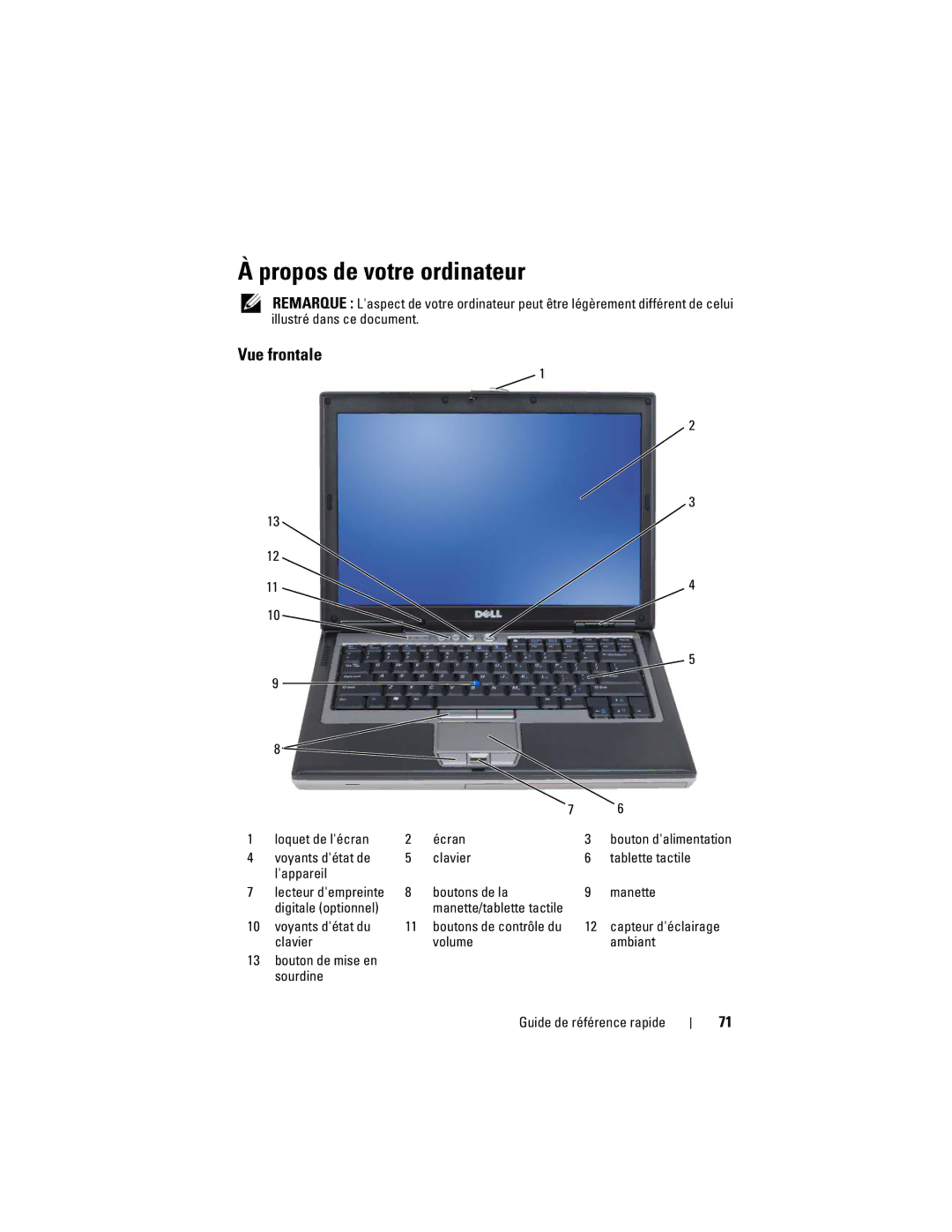
About Your Computer
Front View
Track stick
Right Side View
Left Side View
Bottom View
Back View
Battery Performance
Using a Battery
Checking the Battery Charge
Check the Battery Health Quick Reference Guide
Check the Battery Charge
Charging the Battery
To remove the battery
Removing the Battery
Reinstall the program
Troubleshooting
Storing a Battery
Lockups and Software Problems
C K U P Y O U R F I L E S I M M E D I a T E L Y
CD S Quick Reference Guide
Dell Diagnostics
During the assessment, answer any questions that appear
Option Function
Option Function
Quick Reference Guide
Quick Reference Guide
Index
Index
Index
Index
Index
Dell Precision M2300 Snelle referentiegids
Opmerkingen, kennisgevingen en waarschuwingen
Inhoud
De batterijlading controleren
Inhoud
Hulpprogrammas-schijven
Informatie vinden
Drivers and Utilities Stuur- en
Dell Productinformatiegids
Servicelabel en Microsoft Windows- licentie
Dit document
De computer openen Garantie-informatie
Website op te roepen
Servicelabel op
Installeren. NSS biedt belangrijke
Waar bent u naar op zoek? Hier kunt u het vinden
Windows Help en ondersteuning
Het hulpprogramma Dell Support
Schijf met besturingssysteem
De computer instellen
Knop voor geluid uit/aan Snelle referentiegids
Over de computer
Vooraanzicht
Beeldscherm
Aanzicht rechterkant
Aanzicht links
Onderaanzicht
Achteraanzicht
Batterijprestatie
Batterijen gebruiken
De batterijlading controleren
Snelle referentiegids
Waarschuwing batterij bijna leeg
De batterij opladen
De batterij verwijderen
De batterij verwijderen
De computer start niet op
Blokkeringen en softwareproblemen
Probleemwijzer
Een batterij opslaan
Klik op Taak beëindigen
Een programma reageert niet meer of crasht regelmatig
Klik op Taakbeheer
101
Wissenswertes über Ihren Computer
Vorderansicht
102
Seitenansicht linke Seite
Seitenansicht rechte Seite
103
Rückansicht
Unterseite
104
Verwenden eines Akkus
Akkuleistung
105
Prüfen des Akkuladezustands
3D-Grafik-Anwendungen
Prüfen der Akkuladung
Akkuanzeige von Dell QuickSet
107
Aufladen des Akkus
Warnung „Akku niedrig
So entfernen Sie den Akku
Entfernen des Akkus
Lagern eines Akkus
Probleme mit Absturz und Software
Beheben von Störungen
Ein Programm reagiert nicht mehr oder stürzt wiederholt ab
111
Andere Probleme mit der Software
Ein blauer Bildschirm wird angezeigt
112
Fahren Sie den Computer herunter
113
Keine Benutzeraktion erforderlich. Führen Sie den
114
Option Funktion Express Test
Schnelltest
115
116
Stichwortverzeichnis
117
Spyware, 111 stark verlangsamte
119
Zulassungsinformationen
120
Dell Precision M2300 Guida di consultazione rapida
Avvisi e Attenzione
123
124
Driver per il computer
Ricerca di informazioni
125
Supporto Drivers and Utilities
Numero di servizio e Licenza di Microsoft Windows
126
Nel presente documento
127
128
Supporto Sistema operativo
129
130
Installazione del computer
Schermo Pulsante di Dello schermo
Informazioni sul computer
Vista anteriore
131
132
Vista laterale sinistra
Vista laterale destra
133
Vista posteriore
Vista inferiore
134
Uso della batteria
Rendimento della batteria
135
136
Controllo del livello di carica della batteria
137
138
Ricarica della batteria
Rimozione della batteria
Per rimuovere la batteria
Risoluzione dei problemi
Blocchi e problemi relativi al software
Conservazione della batteria
140
Il computer non si avvia
Il computer smette di rispondere
Il programma smette di rispondere o si blocca ripetutamente
141
Altri problemi relativi al software
Viene visualizzata una schermata blu
142
Quando utilizzare il programma Dell Diagnostics
Si consiglia di stampare queste procedure prima di iniziare
143
Tenere premuto il tasto Fn durante laccensione del computer
144
Main Menu Menu principale di Dell Diagnostics
145
146
Indice analitico
147
Dell Diagnostics, 142 esecuzione lenta del computer
149
150
Guia de referência rápida do Dell Precision M2300
Notas, Notícias e Advertências
153
154
Controladores e utilitários
Detectar informação
155
Suporte Drivers and Utilities
Etiqueta de serviço e licença do Microsoft Windows
156
Neste documento
Perguntas frequentes
157
Técnico da Dell support.dell.com
Artigos de técnicos, cursos online
Centro de ajuda e apoio técnico
158
Utilitário de Apoio Dell
Suporte do sistema operativo
159
Ajuda do Dell QuickSet
160
Preparar o computador
Lingueta do ecrã Ecrã
Sobre o seu computador
Vista frontal
161
162
Vista esquerda
Vista direita
163
Vista traseira
Vista inferior
164
Utilizar uma bateria
Capacidade da bateria
165
Verificação da carga da bateria
Verificar a longevidade da bateria
166
167
Carregar a bateria
Aviso de bateria fraca
Para retirar a bateria
Remover a bateria
Armazenar uma bateria
Resolução de problemas
Bloqueios e problemas de software
170
171
172
173
Opção Função
Menu principal do Dell Diagnostics
174
Separador Função
175
176
Índice remissivo
177
Índice remissivo
179
180
Dell Precision M2300 Guía de referencia rápida
Notas, Avisos y Precauciones
183
209
184
El ordenador
Búsqueda de información
185
Ordenador
Etiqueta de servicio y licencia de Microsoft Windows
186
En este documento
187
Para la solución de problemas
Centro de ayuda y soporte técnico de
188
Utilidad Dell Support
Sistema operativo
189
Ayuda de Dell QuickSet
Soporte multimedia Operating System
190
Configuración del ordenador
114 Guía de referencia rápida
Acerca de su ordenador
Vista anterior
191
192
Vista lateral izquierda
193
Vista lateral derecha
Vista posterior
Rendimiento de la batería
Uso de la batería
195
196
Comprobación de la carga de la batería
Comprobación del estado de consumo de la batería
197
198
Carga de la batería
199
Extracción de la batería
Para extraer la batería
El ordenador no se inicia
Solución de problemas
Bloqueos y problemas de software
Almacenamiento de una batería