Presario
Presario
Page
Contents
Using Your Notebook
Common Tasks
Let’s Go Surfing
Caring for Your Battery
Solutions
Glossary Index
CONTENTS-VIII
Introduction
Where Can
Safety and Comfort Guide
Printed Documents
Getting Started Poster
Warranty Certificate
Presario Operating System Manual
Symbols
Graphics
Safety
Protecting Your Notebook During an Electrical Storm
Series
Your At a Glance
Common Features
Front Your Presario
Internet Zone Buttons and Lights
These buttons automatically connect you to the Internet
Function Keys
Description
Status Display and Volume Controls
Left Side Components
Right Side Components
Rear Panel
Rear Components
Underside
Underside Components
Using Your
Power On
Plugging and Unplugging AC Power
Do’s
Don’ts
Power Button Functionality
Why Use AC Power When I’ve Got a Battery?
Turning Your Notebook On and Off
Recovering from a Locked Programme
Recovering from a Locked System
Using Battery Power
Inserting the Battery
Removing the Battery
Charging the Battery
Using the TouchPad Instead of a Mouse
TouchPad
Left-Click
Right-Click
Tapping and Double-Tapping
Edge Motion
Changing Resolution
Display Properties
Adjusting Brightness
Internet Zone Buttons
Re-programming Internet Zone Buttons
Storage Drives
Using the Diskette Drive
Identifying Your Storage Drives
Using the Security Slot
Power-On Password
Setting the Password
Security
Removing the Password
If Supervisor Password Is
Series
Common 4 Tasks
Connecting and Enabling TV-Out
TV-Out Connection
Adjusting the Television Screen
Select a Display Device Select a Multi-monitor Device
Switching Between Displays
Display Modes
Using Anti-Virus Software
Anti-Virus Software
Recognising a Computer Virus
Removing a Virus
Updating McAfee VirusScan
Virus Protection
Upgrading McAfee VirusScan software
Installing Software from a CD or Diskette
Adding and Removing Software
Installing a Downloaded Programme File
Software and Hardware
Using ScanDisk
Hard Disk Errors
Using Disk Cleanup
Deleting Stored Files
De-fragmenting Your Hard Disk
Hard Disk Space Management
Checking the Hard Disk Space
Deleting Unnecessary Files
Using the Recycle Bin
Compaq Diagnostics
System Support
Types of Tests
Tab Description
Testing Equipment
Select Interactive mode or Unattended mode
Turning Compaq Service Connection On and Off
Compaq Service Connection
How Does It Work?
Privacy and Data Security
Solutions
Finding Solutions Quickly
Basic Solutions
Helpful Hints
Frequently Asked Questions
General Questions
Series
Display Questions
How can I change the display settings on my Notebook?
My display monitor is blank. What should I do?
Questions about Sound
Questions about Movies
There is no sound coming from my Notebook. What’s wrong?
DVD movie is too dim or too bright. What should I do?
Questions about Upgrades
How do I know how much battery power I have?
Can I download upgrades from the Compaq Internet site?
Questions about Peripherals
Error Messages
Receive hard disk error messages. What is wrong?
Series
Solutions Tables
Audio and Video
Video or Display Symptom Problem Solution
Video is also referred to as the display
Battery and Power
Battery Symptom Problem Solution
Cont’d
Power Symptom Problem Solution
Warranty Statement
Restart your Notebook by
CD or DVD Drive Symptom Problem Solution
Mass Storage
Is poor when
Diskette Drive Symptom Problem Solution
2 Floppy a drive
Wrong type of diskette is being used
My Computer g icon
Symptom Problem Solution
Diskette Drive
Hard Drive Symptom Problem Solution
Internet Symptom Problem Solution
Games Symptom Problem Solution
Games and Internet
Internet
Keyboard and TouchPad
Keyboard and TouchPad Symptom Problem Solution
Click Shut Down
Keyboard and TouchPad
Enter key
To Settings
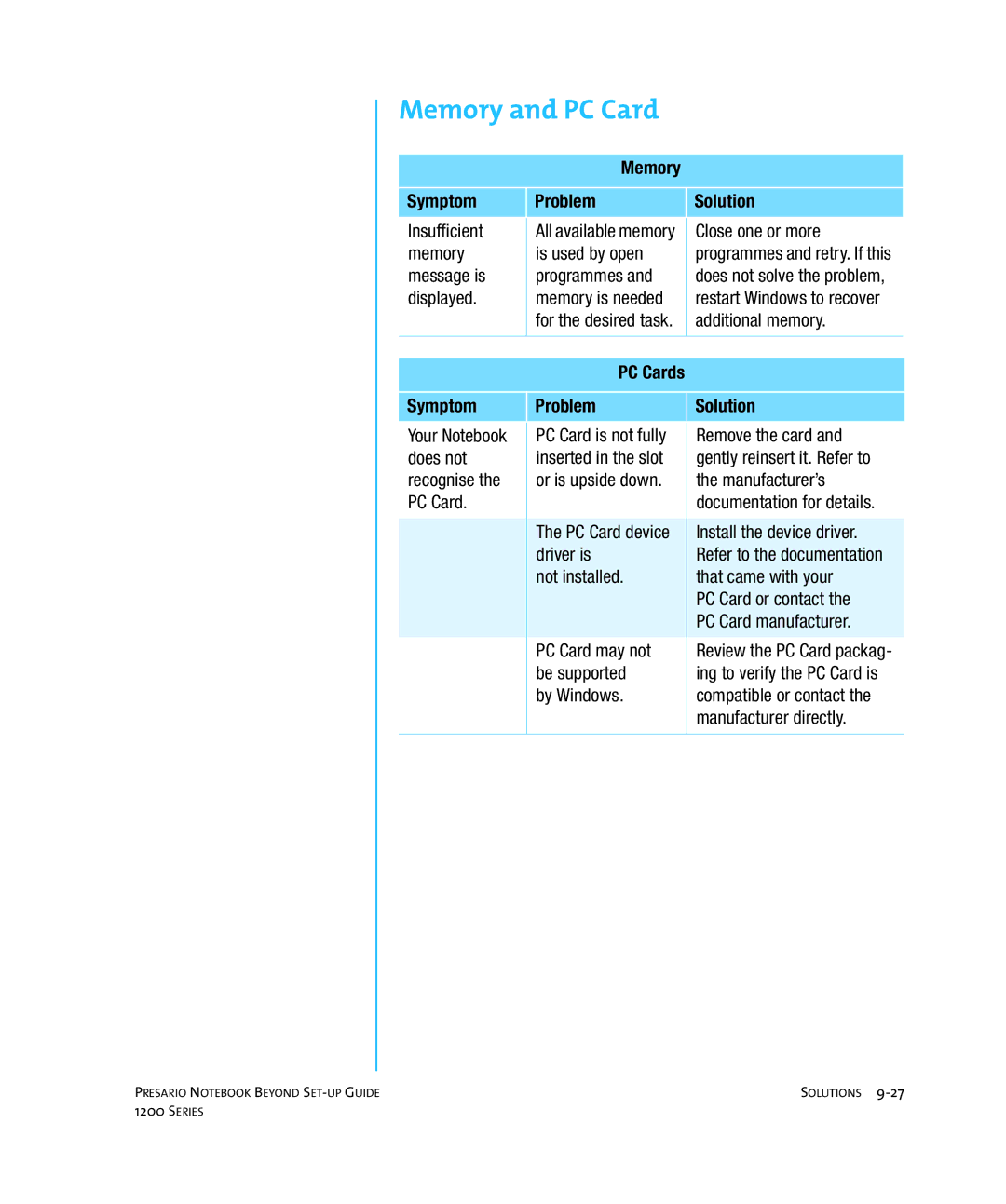
PC Cards Symptom Problem Solution
Memory Symptom Problem Solution
Memory and PC Card
Series
Glossary
See peripheral
GLOSSARY-2
Desktop See Windows desktop
Directory See folder
DSL digital subscriber line
Floppy disk See diskette
GLOSSARY-6
Internet Explorer
See Microsoft
Link See hyperlink
Midi musical instrument digital interface pronounced middy
See Microsoft Windows
Netscape Navigator a Web
See browser
GLOSSARY-10
See microprocessor
See pop-up menu
GLOSSARY-12
Taskbar See Windows taskbar
URL uniform resource locator