Troubleshooting
Problem Solution
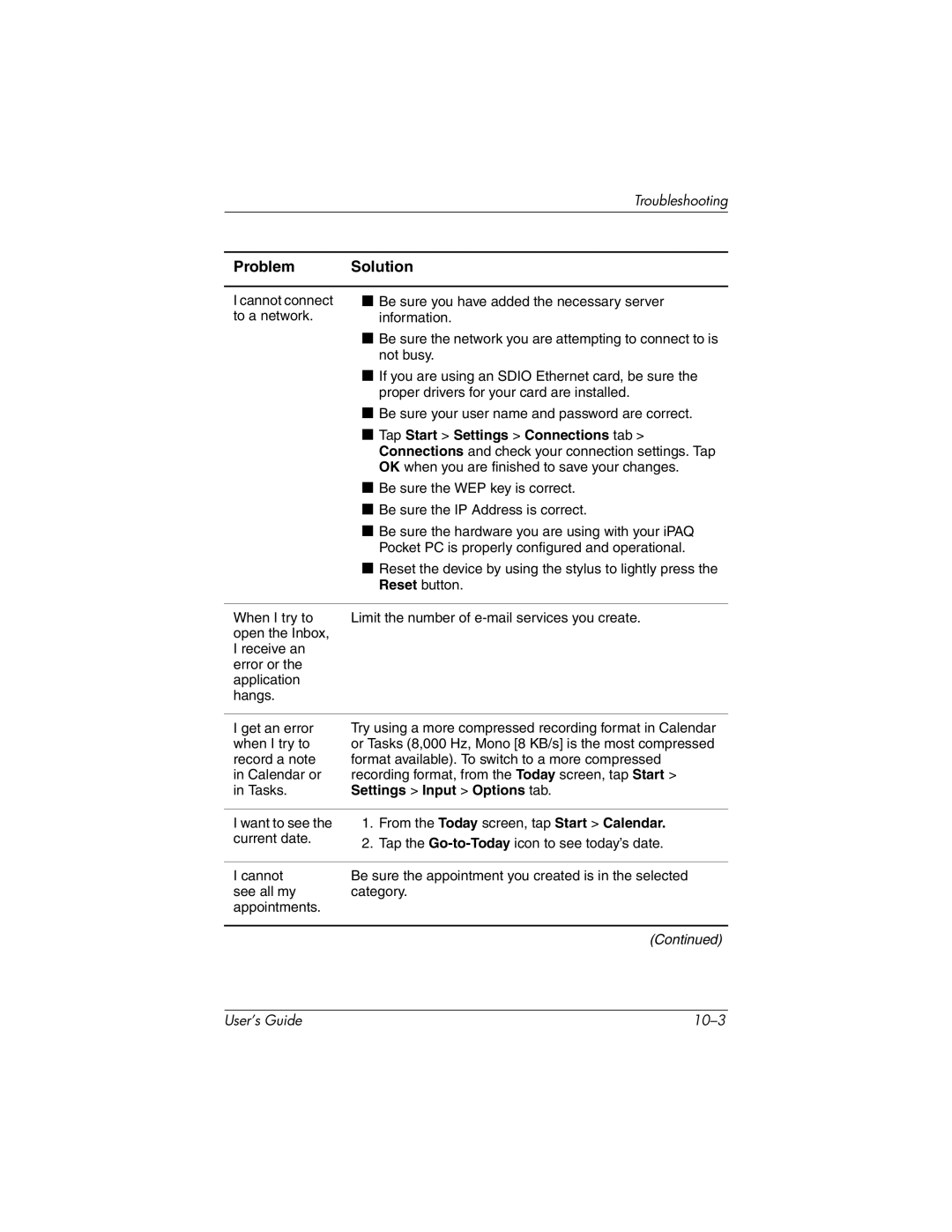
I cannot connect to a network.
■Be sure you have added the necessary server information.
■Be sure the network you are attempting to connect to is not busy.
■If you are using an SDIO Ethernet card, be sure the proper drivers for your card are installed.
■Be sure your user name and password are correct.
■Tap Start > Settings > Connections tab > Connections and check your connection settings. Tap OK when you are finished to save your changes.
■Be sure the WEP key is correct.
■Be sure the IP Address is correct.
■Be sure the hardware you are using with your iPAQ Pocket PC is properly configured and operational.
■Reset the device by using the stylus to lightly press the Reset button.
When I try to | Limit the number of |
open the Inbox, |
|
I receive an |
|
error or the |
|
application |
|
hangs. |
|
I get an error when I try to record a note in Calendar or in Tasks.
Try using a more compressed recording format in Calendar or Tasks (8,000 Hz, Mono [8 KB/s] is the most compressed format available). To switch to a more compressed recording format, from the Today screen, tap Start > Settings > Input > Options tab.
I want to see the | 1. | From the Today screen, tap Start > Calendar. |
current date. | 2. | Tap the |
| ||
|
| |
I cannot | Be sure the appointment you created is in the selected | |
see all my | category. | |
appointments. |
|
|
(Continued)
User’s Guide |
|