TACACS+ Authentication
Overview
Overview
Feature | Default | Menu | CLI | Web |
view the switch’s authentication configuration | n/a | — | page | — |
|
|
|
| |
view the switch’s TACACS+ server contact | n/a | — | page | — |
configuration |
|
|
| |
configure the switch’s authentication methods | disabled | — | page | — |
|
|
|
| |
configure the switch to contact TACACS+ server(s) | disabled | — | page | — |
|
|
|
| |
|
|
|
|
|
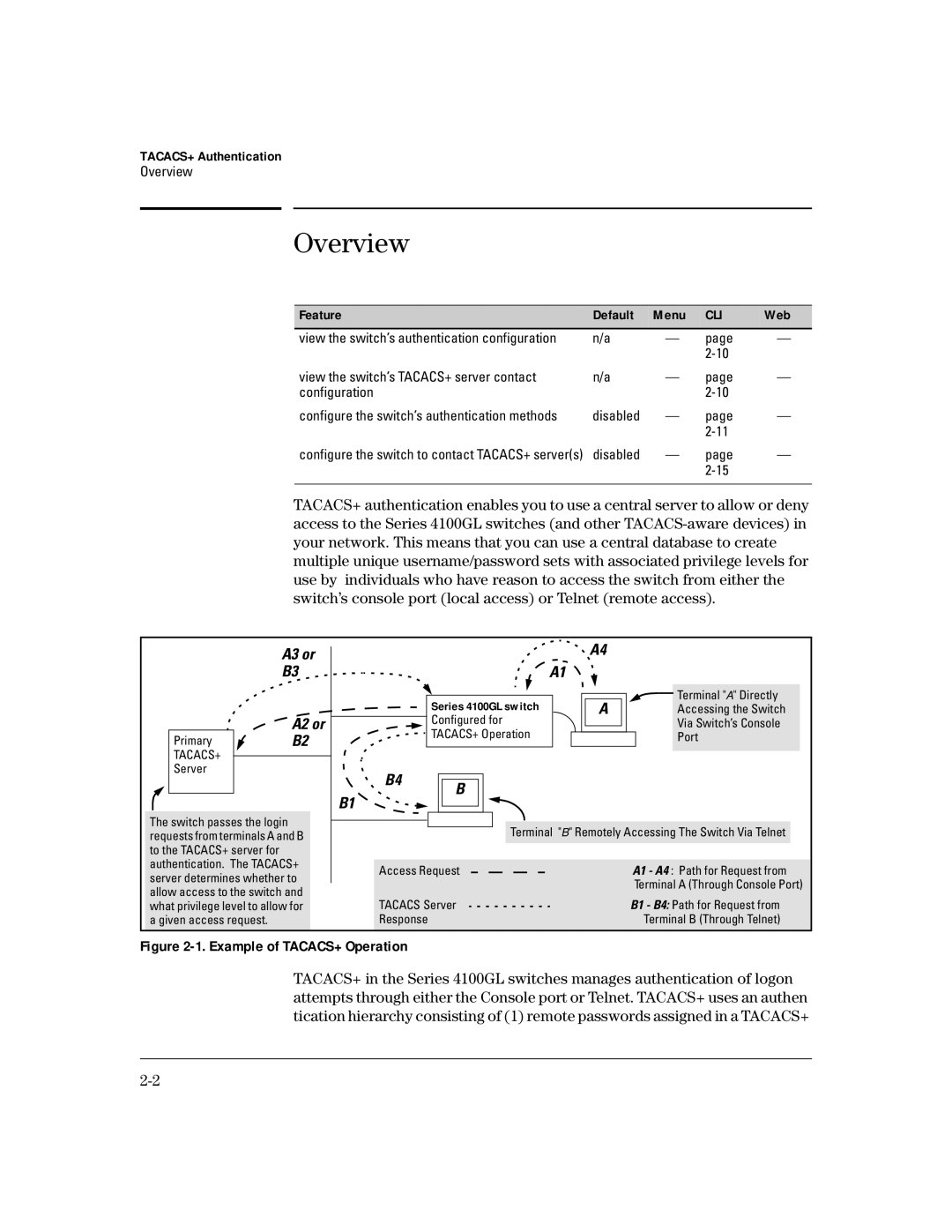
TACACS+ authentication enables you to use a central server to allow or deny access to the Series 4100GL switches (and other
| A3 or |
| B3 |
| A2 or |
Primary | B2 |
TACACS+ |
|
Server |
|
|
|
The switch passes the login requests from terminals A and B to the TACACS+ server for authentication. The TACACS+ server determines whether to allow access to the switch and what privilege level to allow for a given access request.
|
| A4 |
|
|
| A1 |
|
| Series 4100GL switch | A | Terminal "A" Directly |
| Accessing the Switch | ||
| Configured for |
| Via Switch’s Console |
| TACACS+ Operation |
| Port |
B4 | B |
|
|
B1 |
|
| |
|
|
| |
| Terminal "B" Remotely Accessing The Switch Via Telnet | ||
Access Request |
| A1 - A4 : Path for Request from | |
|
|
| Terminal A (Through Console Port) |
TACACS Server | B1 - B4: Path for Request from |
Response | Terminal B (Through Telnet) |
Figure 2-1. Example of TACACS+ Operation
TACACS+ in the Series 4100GL switches manages authentication of logon attempts through either the Console port or Telnet. TACACS+ uses an authen tication hierarchy consisting of (1) remote passwords assigned in a TACACS+