Model
Important Information Equipment Approval Information
Important Information
Interference Information
Hearing Aid Compatibility
Licensing
Do not Open
FCC RF Radiation Exposure Statement
Introduction
Introduction
Table of Contents
Advanced Functions of Your RCA 25450 Phone System
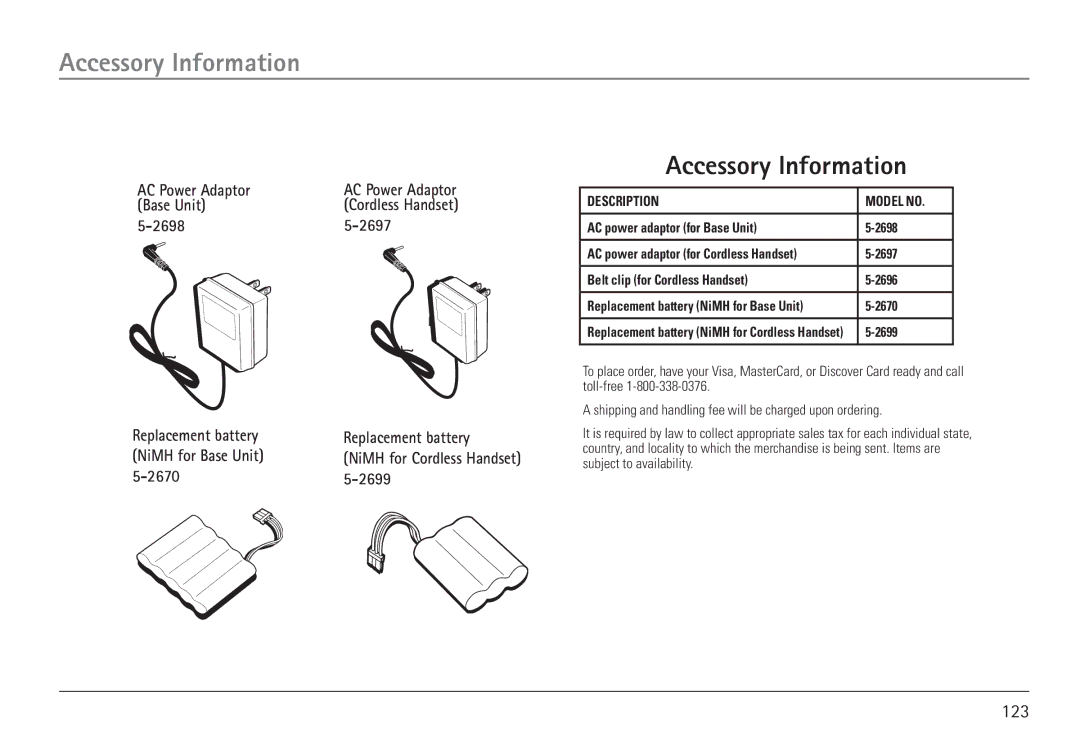
Accessory Information Replacement Parts
Installation Guidelines
Connections and Setup
Important Installation Information
Safety Precautions
Telephone Jack Requirements
Parts Checklist Base Unit
Parts Checklist Cordless Handset
Base Unit Location
Phone Installation Base Unit
Installing Backup Battery
Installing Handset
Four 1-line Wall Jacks Type RJ-11
Installing the AC Adaptor
Connecting the Telephone Line Cords
Two 2-line Wall Jacks Type RJ-14
Four 1-line Jacks
Two 2-line Jacks
Cordless Handset Installation
Installing the Charging Cradle and AC Adaptor
Installing the Cordless Handset Battery
Registering the Cordless Handset
Installing the Charging Cradle Wall Mount
Base Unit Layout
Features
Navigation Button
Base Unit Features
Menu System Adjust Settings and Registration
LCD Display
Dial Button
Redial Button
Line Buttons
Line Dedicate
Button
Speaker Button
Headset Button
Mute Button
Store Button
Reset Button
Exit Button
Memory Buttons
Second Incoming Call
Voice Mail Button Call Transferring
Hold Message
Conference Calling
Cordless Handset Features
Call Waiting
LCD Display Cordless Handset
Cordless Handset Layout
Cordless Handset Charging Cradle
End/Power Button
Talk Button
Redial Soft Button
Headset Jack
Mute
Hold
Voice Mail Indicator Light
Voice Mail Button
Call Forwarding
Extension Groups
Making a Call Base Unit
Using Your RCA 25450 Phone System
Using Your RCA 25450 Phone System
Making a Call
Pre-Dialing Base Unit
Manual Line Selection Dial Base Unit
To Delete a Number from the Redial Log Base Unit
Redial Base Unit
Making a Call Cordless Handset
To Save a Number from the Redial Log to Directory Base Unit
Auto Line-Selection Dial Cordless Handset
Manual Line-Selection Dial Cordless Handset
Redial Cordless Handset
Pre-Dialing Cordless Handset
To Delete a Number from the Redial Log Cordless Handset
Receiving a Call Base Unit
Ending a Call Base Unit
Receiving a Call Cordless Handset
Base Unit
Switching Between Audio Modes
Ending a Call Cordless Handset
Putting Calls on Hold
To resume the call, press the corresponding Line 1-4 button
Call Forwarding Cordless Handset Only
Enable Call Forwarding
Disable Call Forwarding
Transferring a Call to Another Extension
Announced Call Transfer
Base Unit
Unannounced Call Transfer
Making an Intercom Call
Intercom Calls
Receiving an Intercom Call
End an Intercom Call
Ignore and Override an Incoming Line or Intercom Call
Base Unit Making an Outbound Line Call
Cordless Handset Making an Outbound Line Call
Base Unit Making an Outbound Intercom Call
Cordless Handset Making an Outbound Intercom Call
Paging Base Unit
Configure Voice Mail Base Unit
Voice Mail
Voice Mail VM
Phone Settings
Dialing Prefix
Turn On Dialing Prefix
Area Codes
Turn Off Dialing Prefix
Edit Local Area Code LAC
Edit Regional Area Code RAC
Contrast Base Unit
Set Time Base Unit
Do Not Disturb DND Base Unit
Auto Line Selection Setting
Auto or Manual Line Selection Settings Cordless Handset
Manual Line Selection Setting
Reset System Base Unit
Connecting an Optional Headset to the Cordless Handset
Headset and Belt Clip Operation
Attaching the Belt Clip
Cordless Handset Battery
Replacing the Batteries
Handset Memory Retention
Battery Safety Precautions
Base Unit Battery
Other Information
Other Information
Display Messages
Other Information
Sound Signals
Troubleshooting Tips
Troubleshooting Tips
Telephone
115
Causes of Poor Reception
General Product Care
117
Service Information
Service Information
Limited Warranty
Warranty Information
120
Wall Mount Template for Cordless Handset
Wall Mounting Bracket Template for Cordless Handset
Mounting Template
122
Accessory Information
Accessory Information
English Espanol