RF Terminal Users Guide Worth Data Inc 11/05
Page
Introduction
Table of Contents
Appendix D
Installation
Installation Sequence
Optional rechargeable batteries and a 9v power supply
Components
Connecting the Base station…
Connecting the Base Station to a serial port
How it works…
Configuring the Base station…
Base station channel…
Using the RF Terminal keypad…
Terminal Operation
Battery Life Indicator
To change the AA batteries
Finish, Sign Off Change Batteries Hit Any Key
Mm/dd/yy hhmm
Terminal Menu Functions
Recharging the batteries
Checking Batteries Please Wait………
Charging Batteries Please Wait………
Sign ON? KEY YES/NO?
Using the Windows 700 RF Terminal Loader Utility
Installing the R/F Terminal Utilities Software
Running the demo programs…
Installing the Windows Terminal Loader Utility
Terminal Eprom Loader Help Uninstall
Page
RF Terminal Setup
RF System Setup
RF Terminal Default Settings
Default RF Terminal Configuration
Using the bar code RF Terminal Setup Menu
Using the keypad to setup the RF Terminal
Terminal Base Setup Voice Operations-3
RF Setup Batteries--4 BarCodes
RS232
Date/Time Battery Speaker Other
Group you will find the parameter
RF Terminal ID
RF Terminal Setup Parameters
RF Terminal Channel
Security Code
Control Keys Only
LCD Display Mode
LCD Backlight Display Mode
Skip Opening Screens
Backlight Duration
UC31003A IDx CHn RLx 6/6 SC=N RF=NN C=N
Speaker and Headphone Volume Controls
Enter 0-9 for Volume Control Current Value is
Automatic Check Back
Key Current Value
Code 3 of 9 Code
UPC/EAN
Code
ID character is transmitted in front of the bar code data
Codabar
5 Code
MSI and Plessey
5 Length
RSS-14
Preamble
Postamble
Nnmm
Characters
Where b is the Bar Code ID character see the Code 128 setup
Scan Characters
Batteries
Beep Tone
Date Format
Set Date
Set Time
Display of Year
Voice Message Partitions
Shut Down Time
Laser Scanner Options
Aiming Dot Duration
Scan Shut Down Time
Reset
Baud Rate
Parity
Data Bits
Base and Relay Setup
Using the RF 700 Configuration Utility
Testing the RF link between base station and host
@@*EdataaaaaaaaEOT
DataaaaaaaaCR
How the Two-Way RF System works
Operational Theory
Basic RF System communications…
Little more in depth…
Here is how it works
Can I change a prompt after it has been sent?
Waiting for Host Prompt
How the One-Way RF System works
Data Received Was Enter Data?
How Site Testing works
Data Received Was aaaaaaaaaaaaaaaaaa Enter Data?
Page
Performance Issues
Evaluating your area of planned operation
Press Enter When Ready, F1 to Exit
Site Testing Progress, Please Wait…………
Nn% Good Press Enter When Ready, F1 to Exit
Performing a Site Test
Relay Stations
How Relay Stations work…
Relay n Cannot be
Heard by the Base Notify Supervisor Press ANY KEY
Determining coverage areas for Base Stations and Relays
Is radio traffic contention likely?
Relay Installation
Before you begin programming…
Failure Planning
Hardware Failures
Operator Errors
Page
Programming for the RF Terminal
LOW Level Ascii sequences directly
Planning
Host to Terminal Programming
@n,m,o, data
Where
These are valid entries for the third position character
@1,1,1,ITEM@2,1,1,QTY
Page
Line
Serial Reply
Base Station to Host Formats
2123+CR
Sign on
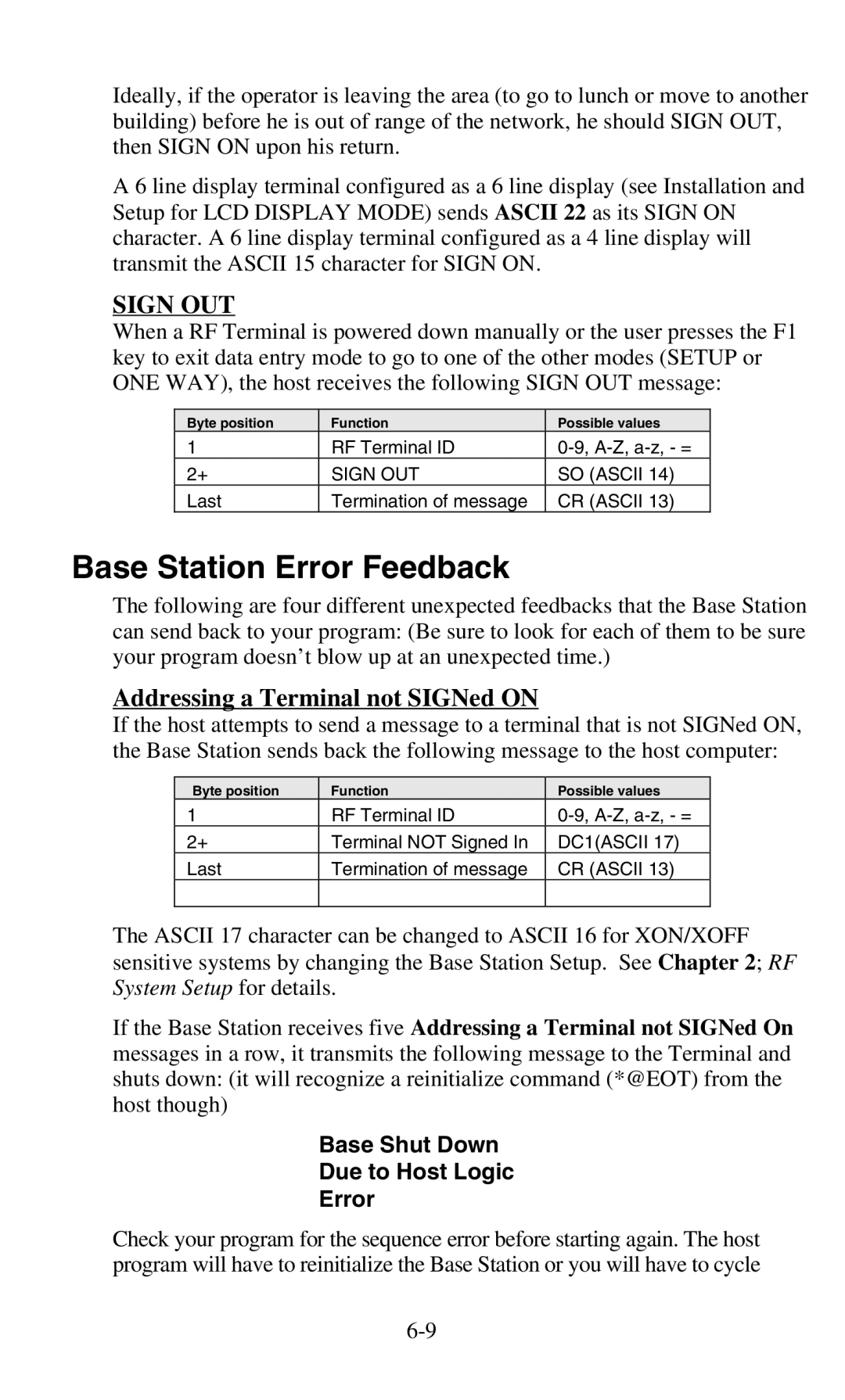
Base Station Error Feedback
System Setup for details
Base Shut Down Due to Host Logic Error
Addressing a Terminal not SIGNed on
Sequence Error Message
Illegal Command
?CR
@1,1,1,Scan Serial Number
Automatic Check Back
Base Station Initialized Message
Control Keys for Possible Programming
Are as follows
Setup
LOW Level Ascii Sequences using a DLL
PromptCOM/ActiveX
Programming Considerations for Serial COM
Test For Good Communication Serial COM
Multiple Base Stations
Terminal Tracking
Concepts Serial COM
Properties Serial COM
57600
300, 600, 1200, 2400, 4800, 9600, 19200
None, Even, Odd
Methods Serial COM
True, False
Ignore methods you see that are not listed here
Line, position, prompt, shifted, timestamped
Entry while scanning with the integrated laser
Line, position, prompt
Line, position, prompt, shifted
Line
Data
Count
Events Serial COM
Msgnum
Prevent most logic errors, they are still possible so
Commands but software is not always perfect
Terminal
Terminal, data
OnTermUpArrow
PromptNET TCP/IP Active X Controls
Network Setup
Programming Considerations
Server Communications
Client Utility
Test For Good Communication
Concepts TCP/IP COM
Properties TCP/IP COM
Methods TCP/IP COM
Blank or a valid file name
Basename, channel, terminal, line, position
Prompt, shifted, timestamped
Prompt, allowbreakout, timestamped
Prompt, shifted
Basename, channel, terminal
Basename, channel, terminal, data
Basename, channel, terminal, line
Basename, channel, terminal, count
Basename, channel, terminal, msgnum
Reinitialized... to indicate a single terminal re
Initialization
Events TCP/IP COM
Commands but we may not have imagined all
While PromptNET/ActiveX will intercept
PromptNET/ActiveX is designed to prevent illegal
Ways in which our customers will want to use it
OnTermRightArrow
Cameo and QL 3 Common Information
Portable Printers
Zebra Cameo Printer
Track
Zebra QL 3 Printer
Track 1&2
Part Number Description Price/Roll
Page
Tips for Using Voice Prompts
Why Use Voice Messages and Prompts?
Voice Message Operations
Terminal Setup-1 Base Setup------2 Voice Operations----3
RF Terminal’s Voice Message Mapping
Programming Voice Messages
00 ½ second message
Recording and Playback of Voice Messages
Assign Errors Cloning Master Cloning Receiver
KEY R/P?
Assigning Error Messages
Default Voice Messages
Recv Setup/Voice Please Wait
Xmit Setup/Voice Please Wait
End of Cloning Hit Any Key
Data Xmit Error Cycle Power
Troubleshooting
General Considerations
Site Test
Changing Batteries
Problems with a new installation
Message
Terminal Error Messages
Meaning Action Required
Two bases on the same channel are big trouble
Troubleshooting specific problems
Can’t communicate at all
My response time is poor
Im not getting the distance I need
Page
Problems reading Bar Codes
Get 6 beeps when the RF Terminal powers up
Reader wont beep when I try to read bar codes
Have very poor read rates when scanning bar codes
If you have a problem…
Worth Data Inc Swift St Santa Cruz, CA 95060
Opening a Base
Channel and Jumper Changes
Changing a Base to a Relay
Setting the Relay ID
Channel Changes
RS-422 Termination Jumpers
Changing the Channel on a Base/Relay
Connecting a Relay Station
Adding Relays
Routing the Wiring
Correct Routing for Wiring
Incorrect Routing for Wiring
Relay Station RS422 Pin-outs
Relay Test Plan and Failures
Relay Failure
Testing the Relay
Relay ID and Channel…
Changing the Channel on a Relay
Changing a Relay back to a Base
RS-422 Termination
Page
Serial Pin-outs
Base Station to Host Pin-outs
F34 DB25 Null Modem Cable
F36 DB9 Straight Cable
Relay Station RS422 Pin-outs
Zebra Cameo/QL 3 Printers
Laser and CCD
Remember
Zebra Cameo/ QL 3 to RF Terminal Pin-outs
Page
Firmware Upgrades
Terminal Firmware Upgrades
Normal Firmware Download for a Terminal
Failsafe Firmware Download for a Terminal
Base Station Firmware upgrades
Code 39 Specifications
C39
Code 39 Advanced Features and Functions
Mod 43 Check Character
+ 2 + 3 + 33 + 34 + 35 =
108/43 = 2 with a Remainder
Full Ascii Extension to Code
Start/Stop Character only
Accumulate Mode
Clear Enter
Code 93 Specifications
Page
Codabar Specifications
Codabar start/stop transmission
Page
Code 128 Specifications
UCC-128/ EAN-128
UCC-128 Shipping Container Code
Interleaved 2 of 5 Code Specifications
Interleaved 2 of 5 Mod 10 check digit calculation
Even Odd
+ 1 =
+ 9 x 3 =
+ 48 =
60 57 =
019873
UPC / EAN Specifications
Isbn Specifications
Supplemental codes
UPC/EAN checksum character
Checksum calculation for UPC-A, EAN-13 and EAN-8
130 125 =
UPC-E Checksum Calculation
183145899385
MSI/Plessey Specifications
835 x 2 =
+ 6 + 7 + 0 =
+ 4 + 14 =
943457842
4,5,6,7,2,3,4,5,6,7
+ 12 + 32 + 35 + 30 + 28 + 6 + 12 + 36 =
195/11 = 17 remainder
How to scan a bar code
Laser and CCD Scanners
Scan Start Setup Scan Laser Options
Scan End Setup
Laser Options
Aiming the Laser Dot
Scan Start Setup Scan 2 of 5 Code
Difficult Code 39 Reading
Page
Using the Scan Stand
Page
Optional Features
CCD Scanners
Laser Scanners
LI50 Linear Imager Scanner
Laser Accessories
LZ300 Laser Scanner
LZ400 Laser Scanner
PSC Long Range Laser
Page
Rubber Boot for RF Terminal
RF Terminal Cases and Holsters
F41 Leather RF Terminal Carrying Case
T46 Holster for RF Terminal
Ascii Code Equivalent Table
BEL
Index
Aiag
XON/XOFF
EDI
Logmars
ONE-WAY Setup Mode Sign on Site Testing
Speaker Volume
Waiting on Host Prompt