Zebra TTP
P1003636-002 TTP 7030 Technical Manual 10/05/2009
Contents
Programming
Interface
P1003636-002 TTP 7030 Technical Manual 10/05/2009
Updating
Introduction
About This Manual
Subject line Emaillist
Contacts
Printer Exterior, Rear View
Product Presentation
Printer Exterior, Side View
Control Board Indicators
Indicators
Status Indicator
Feed Button
Installation
Top view
Installation Considerations
Ambient Light
Electrostatic Discharges, and Earth Currents
Connect the TTP
Connecting To The Computer
Using a Serial Adapter
Fitting a serial adapter to the printer
GND
Connecting the Power
Making a Test Printout
Is a power button available for the printer?
Installing a Printer Driver
Paper Level Sensors
Paper Level Sensor Indicators on Roll Holder
Paper-near-end Sensor Connection
Operation
Make sure the printer is turned on
Installing a Paper Roll
Cut the paper in a suitable angle. See Figure
Angle
Open the Print Module
Clearing Paper Jams
Programming
Text text
How The Commands Are Described
Therefore, the two-byte representation of 731 is
Two-Byte Character Definitions
Summary Of Control Codes & Escape Sequences
27 5 Bootware version Enquiry
27 5 Head temperature Enquiry
50 n1 27 5 80 n1 Parameter-setting data Enquiry
27 5 Device ID Enquiry
Black Mark Top-Of-Form Commands
Software Command Syntax
Left Center Right
Text Commands
Changes the alignment of text and logotypes
Selects font ESC ! 5 selects font
Selects normal font font ESC ! 4 selects font
Selects font
Turns OFF Italics Normal Turns on Italics
ESC T n1 Reversed/Inversed Text
ESC w n1
Overprint the O
Commands, are not cancelled
ESC d n1 Make n Linefeeds
Barcode Commands
Samples of barcodes
Specified in any order
Specifies the bar code field No -15. Bar code fields may be
N2 . . . nx Specifies bar code data bytes
But other values than 0 to 15 are ignored
Add-on. Two of five characters are allowed of the add-on
Must be placed at the end of the bar code data
Dot Height, sets mow many pixel lines each row consists
Error level, 0=auto, 1=Level0, 2=Level1, etc
Columns
Determines the number of bytes. Range
Graphics Commands
ESCr000000000000001193000024003
ESC g n1 Print Logotype
Form feed Clear presenter
Print Commands
Run presenter
Print buffer full Press on FF-button
ESC j n1 Paper Reverse
You can also use RS together with the paper advance command
Cut And Present Commands
To auto
Gives a cut & eject after the last text line
Retracts the presented
Ejects the presented
ENQ
Erases all logotypes stored in the flash Prom
System Related Commands
Erases all fonts stored in the flash Prom
Set several parameters at once
See Default Parameter Settings on
Status Reporting Commands
Paper-near-end Enquiry
Read
Send
Sensor Status
That is, a response with the value 129 indicates version
Readn Where n can be ‘A’ Ascii or 41 hex or 65 dec
That is, a response with the value 130 indicates version
Under Summary Of Parameter Settings on
One-byte marker. Range 1h to 255h
File Format
Font Loading
Character bitmap data
Loading
Logotypes
Printing
All logotypes are erased with the ESC&L command
Status Reporting
Default Parameter Settings
Programming
Default Value
Default Parameter Settings
Summary Of Parameter Settings
Serial Interface Set-Up
No flow control
Select what handshaking to use on the serial interface
Xon / Xoff
Hardware
Yes, paper out and error signals are disabled
Parallel Port Setup
No, paper out and error signals are not disabled
Disable the loop
Print Setup
Current consumption
Cm loop
Burn pulse + history
Controls what the printer does with buffered data
Burn pulse
Burn pulses + history
CR = Ignored
Black mark synchronization enabled
LF = Ignored
On the paper
Determines what should control the page length
Contents printouts shorter than the value specified by
Fixed Document Mode. Shorter documents will automatically
Be extended, while longer documents will be divided into
Length P37 P38
Fixed Document Mode
Sets min black mark length to 4 mm
Sets max black mark length to 5 mm
Feeds 50 mm between black mark and cut
Add 30-mm top margin
Retract page when new page is printed
Eject page when new page is printed. Retract disabled
Do nothing when new page is printed. Auto-eject and retract
Will be retracted. Range 1-30, 1 step = 10 s
Automatic Distance Calculation
Off
No indication
Paper Near End indication
Default Parameter Settings
Setup
N43 N44
Printable Area
Recommended black mark size and position
Aligning Preprint And Thermal Print
Setup
Parameters Used
Enables/disables black mark check
Garbage, Black Mark and Out of Paper Detection
Parameter n41 and n42 -Black Mark Cut Offset
Send RS Cuts and ejects the printout
Specified by the ESC x command
Send Text and graphics
Simple Calibration Process
Black-Mark Sensing from Within Windows
Interface
USB Interface
Cable power
+ Data
Cable ground
Serial Option, TTP
Setup Options
Interface
Maintenance
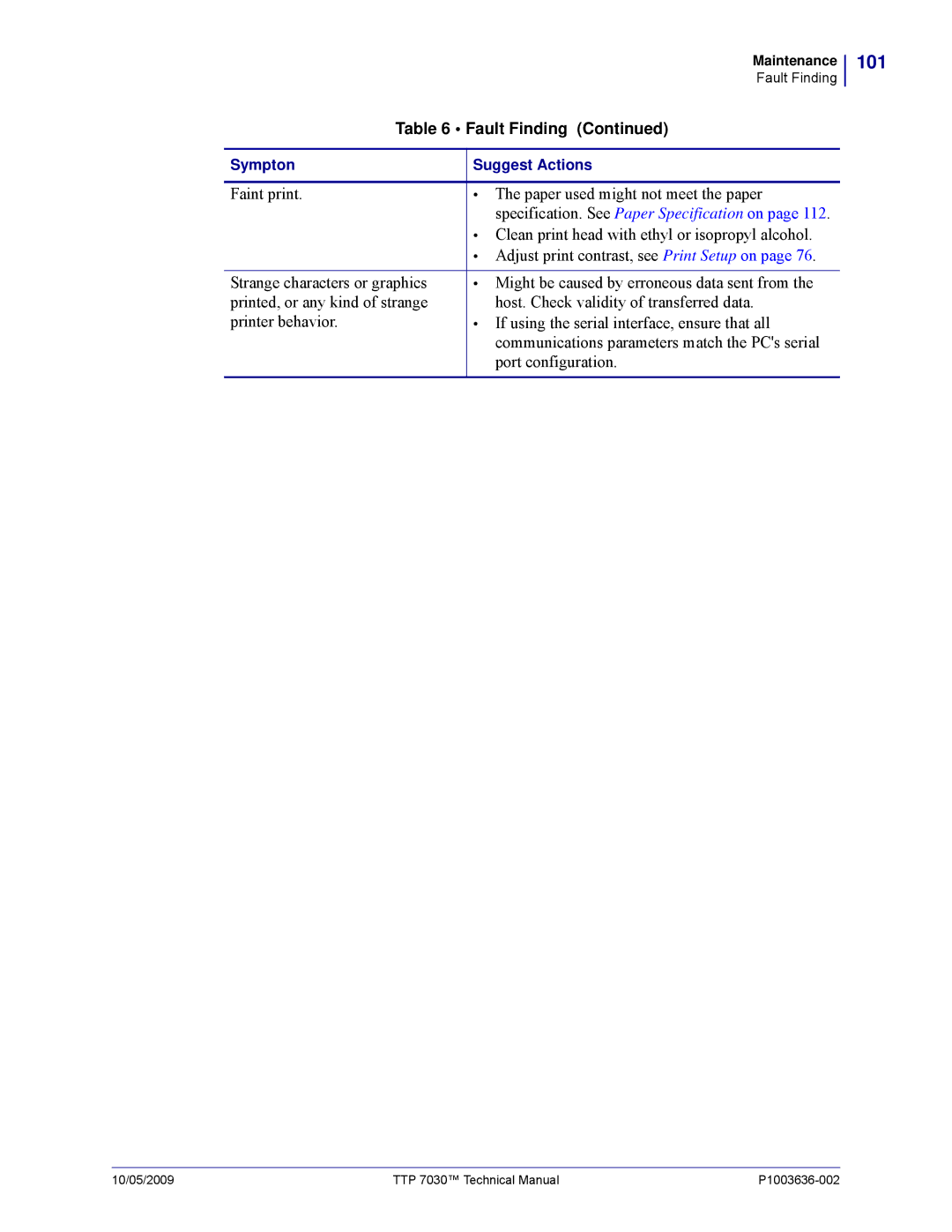
Fault Finding
Fault Finding
101
Cleaning The Print Head
Fitting a Shutter
Printer with retract
Firmware
Specifications
None, Odd or Even
Print Data
Basic Character Set
Command Code Modes Non-Windows Applications
108
109
Paper Handling
Bar Codes Non-Windows Applications
Environmental Conditions
Printer Dimensions
Miscellaneous
Paper Specification
General
Thermal coating
Preprinting
Perforation
Around the edges of the hole. The function must be tested
Black Mark Size and Position
Print can be expected within a zone of approximately 2-mm
Printers
Accessories
Part Number List
116
117
Roll Holder for Paper Rolls up to 150 mm
Roll Holders
119
120
表示该部件的某一均质材料中的有毒有害物质的含量超出 SJ/Txxx-2006标准规定的限量要求。
中国 RoHS 材料声明 China RoHS Material Declaration
122
Numerics
Index
Index
Index
USB
Connector Port
Page
Zebra Technologies Europe Limited