To manually configure MultiTargetMode 1 At the CLI prompt type
set MultiTargetMode enabled
Because current mapping will be deleted, you are asked for confirmation to change mapping.
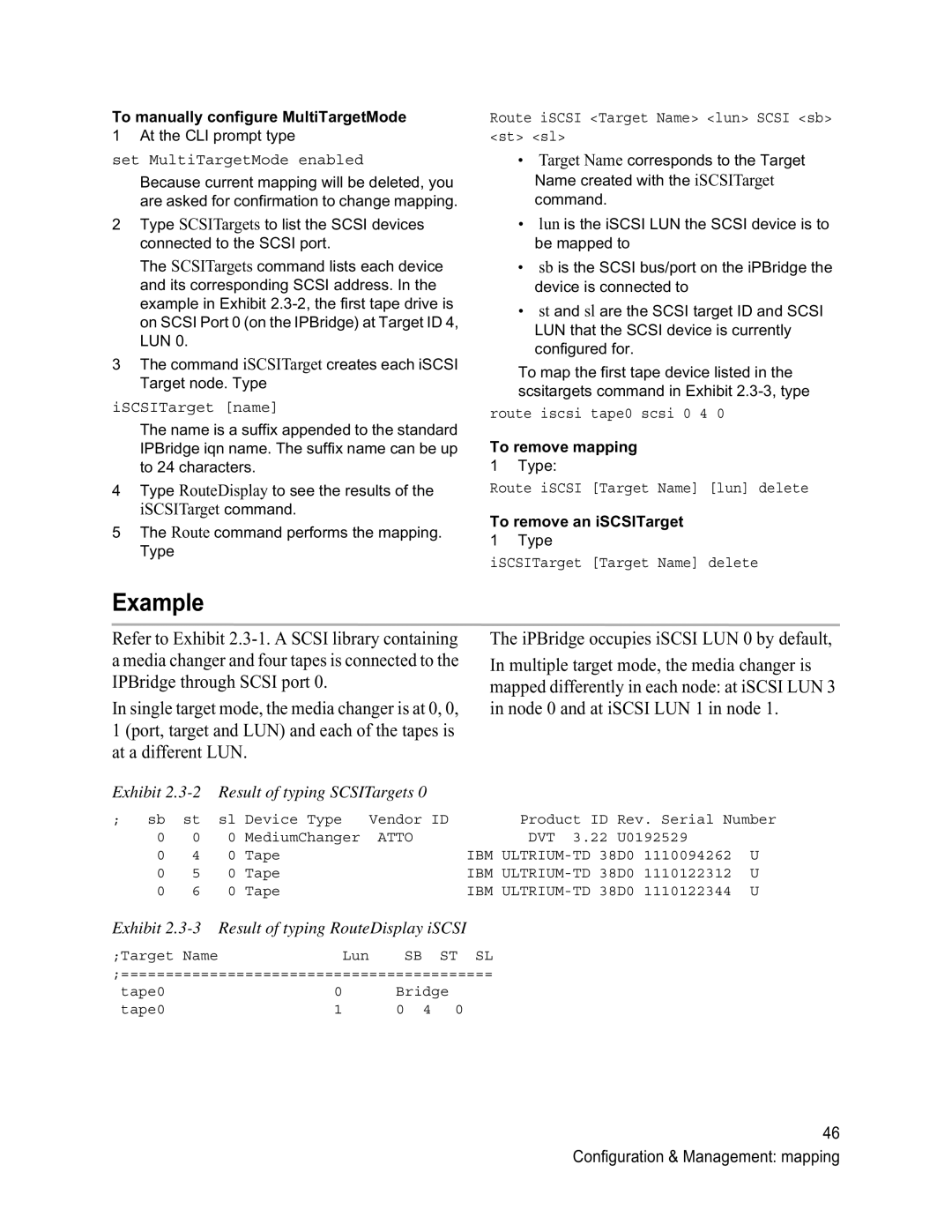
2Type SCSITargets to list the SCSI devices connected to the SCSI port.
The SCSITargets command lists each device and its corresponding SCSI address. In the example in Exhibit
3The command iSCSITarget creates each iSCSI Target node. Type
iSCSITarget [name]
The name is a suffix appended to the standard IPBridge iqn name. The suffix name can be up to 24 characters.
4Type RouteDisplay to see the results of the iSCSITarget command.
5The Route command performs the mapping. Type
Route iSCSI <Target Name> <lun> SCSI <sb> <st> <sl>
•Target Name corresponds to the Target Name created with the iSCSITarget command.
•lun is the iSCSI LUN the SCSI device is to be mapped to
•sb is the SCSI bus/port on the iPBridge the device is connected to
•st and sl are the SCSI target ID and SCSI LUN that the SCSI device is currently configured for.
To map the first tape device listed in the scsitargets command in Exhibit
route iscsi tape0 scsi 0 4 0
To remove mapping
1 Type:
Route iSCSI [Target Name] [lun] delete
To remove an iSCSITarget
1 Type
iSCSITarget [Target Name] delete
Example
Refer to Exhibit
In single target mode, the media changer is at 0, 0, 1 (port, target and LUN) and each of the tapes is at a different LUN.
Exhibit
The iPBridge occupies iSCSI LUN 0 by default,
In multiple target mode, the media changer is mapped differently in each node: at iSCSI LUN 3 in node 0 and at iSCSI LUN 1 in node 1.
; | sb | st | sl | Device Type | Vendor ID |
| Product ID | Rev. Serial Number | |||
| 0 | 0 | 0 | MediumChanger | ATTO |
| DVT 3.22 | U0192529 |
| ||
| 0 | 4 | 0 | Tape |
| IBM | 1110094262 | U | |||
| 0 | 5 | 0 | Tape |
| IBM | 38D0 | 1110122312 | U | ||
| 0 | 6 | 0 | Tape |
| IBM | 38D0 | 1110122344 | U | ||
Exhibit 2.3-3 Result of typing RouteDisplay iSCSI
;Target NameLun SB ST SL ;==========================================
tape0 | 0 | Bridge |
tape0 | 1 | 0 4 0 |
46 Configuration & Management: mapping