Compaq R6000 Series UPS Operation and Reference Guide
Page
Contents
Operation
Configuration
Appendix B
Symbols in Text
About This Guide
Text Conventions
Symbols on Equipment
Viii Compaq R6000 Series UPS Operation and Reference Guide
Rack Stability
Getting Help
Compaq Technical Support
Compaq Website Compaq Authorized Reseller
Compaq R6000 UPS Series Models
Introduction
Compaq R6000 UPS Series Models
UPS Model Part Number Comments
Front Panel
R6000 front panel
Rear Panel
Compaq R6000 UPS Features
Communication Ports
Solid green means normal operation
Front Panel LEDs
LED Meaning
Flashing green means Standby
Front Panel Controls and LCD Display
Control Name Function
Power Management Software
Compaq Power Management Software
UPS Option Cards
Hardware Options
Hardware Options
Option Part Number
Option Card Matrix
Case
Scalable
Compaq Multi-Server UPS Card
Multi-Server UPS Card
Compaq Scalable UPS Card
Scalable UPS Card
Compaq SNMP-EN Adapter
SNMP-EN Adapter
Power Distribution Units PDUs
Extended Runtime Modules ERMs
Warranty
Remote Emergency Power Off Repo Port
$25,000 Computer Load Protection Guarantee
Pre-Failure Battery Warranty
Installation
Important Safety Instructions About This Device
Installation Considerations
Weight
Position
Outline of Installation Procedure
Check Battery Recharge Label
Unpacking the UPS
Preparing the Rack
Assembling the Compaq R6000 UPS
Placing UPS in rack
Placing chassis in rack
Wiring the Compaq R6000 UPS
8Compaq R6000 Series UPS Operation and Reference Guide
Connecting the Compaq R6000 UPS to AC Branch Circuit
Risk of Fire Notice Electrical Safety Requirements
High Leakage Current
Procedure
Recommendation
Input Wiring
Removing terminal input block cover
Install and connect the battery packs
Sliding battery packs into chassis
Connect cables
11. Connecting battery packs to the Compaq R6000 UPS
Attaching Front Top Bezel
12. Attaching the top front bezel
Installing Extended Runtime Modules ERMs
Connecting Communications Ports
Connecting Communication Ports to Other Devices
Connecting Loads
Installing and Connecting Communication Options
Load Segments Description
Load Effect on Backup Time
Ordering Extra Power Cords
Configuring Load Segments
Attaching the Load Segments
Completing the Assembly R6000 UPS in the Rack
16. Placing the battery circuit breaker in the on position
Pressing the on button
Powering up the R6000 UPS
Turning on the Main Circuit Breaker
Shutting Down the System
Installation is Now Complete
Charging Batteries
Operation
Front Panel Controls
Front Panel Indicators
Front Panel LCD
Front Panel LEDs Ref # Description
Standby Mode
Modes of Operation
Battery Mode
Audible Alarm
Initiating a Self-test
Silencing an Audible Alarm
Silencing an audible alarm
Configuration
Changing Configuration Parameters
Matching the Utility Voltage
Voltage Ranges VAC
Range
Configuring the Compaq R6000 UPS Using the LCD Display Menu
LCD display, showing the three buttons that control it
Top Level Main Menu
Initial Power-Up Display
LCD Display Menu Structure
Sub-Menu Choices
Status
UPS Status + Load Segment status
Load Power Off
UPS Status + Active Alarm Count
On Battery
Load Power On
Input Volts
Meters
Overload
Output Volts
Battery Volts
Active Alarms
Output Power
Output Frequency
Input Over or Under Frequency
Input AC Over Voltage
Input AC Under Voltage
Output Overload
Battery Totally Discharged
Inverter Fault
Battery Low
UPS on Battery
Battery Data
Battery Test Failed
Site Wiring Fault
Firmware Version
Load Control
Display Test
System Setup
Set Hardware HW Configuration
Battery Setup
Set Language
Set Alarm Horn
Set Password
Serial Port
Communications Setup
Set Sync Range ±Hertz
Baud Rate
Data Bits
Stop Bits
Parity
Set Site Fault
Set Sleep Mode
Set Voltage
Battery Maintenance
Precautions
When to Replace Batteries
Obtaining New Batteries
How to Replace Batteries
Removing the Battery Packs
Before Replacing Batteries
Place the battery circuit breaker in the OFF position
Disconnecting the battery cables
Slide out the Compaq R6000 UPS battery packs
Installing New Batteries
Test/Reset Alarm button
Disposing of Used Batteries
Care and Storage of Batteries
Extended Runtime Module ERM Batteries
Troubleshooting
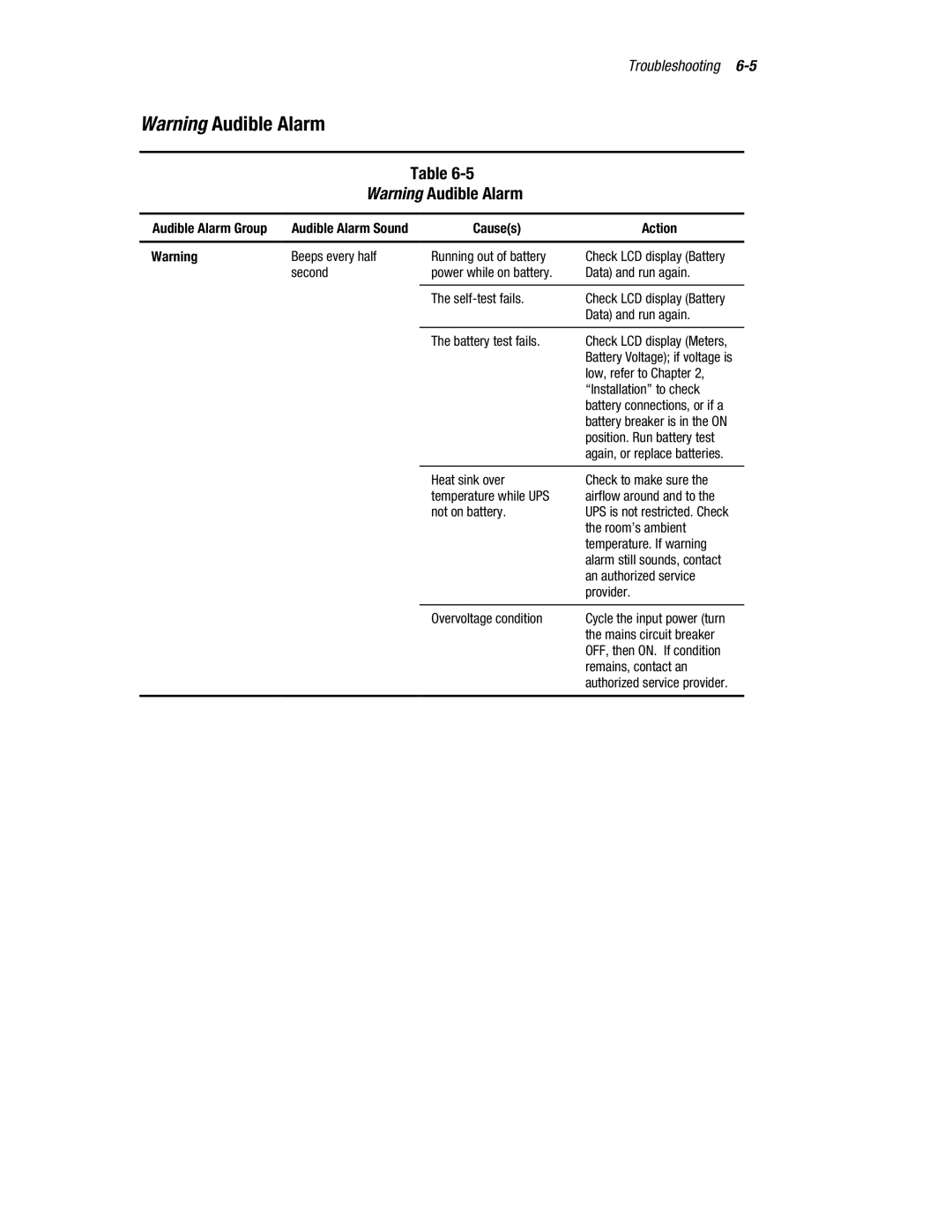
Responding to Audible Alarms
Audible Alarm Group
Causes Action Shutdown Imminent
Causes Action Shutdown within
Seconds
Loads in Jeopardy Audible Alarm
Causes Action
Low, refer to Chapter
6Compaq R6000 UPS Series Operation and Reference Guide
Responding to Audible Alarms Audible Alarm Group
Battery breaker is in the on
Compaq R6000 UPS Trouble Indicators
Trouble Indicators
LED Alarm Configurations
Repairing the UPS
Regulatory Compliance Notices
Federal Communications Commission Notice
Class a Equipment
Class B Equipment
Canadian Notice Avis Canadien
European Union Notice
Japanese Notice
Taiwanese Notice
Class A/B Equipment
Battery Replacement Notice