Troubleshooting
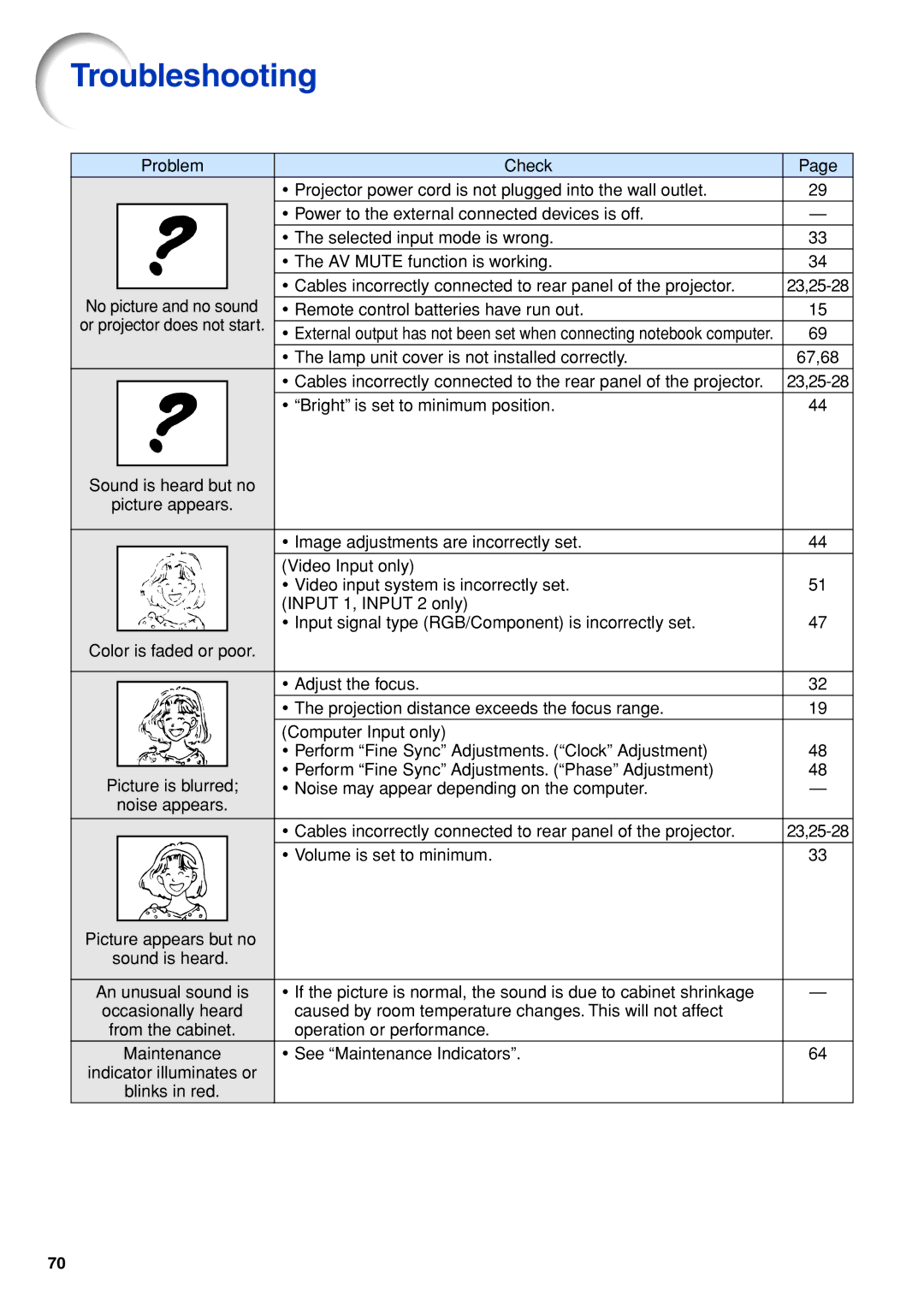
| Problem | Check | Page | ||
|
|
| • Projector power cord is not plugged into the wall outlet. | 29 | |
|
|
| • Power to the external connected devices is off. | — | |
|
|
| • The selected input mode is wrong. | 33 | |
|
|
| • The AV MUTE function is working. | 34 | |
|
|
| • Cables incorrectly connected to rear panel of the projector. | ||
No picture and no sound | |||||
• Remote control batteries have run out. | 15 | ||||
or projector does not start. |
|
| |||
• External output has not been set when connecting notebook computer. | 69 | ||||
|
|
| • The lamp unit cover is not installed correctly. | 67,68 | |
|
|
| • Cables incorrectly connected to the rear panel of the projector. | ||
|
|
| |||
|
|
| • “Bright” is set to minimum position. | 44 | |
|
|
|
|
| |
Sound is heard but no |
|
| |||
picture appears. |
|
| |||
|
|
|
|
| |
|
|
| • Image adjustments are incorrectly set. | 44 | |
|
|
| (Video Input only) |
| |
|
|
| • Video input system is incorrectly set. | 51 | |
|
|
| (INPUT 1, INPUT 2 only) | 47 | |
|
|
| • Input signal type (RGB/Component) is incorrectly set. | ||
Color is faded or poor. |
|
| |||
|
|
|
|
| |
|
|
| • Adjust the focus. | 32 | |
|
|
| |||
|
|
| • The projection distance exceeds the focus range. | 19 | |
|
|
| (Computer Input only) |
| |
|
|
| • Perform “Fine Sync” Adjustments. (“Clock” Adjustment) | 48 | |
|
|
| • Perform “Fine Sync” Adjustments. (“Phase” Adjustment) | 48 | |
Picture is blurred; | |||||
• Noise may appear depending on the computer. | — | ||||
| noise appears. |
|
| ||
|
|
| • Cables incorrectly connected to rear panel of the projector. | ||
|
|
|
|
| |
|
|
| • Volume is set to minimum. | 33 | |
|
|
|
|
| |
Picture appears but no |
|
| |||
sound is heard. |
|
| |||
|
|
|
|
| |
An unusual sound is | • If the picture is normal, the sound is due to cabinet shrinkage | — | |||
occasionally heard | caused by room temperature changes. This will not affect |
| |||
from the cabinet. | operation or performance. |
| |||
| Maintenance | • See “Maintenance Indicators”. | 64 | ||
indicator illuminates or |
|
| |||
| blinks in red. |
|
| ||
70