Trek N300 Travel Router and Range Extender PR2000
Table 1. Status LEDs (continued)
WiFi LED
•Green. Either the LAN port or a wireless device is connected to the Trek.
• Off. No device is connected.
USB LED
•Green. The USB drive is properly mounted.
• Off. No USB drive is detected.
Connection Ports and Reset Button
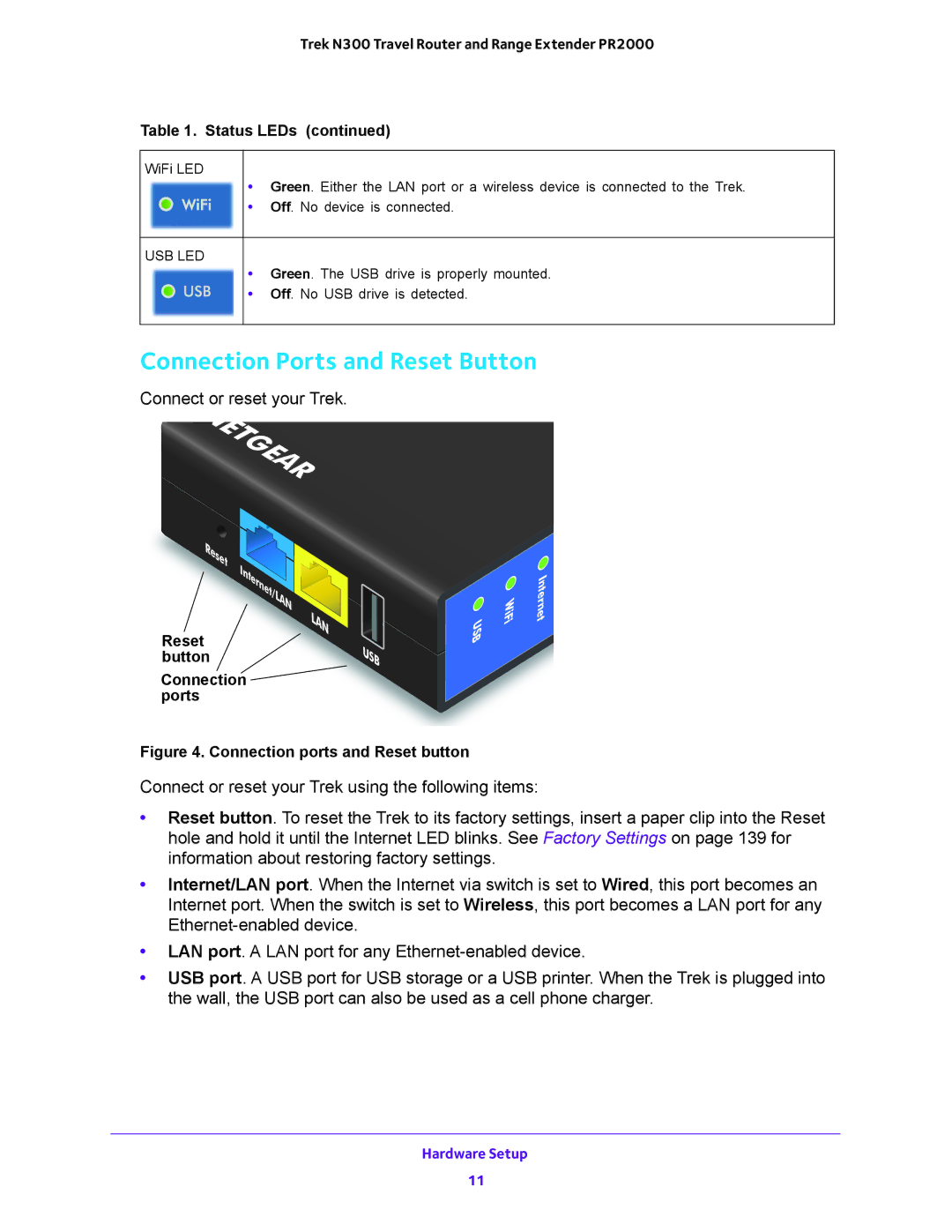
Connect or reset your Trek.
NETGEAR
Reset | Internet/LAN |
|
Reset | LAN |
| |
button |
|
Connection |
|
ports |
|
USB
USB
WiFi
Internet
Figure 4. Connection ports and Reset button
Connect or reset your Trek using the following items:
•Reset button. To reset the Trek to its factory settings, insert a paper clip into the Reset hole and hold it until the Internet LED blinks. See Factory Settings on page 139 for information about restoring factory settings.
•Internet/LAN port. When the Internet via switch is set to Wired, this port becomes an Internet port. When the switch is set to Wireless, this port becomes a LAN port for any
•LAN port. A LAN port for any
•USB port. A USB port for USB storage or a USB printer. When the Trek is plugged into the wall, the USB port can also be used as a cell phone charger.
Hardware Setup
11