Connecting to a Power Source

Using the SAC-41

If you have access to a mains supply, using an SAC-41 allows the camera to be used for long periods of time.

Plug the SAC-41 into the DC connection terminal on the camera or cradle.

Before turning on the camera power with an SAC-41, insert the rechargeable battery that was charged for over 10 minutes with turning off the camera.

DANGER

●Always turn off the power before taking the SAC-41 out of the mains supply.

●As with all mains powered devices, safety is important. Ensure that neither the camera nor Charger comes into contact with water or metallic materials.

●Please ensure that you use the SAC-41 with the correct specification for the camera. Failure to do so may affect your warranty.

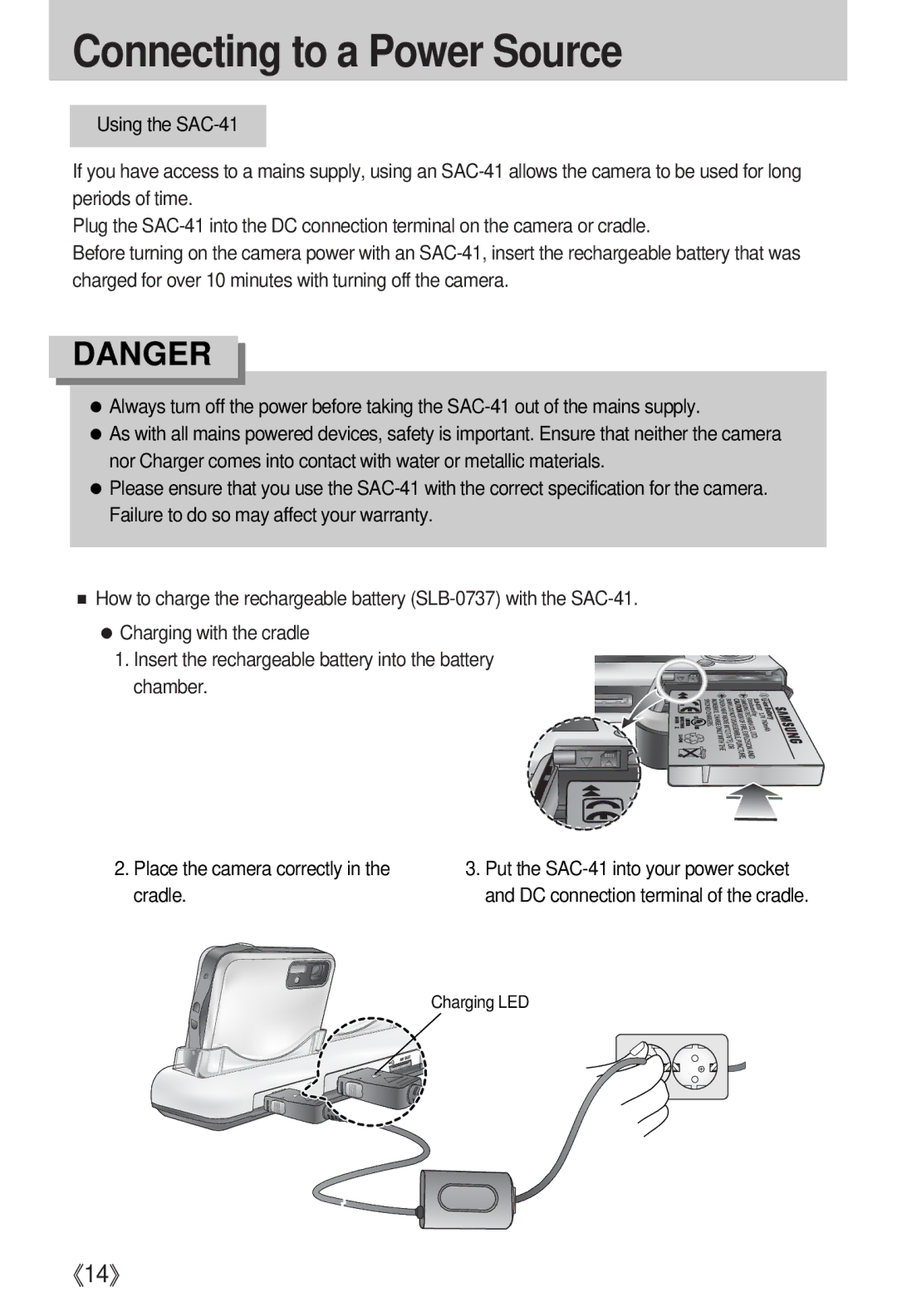
■How to charge the rechargeable battery (SLB-0737) with the SAC-41.

●Charging with the cradle

1. Insert the rechargeable battery into the battery chamber.

2.Place the camera correctly in the cradle.

3.Put the SAC-41 into your power socket and DC connection terminal of the cradle.

Charging LED

《14》

Page 14
Image 14
Samsung i5 user manual Connecting to a Power Source, Place the camera correctly in the cradle