<P=002>
(Continued)
CD CD 1
-3

CD
CD 1

■When choosing a CD for playback
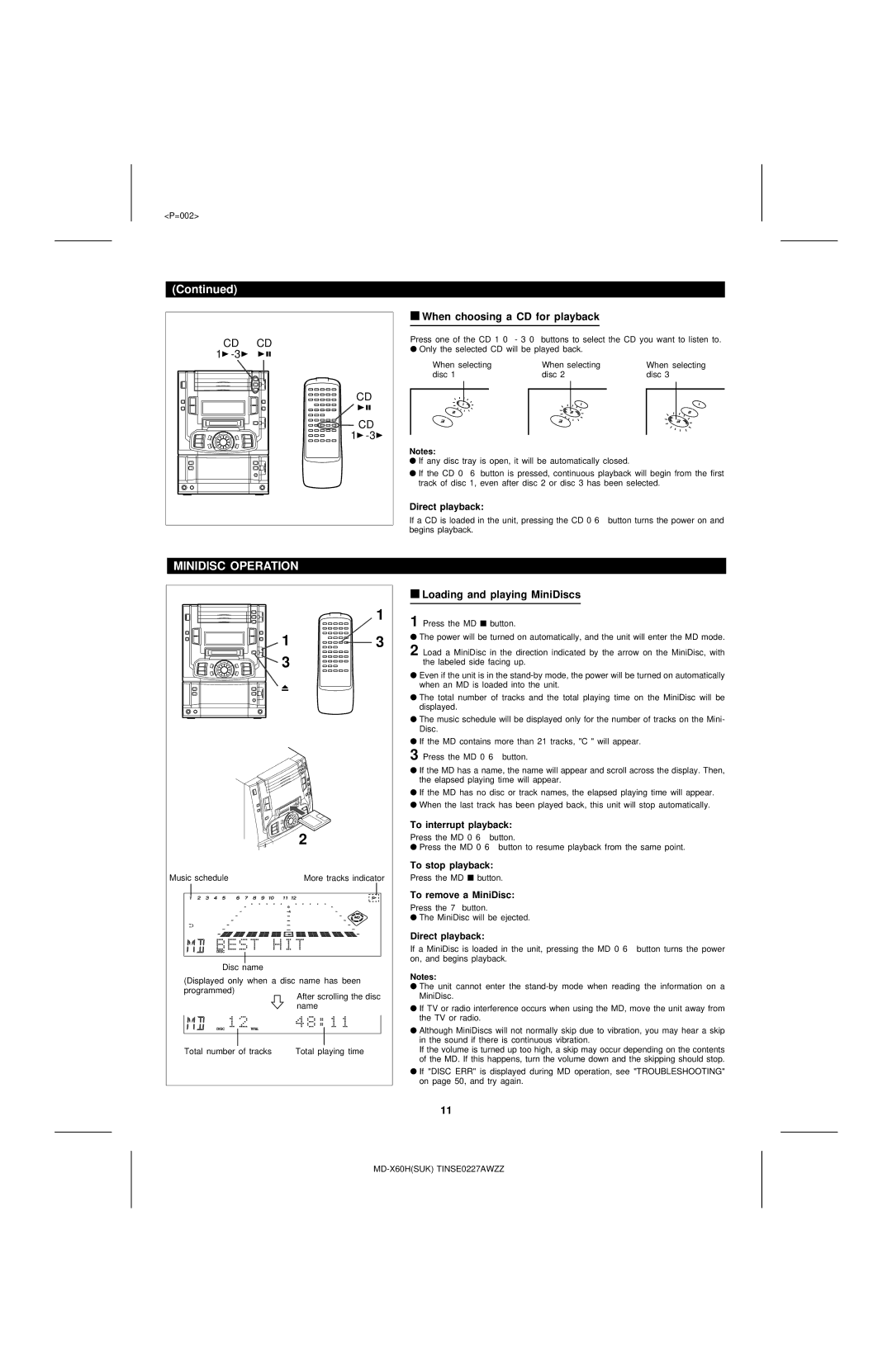
Press one of the CD 1 0 - 3 0 buttons to select the CD you want to listen to.
●Only the selected CD will be played back.
When selecting | When selecting | When selecting | |||||
disc 1 | disc 2 | disc 3 | |||||
|
|
|
|
|
|
|
|
|
|
|
|
|
|
|
|
|
|
|
|
|
|
|
|
|
|
|
|
|
|
|
|
|
|
|
|
|
|
|
|
|
|
|
|
|
|
|
|
Notes:
●If any disc tray is open, it will be automatically closed.
●If the CD 0 6 button is pressed, continuous playback will begin from the first track of disc 1, even after disc 2 or disc 3 has been selected.
Direct playback:
If a CD is loaded in the unit, pressing the CD 0 6 button turns the power on and begins playback.
MINIDISC OPERATION
1
1  3
3
3
2
Music schedule | More tracks indicator | ||||
|
|
|
|
|
|
|
|
|
|
|
|
|
|
|
|
|
|
|
|
|
|
|
|
Disc name
(Displayed only when a disc name has been programmed)
After scrolling the disc name
Total number of tracks | Total playing time |
■Loading and playing MiniDiscs
1 Press the MD ■ button.
●The power will be turned on automatically, and the unit will enter the MD mode.
2 Load a MiniDisc in the direction indicated by the arrow on the MiniDisc, with the labeled side facing up.
●Even if the unit is in the
●The total number of tracks and the total playing time on the MiniDisc will be displayed.
●The music schedule will be displayed only for the number of tracks on the Mini- Disc.
●If the MD contains more than 21 tracks, "C" will appear.
3 Press the MD 0 6 button.
●If the MD has a name, the name will appear and scroll across the display. Then, the elapsed playing time will appear.
●If the MD has no disc or track names, the elapsed playing time will appear.
●When the last track has been played back, this unit will stop automatically.
To interrupt playback:
Press the MD 0 6 button.
●Press the MD 0 6 button to resume playback from the same point.
To stop playback:
Press the MD ■ button.
To remove a MiniDisc:
Press the 7 button.
●The MiniDisc will be ejected.
Direct playback:
If a MiniDisc is loaded in the unit, pressing the MD 0 6 button turns the power on, and begins playback.
Notes:
●The unit cannot enter the
●If TV or radio interference occurs when using the MD, move the unit away from the TV or radio.
●Although MiniDiscs will not normally skip due to vibration, you may hear a skip in the sound if there is continuous vibration.
If the volume is turned up too high, a skip may occur depending on the contents of the MD. If this happens, turn the volume down and the skipping should stop.
●If "DISC ERR" is displayed during MD operation, see "TROUBLESHOOTING" on page 50, and try again.
11