<P=003>
(Continued)
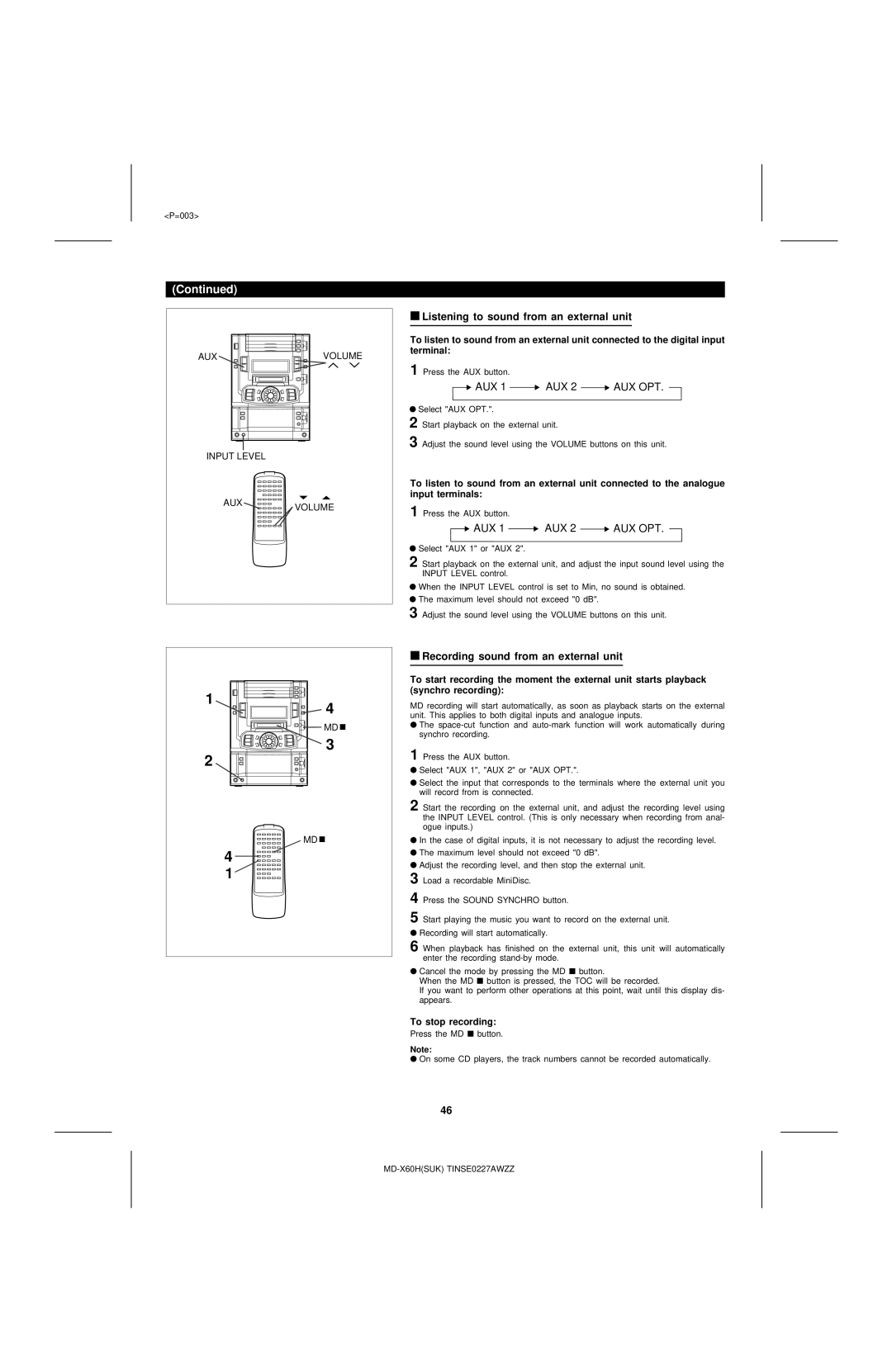
AUXVOLUME
INPUT LEVEL
AUXVOLUME
■Listening to sound from an external unit
To listen to sound from an external unit connected to the digital input terminal:
1 Press the AUX button.
 AUX 1
AUX 1  AUX 2
AUX 2  AUX OPT.
●Select "AUX OPT.".
2 Start playback on the external unit.
3 Adjust the sound level using the VOLUME buttons on this unit.
To listen to sound from an external unit connected to the analogue input terminals:
1 Press the AUX button.
 AUX 1
AUX 1  AUX 2
AUX 2  AUX OPT.
●Select "AUX 1" or "AUX 2".
2 Start playback on the external unit, and adjust the input sound level using the INPUT LEVEL control.
●When the INPUT LEVEL control is set to Min, no sound is obtained.
●The maximum level should not exceed "0 dB".
3 Adjust the sound level using the VOLUME buttons on this unit.
1
4
MD 
3
2
MD 
4
1
■Recording sound from an external unit
To start recording the moment the external unit starts playback (synchro recording):
MD recording will start automatically, as soon as playback starts on the external unit. This applies to both digital inputs and analogue inputs.
●The
1 Press the AUX button.
●Select "AUX 1", "AUX 2" or "AUX OPT.".
●Select the input that corresponds to the terminals where the external unit you will record from is connected.
2 Start the recording on the external unit, and adjust the recording level using the INPUT LEVEL control. (This is only necessary when recording from anal- ogue inputs.)
●In the case of digital inputs, it is not necessary to adjust the recording level.
●The maximum level should not exceed "0 dB".
●Adjust the recording level, and then stop the external unit.
3 Load a recordable MiniDisc.
4 Press the SOUND SYNCHRO button.
5 Start playing the music you want to record on the external unit.
●Recording will start automatically.
6 When playback has finished on the external unit, this unit will automatically enter the recording
●Cancel the mode by pressing the MD ■ button.
When the MD ■ button is pressed, the TOC will be recorded.
If you want to perform other operations at this point, wait until this display dis- appears.
To stop recording:
Press the MD ■ button.
Note:
●On some CD players, the track numbers cannot be recorded automatically.
46