<P=002>
(Continued)
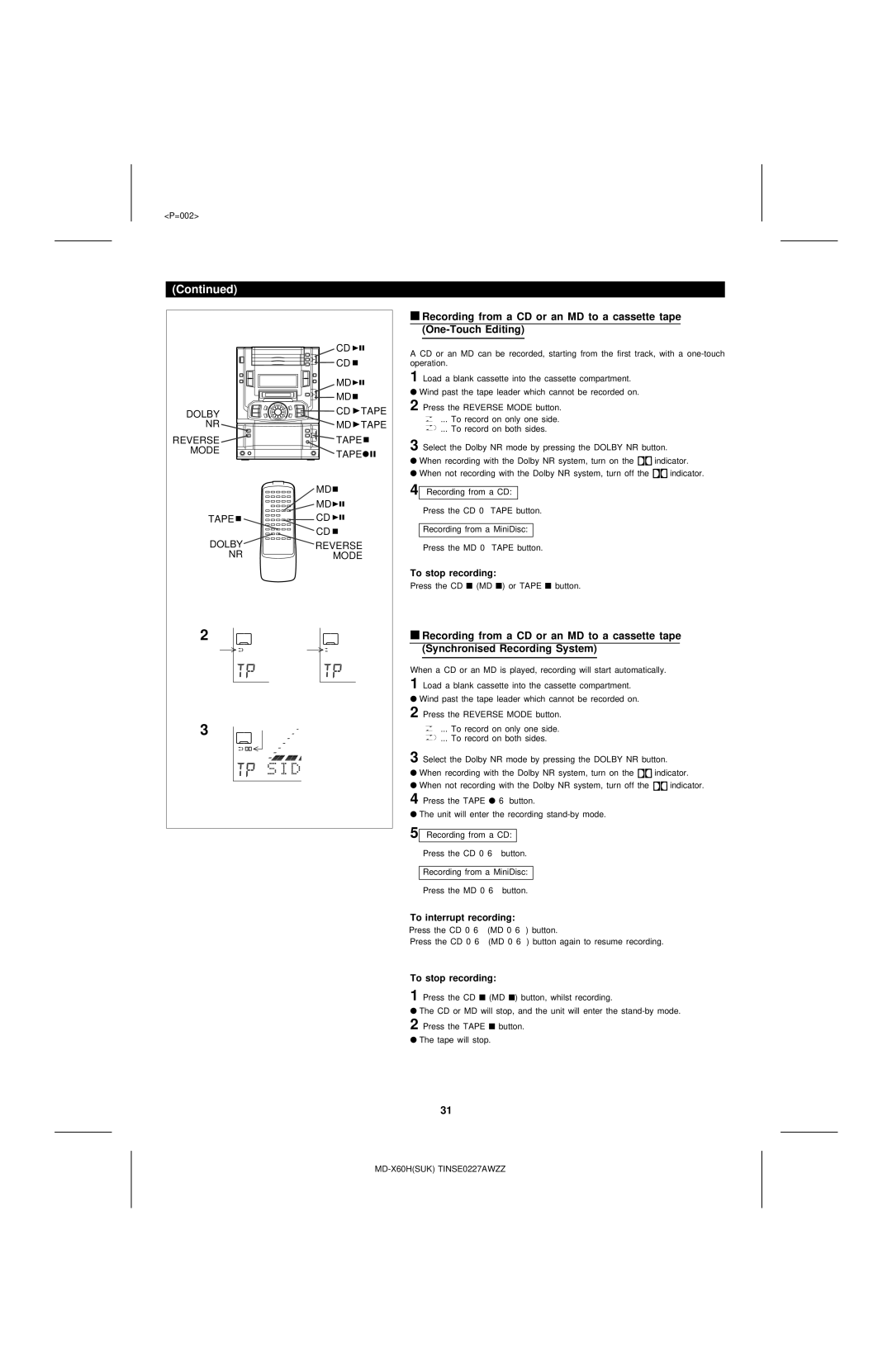
■Recording from a CD or an MD to a cassette tape
| CD |
| A CD or an MD can be recorded, starting from the first track, with a | |
| CD |
| ||
|
| operation. |
| |
| MD |
| 1 Load a blank cassette into the cassette compartment. |
|
|
| ● Wind past the tape leader which cannot be recorded on. |
| |
| MD |
|
| |
|
| 2 Press the REVERSE MODE button. |
| |
DOLBY | CD | TAPE |
| |
... To record on only one side. |
| |||
|
|
| ||
NR | MD | TAPE |
| |
... To record on both sides. |
| |||
|
|
|
| |
REVERSE | TAPE | 3 Select the Dolby NR mode by pressing the DOLBY NR button. | ||
MODE | TAPE | |||
| ● When recording with the Dolby NR system, turn on the | indicator. | ||
|
|
| ||
|
|
| ● When not recording with the Dolby NR system, turn off the | indicator. |
| MD |
| 4 Recording from a CD: |
|
| MD |
| Press the CD 0 TAPE button. |
|
TAPE | CD |
|
| |
| Recording from a MiniDisc: |
| ||
| CD |
|
| |
DOLBY | REVERSE | Press the MD 0 TAPE button. |
| |
NR | MODE |
|
| |
To stop recording:
Press the CD ■ (MD ■) or TAPE ■ button.
2 | ■ Recording from a CD or an MD to a cassette tape | ||
|
| (Synchronised Recording System) | |
|
|
|
|
When a CD or an MD is played, recording will start automatically. 1 Load a blank cassette into the cassette compartment.
●Wind past the tape leader which cannot be recorded on.
2 | Press the REVERSE MODE button. |
| |||||
3 |
|
|
|
|
| ... To record on only one side. |
|
|
|
|
|
| |||
|
|
|
|
| |||
3 |
|
|
|
|
| ... To record on both sides. |
|
|
|
|
|
|
| ||
Select the Dolby NR mode by pressing the DOLBY NR button. | |||||||
● When recording with the Dolby NR system, turn on the | indicator. | ||||||
●When not recording with the Dolby NR system, turn off the 
 indicator.
4 Press the TAPE ● 6 button.
●The unit will enter the recording
5 Recording from a CD:
Press the CD 0 6 button.
Recording from a MiniDisc:
Press the MD 0 6 button.
To interrupt recording:
Press the CD 0 6 (MD 0 6) button.
Press the CD 0 6 (MD 0 6) button again to resume recording.
To stop recording:
1 Press the CD ■ (MD ■) button, whilst recording.
●The CD or MD will stop, and the unit will enter the
2 Press the TAPE ■ button.
●The tape will stop.
31