Pelco TLR3168 operation manual Direct Shuttle Ring

Page 51

SHUTTLE RING

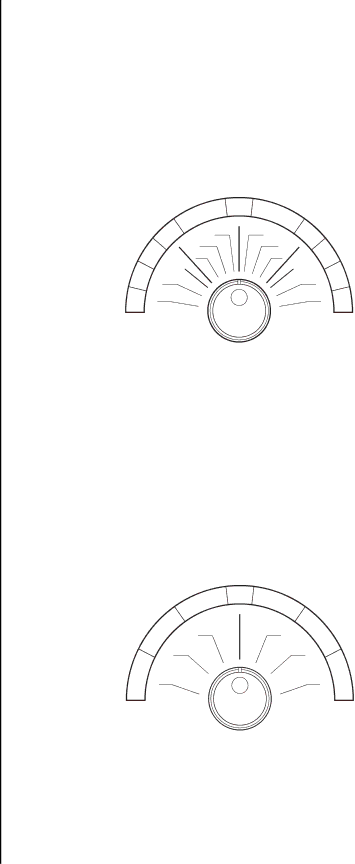
You can set the playback speed using the SHUTTLE ring.

1.Press PAUSE during playback to get a still picture.

2.Turn the SHUTTLE ring right or left to get the playback speed you want.

3.Cancel by pressing PAUSE to get a still picture and then pressing it again to return to the playback.

Playback speed varies according to the angle of the SHUTTLE ring (as shown in Figure 26).

When the SHUTTLE ring is released, it comes back to the center position and the playback picture stays still.

6

5

7

4

1/30

1/308

1/15

31/7

3

29(5)

15(7)

1

1/15

1/7 9 2

9(5) 10

15(7)

11

00485

( ) indicates the playback speed of the recorded tape in 2H mode.

1.

Reverse high speed search

7.

Slow playback

2.

Reverse speed search

8.

Normal playback

3.

Reverse fast playback (x3)

9.

Fast playback (x2)

4.

Reverse playback

10.

Forward speed search

5.

Reverse slow

11.

Forward high speed search

6.Still

Figure 26. Shuttle Ring Speed Settings

DIRECT SHUTTLE RING

You can also change the playback speed without entering pause mode by turning the SHUTTLE ring during playback, as shown below.

4

3

23

9(5)

115(7)

5

26

9(5)

15(7) 7

00486

( ) indicates the playback speed of the recorded tape in 2H mode.

1.

Reverse high speed search

5.

Fast playback (x2)

2.

Reverse speed search

6.

Forward speed search

3.

Reverse fast playback (x3)

7.

Forward high speed search

4.Normal playback

Figure 27. Direct Shuttle Ring Speed Settings

Pelco Manual C673M (2/01)

51

Image 51
Contents TLR3168 Time-Lapse VCR Installation C673M 2/01 Contents Pelco Manual C673M 2/01 List of Tables List of IllustrationsAvertissement GeneralSAFEGUARDS, WARNINGS, CAUTIONS, and Care When Not In Use CleaningAccessories Lightning/Power SurgesIntroduction to TIME-LAPSE Recorders Unpacking InstructionsTLR3168 Features and Functions Quick Start Basic StartAdditional Items Monitor Tips InstallationPRE-INSTALLATION Cautions Securing the VCR ControlsTypical System Setup InstallationConnecting a VCR to a Multiplexer Connecting the VCR to a MultiplexerAlarm Recording Connection Connecting for Series RecordingConnecting for Remote Recording Connecting for External Time Clock Adjustment Connecting for Synchronous RecordingConnecting the VCR to a PC Connecting to a PC for Remote ControlTable A. RS-232C Protocol Cable Connections Controls Front PanelPLAY/REC Check Search button POSITION/VERTICAL Adjust buttons +Timer REC button Eject buttonFluorescent Display LOCK/LOCK a indicator Timer Recording indicatorTape Remaining indicator Emgcy emergency recording indicatorMode OUT Rear PanelCall OUT JOG and Shuttle Controls Adjusting the Clock and Using the JOG and Shuttle ControlsUsing the JOG Dial Using the Shuttle RingAdjusting to the Exact Second Adjusting the ClockMenu ProgrammingGeneral Programming Instructions Language Selection MenuQuick Guide to the Menu Structure Program to Record Holiday SET UPBlue Back Display Menu Display ModeMain Menu TIME/DATE SizeSTART/END Timer ProgramRecording SET UP Menu Clock OUT SettingRear Terminal Menu Wrngtape END Wrngremain Tape ENDREC First Time SET UP Menu Maintenance MenuAdditional Material DAY and Time Display Modes RS-232C MenuMain Menu Display SET the DAY and TimeLoading LOADING, UNLOADING, Protecting the Tape CassettePreventing Accidental Erasure When to Replace a TapeTable C. Tape Replacement by Use UnloadingManual Recording RecordingRepeat Recording Recording ModeRecording Check Function Audio RECORDING/PLAYBACKTable E. Action When Tape End Is Reached by Setting Stop Rewind Repeat AlarmprotSeries Recording ONE-SHOT/INTERVAL Recording Remote RecordingSynchronous Recording Sequence Synchronous RecordingProgramming Procedure Timer RecordingOverlapping Programs Holiday SET UPSpecial DW Setting What if the Timer Recording Indicator Starts FLASHING?Table G. Minimum Interval Between Recordings Alarm RecordingProgramming for Alarm Recording Viewing the Power Loss List MaintenanceRecording After a Power Failure Power Loss ListALL Menu Initialize Reset Alarm ListViewing the Alarm List Clearing the Alarm ListElapsed Time and Repeat Recording Times Display Elapsed TimeRepeat REC Times Playback Playback ProcedureSpecial Effects Playback Playback ModeAudio Playback END of TapeDirect Shuttle Ring Shuttle RingAdjusting Picture Quality Adjusting the Picture During Playback Tracking AdjustmentVertical Vibration Adjustment Search Techniques Counter Memory StopSkip Search Index Search HOW to Count the Index NumberTime and Date Search Additional Functions and Features Assigning the RS-S32C Settings Using with a PCCommands from a PC When Controlling only ONE VCRSending Commands Status or Error Code from Meaning Commands When Controlling Multiple VCRs When Controlling Multiple VcrsVCR01, RC CR Commands Functions Status After Normal Explanation of Status Commands and Responses ChartOn next SKP Small =WRNG, 1=WRNGTAPE END =OFF, 1=ON Regular System Testing TestingError Codes Initial System TestingFluorescent Monitor Cause Remedy To Turn Off Display TroubleshootingSELF-DIAGNOSTIC Function and Warning Display Table J. Warning Display and ActionsSymptom Remedy Before Calling for ServiceRecording Problems Mechanical SpecificationsElectrical Video and AudioTable K. Tape Speed and Recording Time Video Audio Tape Mode 120/T-160 Mm/s Field Fields/sIndex Pelco Manual C673M 2/01 Revision History Regulatory Notices