ER-A450
Aviso
Introduction
Precaution
Contents
Page
For the Operator
Page
External View
Front view
Rear view
Print head release lever
Printer
Standard keyboard layout
Keyboard
000
Standard key number layout
Operative range Manager key MA Submanager key SM
Keys and Switches
Mode switch and mode keys
Drawer lock key
Number of repeats for repetitive registrations
Machine state symbols
Displays
Operator display Customer display Pop-up type
General instructions
How to program alphanumeric characters
Using character keys on the keyboard
Prior to Programming
Entering character codes
253 ¼ 083 ¼ 072 ¼ 065 ¼ 082 ¼ 080 ¼
Editing the characters
Alphanumeric character code table
231
X X X X =
Setting the date and time Date PGM
Programming
Preparations for Programming
X X =
Time PGM
Programming for departments
Unit price
Selection Entry
Functional selection
0 0 0 0 0 0 1 0 0 0 0 1 0 9
Unit price PGM
Price lookup PLU programming
PLU
§ §
§ § §
PLU assignment to departments PGM 1 PGM
Programming for discount keys Deduction amount PGM 1 PGM
High amount lockout Halo and +/- sign PGM
Programming minus sign for the key Key operation Print
Programming for percent keys Percent rate % PGM 1 PGM
Sign +/- % PGM
Selection Entry Sign plus/minus Plus premium Minus discount
15 Å
Programming the tax rate Tax rate PGM
Direct
Setting the date and time Setting the date PGM 2
Setting the time PGM 2 2611 Direct
2610 . Å 260898
Setting the consecutive number PGM 2
2611 . Å 1430
2612 . Å 123456
2711 . Å
Programming the tax rate
Tax rate PGM 2
2613 . Å 1000
Functional programming PGM 2
Sics Single Item Cash Sale / SIF Single Item Finalization
Type of unit price entry
2110 . Å
Tax status PGM 2
Limit amount Halo of entry PGM 2 2112 Direct
2111 . Å 0000110 c 2 Å
2112 . Å
Alphanumeric characters PGM 2
2114 . Å
1110 . Å
2115 . Å
Å1 c5 Å2
Commission group assignment PGM 2
Group number PGM 2
Department key positioning PGM 2
2116 . Å
2119 . Å
Sign +
PLU code six digits Associated department
Unit price max. six digits
Base quantity for split-pricing entries two digits
11 Å
Department assignment PGM 1 PGM 2 1200
1200 . Å
2230 . Å
1211 . Å
Unit prices PGM 1 PGM 2 1210 Direct
Base quantity PGM 1 PGM 2
1210 . Å
2231 . Å
PLU/subdepartment mode
Procedure For each PLU
2210 . Å
Direct For each PLU
Sign +/- and tax status PGM 2 2211
2214 . Å Milk
2211 . Å 0000000
2232 . Å
11 Å 0000001
12 Å
Assigning of PLUs to commission groups PGM 2 2215
2215 . Å
2235 . Å
2219 . Å 16 Å
Link PLU PGM 2
Direct PLU key positioning PGM 2
2220 . Å 21 Å
Programming for miscellaneous keys
Programming the rate %, e, commission and the deduction PGM
1310 . Å 52 Å 0
2312 . Å
Limit amount Halo of entry -, r, p PGM 2
2311 . Å
+/- sign %, PGM 2
Item % or subtotal % selection % PGM 2
Percent rate limitation % PGM 2
2315 . Å
Item ‰ or subtotal ‰ selection PGM 2
2313 . Å
2316 . Å
Non-add code compulsory
Change enable over-tender
EFT Transaction
Footer printing
High amount lockout Halo of entry for media keys PGM 2
2320 . Å 50 Å
2321 . Å 41 Å
Programming of function text Programming PGM 2
2322 . Å 50 Å
2314 . Å 48 Å Visa
NET2
List of function texts
1500 . Å
Cashier and clerk programming Cashier code PGM 1 PGM 2
2510 . Å 11 Å
Cashier name PGM 1 PGM 2
Functional programming for cashiers PGM 2
1514 . Å 11 Å Mayer
1414 . Å 11 Å Nils
1400 . Å
OP X/Z mode availability
Selection Entry
Abcdefgh Always enter
2617 . Å
Programming alarm length of time with drawer opening PGM 2
2616 . Å
2615 . Å
Ž= Ž= Ž=
= Ž= Ž= 2 Å / / /Ž= Ž= / ë S ë T ë O ë R ë E
Programming of logo messages PGM 2
2620 . Å
Selection of X1/Z1 and X2/Z2 reports
2690 . Å
Setting the time range for hourly reports PGM 2
RS-232C channel assignment PGM 2
2619 . Å 107
2334 . Å
52 Å
Currency description text programming PGM 2
2631 . Å 1234
Functional programming for the printer PGM 2
2990 . Å 1050
2680 . Å
2900 . Å AUTO1 2 § 100
Setting the Auto key Automatic sequencing key X2/Z2
Reading stored programs
Program details and procedures for their reading
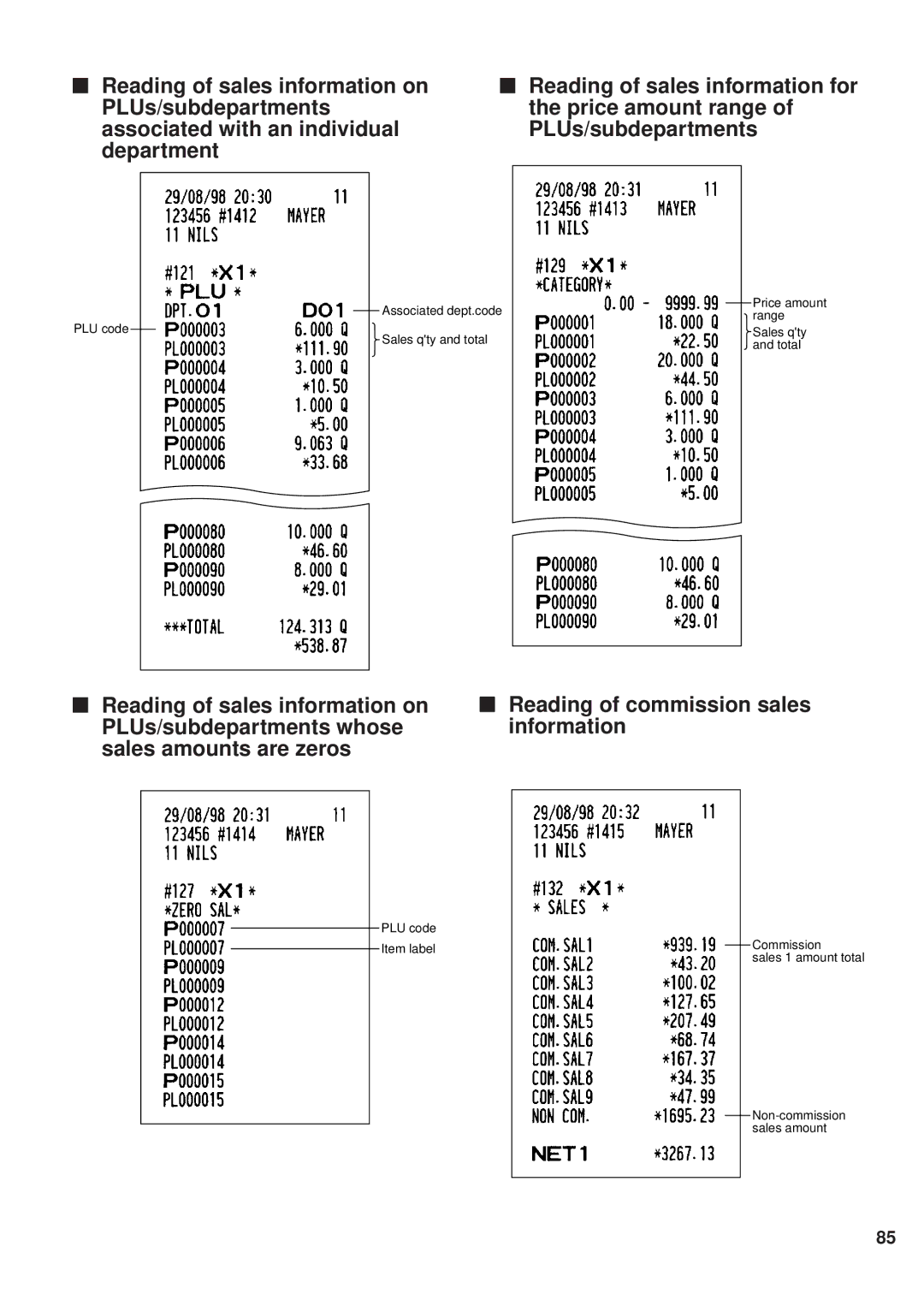
Sample printouts
Key no. Dept. code Leading PLU code Range Linked PLU code
To be on the next
Page
Page
Training mode
X1/Z1
Reading X and Resetting Z of Sales Totals
Mode switch Job Position Key operation Code X1/Z1 X2/Z2
800 . Å
Sample X report Sample Z report
Page
Page
Cashier reading and resetting
Individual cashier reading and resetting
Full cashier reading and resetting
Clerk reading and resetting
Individual clerk reading and resetting
Full clerk reading and resetting
Reading and resetting of hourly sales information
Full department reading
Individual group reading Full group reading
Sample X report Sample Z report
Page
Transaction reading Total in drawer reading
Reading and resetting of a stacked report
Generality
Periodic consolidation
Reading and resetting of the daily net totals
Full cashier report
Compulsory CASH/CHEQUE Declaration
Types of compulsory cash/cheque declaration
Individual cashier report
Page
250
Override Entries
250
1500
Incorrect receipt Cancellation receipt
Receipt ON/OFF function
Prior to Entries
Preparations for entries
Receipt and journal paper rolls
Error warning
Cashier assignment
Clerk assignment
Item entries Single item entries
Entries
165 15 Å 13 §
25 Å
Repeat entries
Multiplication entries
Successive multiplication entries
Split-pricing entries
600
35 §
SIF entries
Single item cash sale SICS/single item finalize SIF entries
Link PLU entries
Sics entries
Normal subtotal
100 700
100 200 700
Displaying subtotals
Mixed tendering cheque + cash
500
300
Finalization of transaction Cash or cheque tendering
2500 3250
950
Credit sale
Computation of VAT Value Added Tax/tax VAT/ tax system
Automatic VAT 1-3 and automatic tax 4-6 system
550
225
VAT shift entries
Auxiliary entries Percent calculations premium or discount
140
Deduction entries
575
100 Ð
675
Payment treatment Currency exchange
250 13 §
Refund entries
Printing of non-add code numbers
Paid out entries
Received on account entries
6789 = 3000 p
No sale exchange
Cashing a cheque
Automatic sequencing key ` key entries
Correction of the last entry direct void
Correction
600 328
58 ? §
1310 1755 10 § 35 §
Subtotal void
Special Printing Functions
850 150
Copy receipt printing
Guest check copy
Printing of header and footer graphic logos
1480
150
Overlapped Cashier Entry
100 360
1Ü 100 1 360
Thermal printing
Operator Maintenance
Case of power failure
Case of printer error
115
Installing the receipt paper roll
Installing the paper roll
Paper specification
How to set the paper roll How to cut the paper end
Installing the journal paper roll
Removing the paper roll
Removing the receipt paper roll
Removing the journal paper roll
Removing a paper jam
Print head
Cleaning the print head
Opening the drawer by hand
Removing the till and the drawer
Installing the fixing angle bracket
How to install the fixing angle bracket
How to remove the register from the fixing angle bracket
Error code table
Before calling for service
List of Options
Specifications
Protection de l’environnement
BLUENeutral BROWNLive
Environment Protection
Umweltschutz
Sharp Corporation