FO-4450
Canada
Introduction
Printing resolution
Full Dual Access
Power requirements
Operating temperature
Weight
Approx .3 lbs .2 kg
Page
Table of Contents
Cleaning the Scanning Glass and Rollers
Housing
Problems and Solutions
Messages and Signals
Look at the Operation Panel
Upper panel
Symbol key
Middle panel Rapid Key pad
Rapid Dial Keys
Counter key
Timer key
Cover Sheet key
Life key
MEM. Status key
Lower panel
JOB Status key
Duplex Scan key
Priority key
Press
Speed Dial key
Menu key
UP and Down arrow keys
Installation
Unpacking Checklist
Points to keep in mind when setting up
About condensation
Connecting the power cord
Connections
Connecting the telephone line cord
Connecting a telephone optional
Attaching the ADF exit tray
Attaching the received document tray
Attaching the national character labels
Verification Stamp option
Installing the Print Cartridges
Press the cover release to open the print compartment cover
Blue
Hold the toner cartridge by the handle
Insert it into the print compartment
Flip up the Rapid Key
Overlay, 3 , and Enter
When to replace the toner cartridge
When to replace the drum cartridge
Sharp FO-44ND or FO-50ND toner cartridge
Sharp FO-47DR drum cartridge
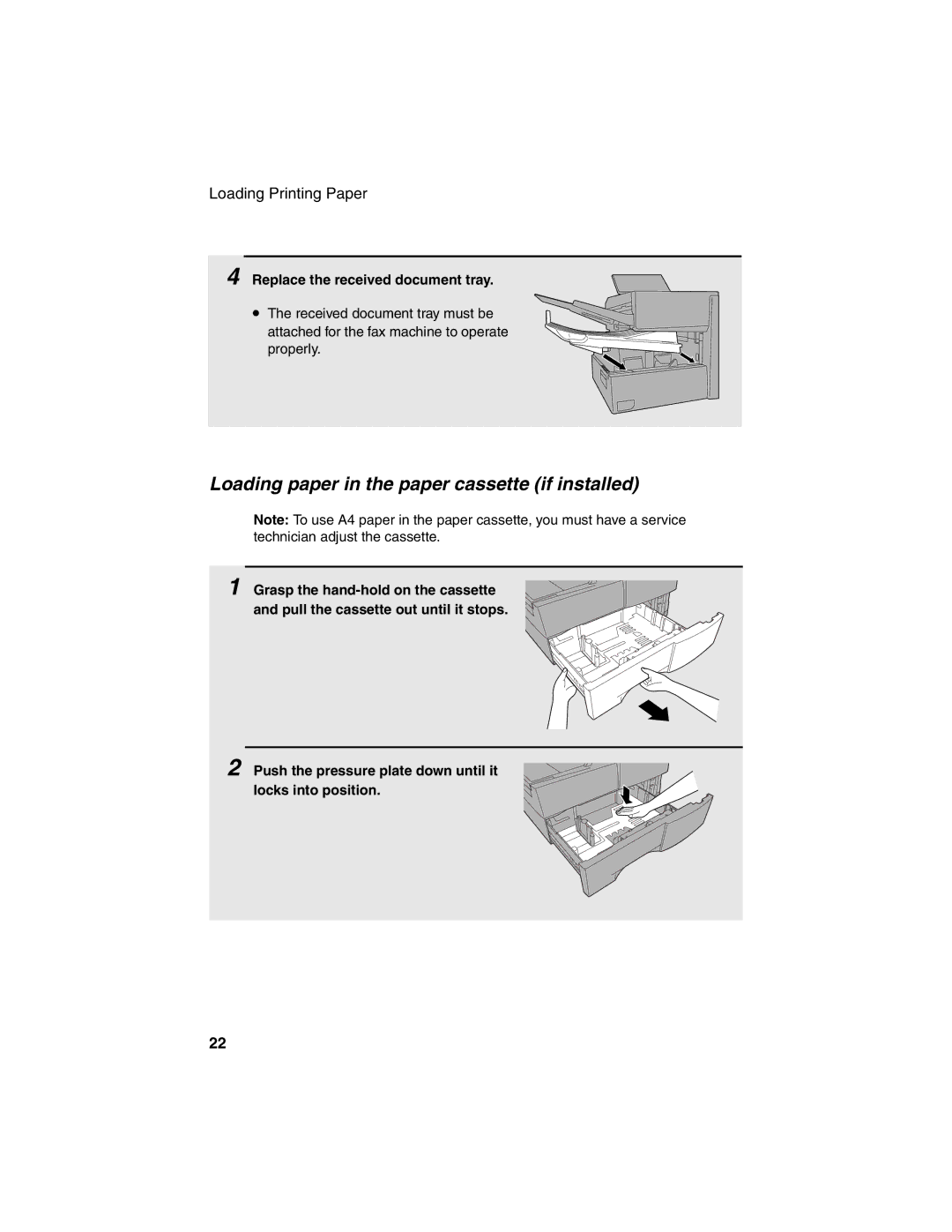
Loading Printing Paper
Loading paper in the paper tray
Remove the received document tray
Insert a stack of paper into the tray, print side up
Loading paper in the paper cassette if installed
Replace the received document tray
Installation
Entering Your Name and Fax Number
Press 0
Press Enter
To enter a space, press
To change case, press
To clear a mistake, press
Press twice to return to the date and time display
Setting the Date and Time
Daylight Saving Time
Press to select A.M. or to select P.M
Press Enter to start the clock
Volume Adjustment
Press or to select the desired volume level
Speaker
Press Speaker to turn off the speaker
Press the or to select the desired volume level. Make sure
Ringer
Has not been pressed
Press Enter to confirm your selection
Size and weight
Sending Documents
Transmittable Documents
Loading one page at a time
Maximum scanning area
Other restrictions
Loading the Document
Adjusting the Resolution and Contrast
Resolution
Contrast
Light
Sending a Fax by Normal Dialing
Using the Redial key
Programming Auto-Dial Numbers
Press To select SET
Return to to program another number, or press
Repeatedly
To return to the date and time display
Chain Dialing for area and access codes
Editing auto-dial numbers
Clearing auto-dial numbers
Press To select Clear
Programming Auto-Dial Numbers
Dual Access
Sending a Fax by Automatic Dialing
Rapid Key Dialing
Load the documents Send Ready will appear in the display
Press the appropriate Rapid Key
Speed Dialing
Flip up the Rapid Key overlay If it is down Press
Then enter the Speed Dial number by pressing
If not, press
Direct Keypad Dialing
Correct, press Enter If it is not correct, press
Searching for an auto-dial number
Press To search from
Chain Dialing
If the memory becomes full
Document will be automatically transmitted once
Connection is established
To cancel a fax transmission or reception
Checking and canceling stored transmission jobs
Checking the status of the current job
Canceling a memory transmission by number
Automatic redialing
Memory Retransmission
Creating and Using Personal Books
Creating a personal directory book
Press 1
Press 1 to select SET
Press Enter to skip this step
Using a personal book
Press Book
Canceling an operation performed from a book
Closing a book
Clearing a book
Press 2 to select Clear
Press repeatedly to return to the date and time display
Cover Sheet
Load the documents
Overlay if it is down
Dial the receiving party and transmit the fax
Transmission you do not have to press
Batch Page Numbering
Caps Lock . Flip up the Rapid Key
Dial the receiving machine and transmit the document
Using Auto Reception Mode
Setting the reception mode
Receiving Documents
Using Manual Reception Mode
When Receiving appears Display, hang up
On the fax machine
Substitute Reception to Memory
Overlay
Making Copies
Load the document
Checking and canceling copy jobs in memory
Want the copies sorted
Copying will begin
While the copy job appears
Special Functions
Broadcasting
Load the document s
Broadcasting using a Group Key
Press Enter twice. Transmission will begin
Press the appropriate Group Key. Transmission will begin
Storing numbers in Group Keys
Press Menu , 5 and then
Press To program a Group Key
Press 2 to clear a Group Key
Editing a group
Appears in the display and then press
Return to to program another Group Key, or press
Repeatedly until you return to the date and time display
Confidential Operations
Confidential transmission
Confidential reception
Digits, press
Programming the confidential passcode
Press Z Flip up the Rapid Key
Clearing a passcode
Printing out received documents
Press Z
Enter your mailbox number Enter your confidential passcode
Polling
Polling others
Then
Number. If you enter less than 2 digits, press
Serial Polling using a Group Key
Being polled Memory polling
Press Then
Contrast to adjust the resolution and contrast if
Clearing a document
Desired, and then press
To clear the documents
Polling Security
Turning Polling Security on and off
Storing and clearing fax numbers for polling permission
Press Menu , 3 , 0
Programming and clearing a System number
Press 1 to program the System
Number
Go to Step Enter the number 4 digits with the numeric keys
Storing and clearing ID numbers for polling permission
Press repeatedly to return to the date and time display.STOP
Timer Operations
Initial procedure
Go to the specific procedure for your operation see
Transmission
Following pages
Load the document and then press
Polling
Serial Polling
Broadcasting
Canceling a timer operation
Enter the 2-digit number assigned to the operation
Batch Transmission
Programming a Batch Key
Clearing a Batch Key
Storing documents for transmission
Canceling a document stored for batch transmission
Press the appropriate Batch Key
Enter the 3-digit message number assigned to the document
Entering and Using Programs
Programmed
Start Enter
This is not possible if you included a timer setting
Digits, press
To complete the entry
If you want the document to be sent through memory, press
Confidential transmission
Polling
Broadcasting
Batch transmission
Clearing a Program Key
Press Menu , 5
Press the Program Key you want to Clear
Using a Program Key
Canceling a programmed timer operation
Press the Program Key
Duplex Scanning for Two-sided Documents
Print Hold
Programming the Print Hold code
Activating the Print Hold function
Printing received faxes
Press @
Press 1 to select YES
Turning off the Print Hold function
Press To select no
Clearing the Print Hold code
Department Control
Programming Department Codes
Accessing the machine
100
Blocking Reception of Unwanted Faxes
101
Press To enter a number in the Anti
Junk Number List
Using Department Control
Telephone Billing
Direct billing code entry
102
103
Enter the billing
Distinctive Ring
104
Press 2
105
Canada
Optional Settings
106
Optional Settings
107
Setting 05 Transaction Report Print Selection
Setting 06 Recall Times
Setting 07 Recall Interval
Setting 08 Security Selection
109
Setting 15 Image Memory Print
Setting 16 Cassette Selection
Setting 17 Retransmission Times
110
111
Setting 23 Quick ON-LINE
Setting 24 Multi TTI
Setting 25 Beep Length
Setting 26 Telephone Billing Code
Setting 27 Department Code Digits
Setting 28 Distinctive Ring
Setting 29 Verification Stamp
Setting 30 Copy Resolution
Setting 31 Separate Mode
Setting 34 Language Select
114
Printing Lists and Reports
Activity Report List
115
Appears, press Enter
116
Timer List List
Passcode List List
Optional Setting List List
Destination List List
Department Usage List List
Confidential Reception List List
Anti Junk Number List List
Personal Book List List
Transaction Report
119
Transmission, press
Maintenance
Cleaning the Scanning Glass and Rollers
Housing
120
Replacing the Verification Stamp
121
Troubleshooting
Problem Solution
122
Dialing and transmission problems
123
Reception and copying problems
124
General problems
125
Messages and Signals
126
127
No CONF. Function
Audible signals
128
Clearing Paper Jams
Clearing a jammed document
129
Clearing jammed printing paper
130
131
Replace the drum cartridge Make sure the drum cartridge is
FCC Regulatory Information
132
A R P
133
Material Safety Data Sheet 2/3
134
Material Safety Data Sheet 3/3
135
136
To complete entry if
Number press Enter
Only one digit is entered
Guía DE Consulta Rápida
137
Guide DE Référence Rapide
138
Index
139
Index
140
Page
Sharp Corporation