UX-BS60
Mains Plug Wiring Instructions
GREEN-AND-YELLOW Earth BLUENeutral BROWNLive
Introduction
At 4% coverage
Telephone function
Applicable telephone line
Important safety information
Page
Table of Contents
Printing Lists 107 Maintenance 111
Look at the Operation Panel
Number keys
Arrow keys
Function key
Repeat key
COPY/HELP key
Icons in the display
Microphone location
Installation
Unpacking Checklist
Removing the packing tape
Points to keep in mind when setting up
Attachments
Open the operation panel Open the print compartment cover
Connecting the handset
Installation
Attaching the paper tray
Loading Printing Paper
Connecting the Power Cord
Print cartridge yield at 4% coverage Initial cartridge
Installing the Print Cartridge
Replacement cartridge Sharp UX-C70B
Press
When this has happened, press
To make the print cartridge
Holder return to its home position
Align Cartridge
Press Once Twice
Quality mode using more/less ink
Press Memory
Press once and twice
High-quality fax print setting fast/slow printing of faxes
Connecting the Telephone Line Cord
Extension phone optional
EnteringYour Name and Fax Number
Press Once Times
Enter your fax number by pressing the number keys max digits
Setting the Date and Time
Press once and once
Enter the year four digits Example
TEL/FAX mode
Setting the Reception Mode
Setting the reception mode
Mode
Press once and 5 times
Flash Select Setting for PBX
Press Once and 3 times
Speaker
Volume Adjustment
Press or to select the desired volume level
Ringer
To turn off the error beep
Error beep off
Press To turn on the error beep or
End beep off
To turn off the end beep
Key tone off
Press To turn on the end beep or
Press To turn on the key tone or
Printing the SMS Quick Reference Sheet
SMS Text Messaging
Requirements
Sending an SMS Message
Sending an SMS message entering the number manually
555 1 222
Sending an SMS message using an auto-dial number
Press Memory
If a message is cancelled before being sent
Viewing messages in the inbox
Receiving SMS Messages
Viewing unread messages
You can press
Press Your most recently sent
Viewing the Outbox
If the inbox is full
Press or to scroll through your sent messages
Deleting all messages
Printing or Deleting all Messages
Printing all messages
Press To select on
SMS Settings
SMS Receive function
To turn off the function, press
SMS center numbers
Press To exit
Lift the handset
Using the Answering Machine
Press REC/MEMO once Once
To listen to the outgoing message
When finished, replace the handset or press
Operating the Answering Machine
Activating the answering machine
Number of rings in A.M. mode Toll Saver function
Toll Saver on Toll Saver OFF
Listening to received messages
Messages will play
Recording phone conversations 2-way recording
Erasing received messages
Recording memos
Pressed Press REC/MEMO once Once
FAX mode on A.M. failure
Optional Answering Machine Settings
Setting ICM time
FAX mode, or To select no
OGM only mode
Press To select YES switch to
Programming the transfer number
Press To turn on OGM only mode
Transfer Function
Once Twice
Recording the transfer message
Press the number keys to enter the transfer number
Press once Lift the handset
Press to turn on the Transferyour selection, then Function
Checking or erasing the transfer message
Turning the Transfer function on and off
Programming the override code
Override Ringing
Overriding the answering machine
Press Press the number keys to enter a 3-digit override code
Toll Saver
Remote Operations
Remote code number
Once Press Twice
Function, or To turn it off
Retrieving your messages
Press To turn on the Toll Saver
Enter your remote code number and then press
Unless you press twice
Comments
Changing the fax reception mode
Other remote operations
Changing the transfer telephone number
Recording a new outgoing message
Turning the Transfer function on or off
To turn Transfer on Press
Recording a new transfer message
To turn on OGM only mode Press 1 , 1 ,
To turn off OGM only mode Press 1 , 2 ,
Recording a memo
Transmittable Documents
Size and weight
Sending Faxes
Loading the Document
Other restrictions
Removing a document from the feeder
Contrast settings
Adjusting the Resolution and Contrast
Resolution settings
Load the documents
To FINE, or To set it to Standard
Changing the default resolution
Press To set the default resolution
Sending a Fax by Normal Dialling
Pick up the handset or press Digital
Use it
Sending a Fax by Automatic Dialling
Storing fax, phone, and SMS numbers for auto dialling
To insert a pause, and then enter the fax or voice
NEW Number
Editing and clearing auto-dial numbers
Press for Edit or for Clear
If you are sending a fax, load the documents
Using an auto-dial number
Make the desired changes to the name
Sending a fax by Direct Keypad Dialling
Correct, press Memory
If you are sending a fax, press Memory . Dialling begins
Redial
Automatic redialling
Select no
Error Correction Mode
Press To select YES, or
Using the Speakerphone to Make a Phone Call
Dial using one of the following methods
Dial the receiving machine and send the fax
Batch Page Numbering
Load the documents Press Once
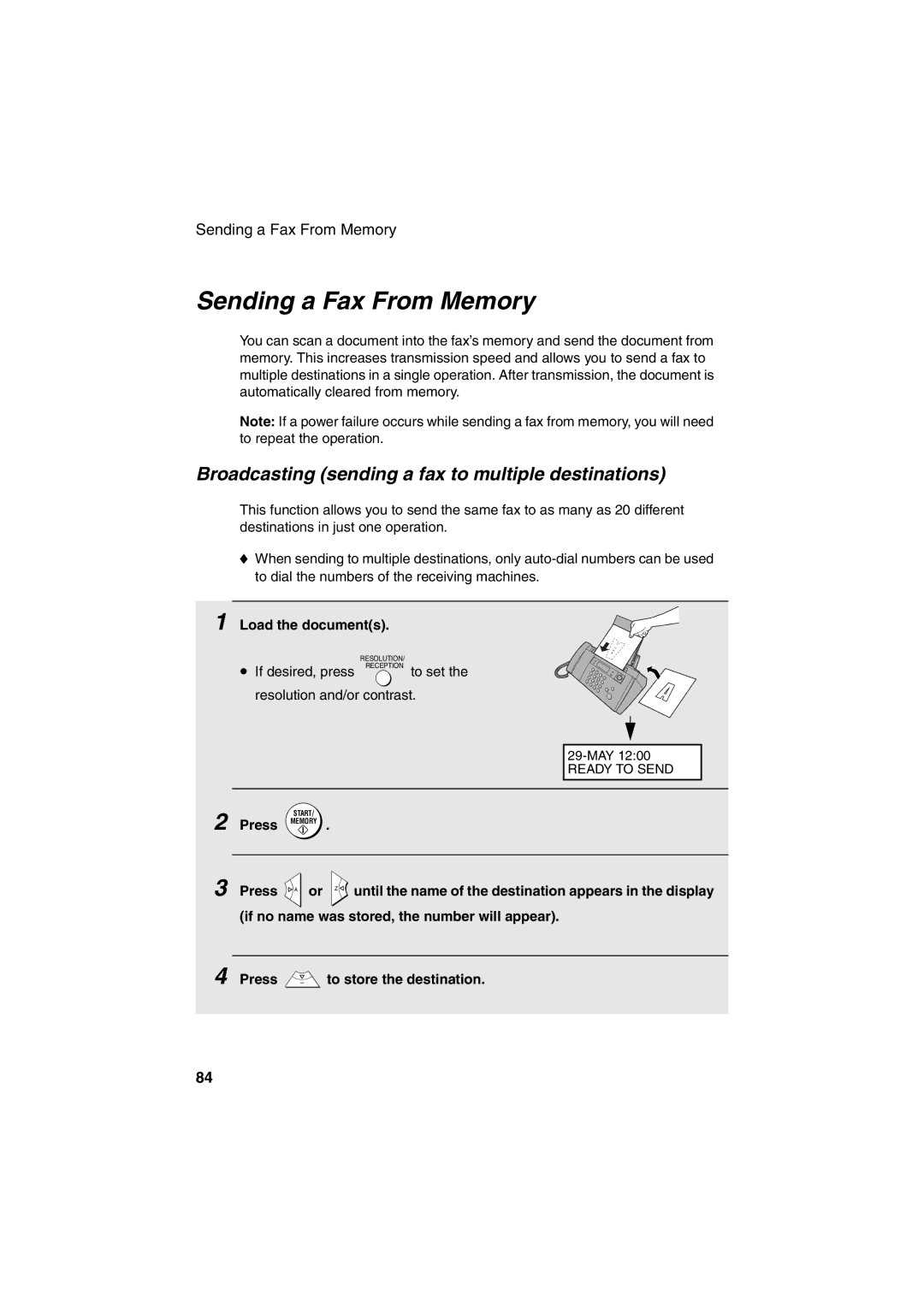
Sending a Fax From Memory
Broadcasting sending a fax to multiple destinations
To send a fax through memory, load the document, press
When you are ready to begin transmission, press
Memory transmission
If the memory becomes full
Using TEL/FAX Mode
Receiving Faxes
Press once and 4 times
Using A.M. Mode
Pseudo Ring Duration for Tel/Fax Mode
Enter a number as follows for the desired duration
Using FAX Mode
Changing the number of rings
Using TEL Mode
Example 3 rings Press to return to the date and time display
Then replace the handset
Answering with the fax’s handset
Display shows FAX Receiving
Answering on an extension phone connected to the same line
Putting a call on hold
Changing the number for remote fax activation
Optional Reception Settings
Fax Signal Receive
Press To turn on the function, or
Reception Ratio
Enter the desired number any number from 0 to Example
To select AUTO, or
When you add paper and press
Substitute Reception to Memory
Select 100%
Load the documents face down. Maximum of 10 sheets
Select any of the following copy settings as needed
Making Copies
Example Two Copies each Three originals
If Memory is Full appears
When you are ready to begin copying, press
Copy Cut-off
Press To turn on high-quality copy
High-quality copy setting fast/slow printing of copies
Press To set copy cut-off to YES
Press YES to turn on Caller ID To turn off Caller ID, press
Caller ID Requires Subscription to Service
Special Functions
How Caller ID operates
Display messages
Fax
Press when you have finished viewing the list
Viewing the Caller ID list
Call
Press Memory to store or clear the number
To delete calls from the Caller ID list
Priority Call
Blocking voice calls
Blocking Reception of Unwanted Faxes
Polling Requesting a Fax Transmission
Transferring calls
PBX operations
Making enquiry calls
Press Memory to print the list
Printing Lists
Press Until the desired list appears in the display Once
Message List
Setup List
Telephone Number List
Caller-ID List
Transaction Report
Headings in the Transaction Report
Transaction Report print condition
Press a number from To select the condition for printing
Cleaning the scanning glass and rollers
Maintenance
Cleaning the Machine
If the scanning glass is difficult to clean
Replace the white roller, inserting the right end first
Cleaning the paper feed roller
Cleaning the housing
Improving Print Quality
Aligning the print cartridge
Cleaning the print cartridge nozzles
Press Memory Press to return to the date and time display
116
Wiping the print nozzles and contacts
Cleaning the cartridge holder
About the lithium battery
Line error
Troubleshooting
Problems and Solutions
Problem Solution
Dialling and transmission problems
Speakerphone key
Reception and copying problems
General problems
SMS messaging problems
123
124
Messages and Signals
Press Start KEY
126
Audible signals
Recalling
Open the operation panel Gently remove the document
Clearing Paper Jams
Clearing a jammed document
Clearing jammed printing paper
Quick Reference Guide
Sending Faxes
Index
131
132
Page
Page
Remote Operation Card
Remote Commands
Other Countries outside the EU
Sharp Corporation


 or
or 
 until the name of the destination appears in the display (if no name was stored, the number will appear).
 to store the destination.