Connecting Monitors and Other Equipment
Using the loopback cable
Connecting a single monitor
Connecting a monitor to your Power Macintosh
Connecting a monitor to your Power Macintosh
Connecting two monitors
Connecting two monitors to your Power Macintosh
Loopback cable into
Connecting an AudioVision monitor
Connecting an AppleVision monitor
Connecting a pointing device
Connecting a Midi device
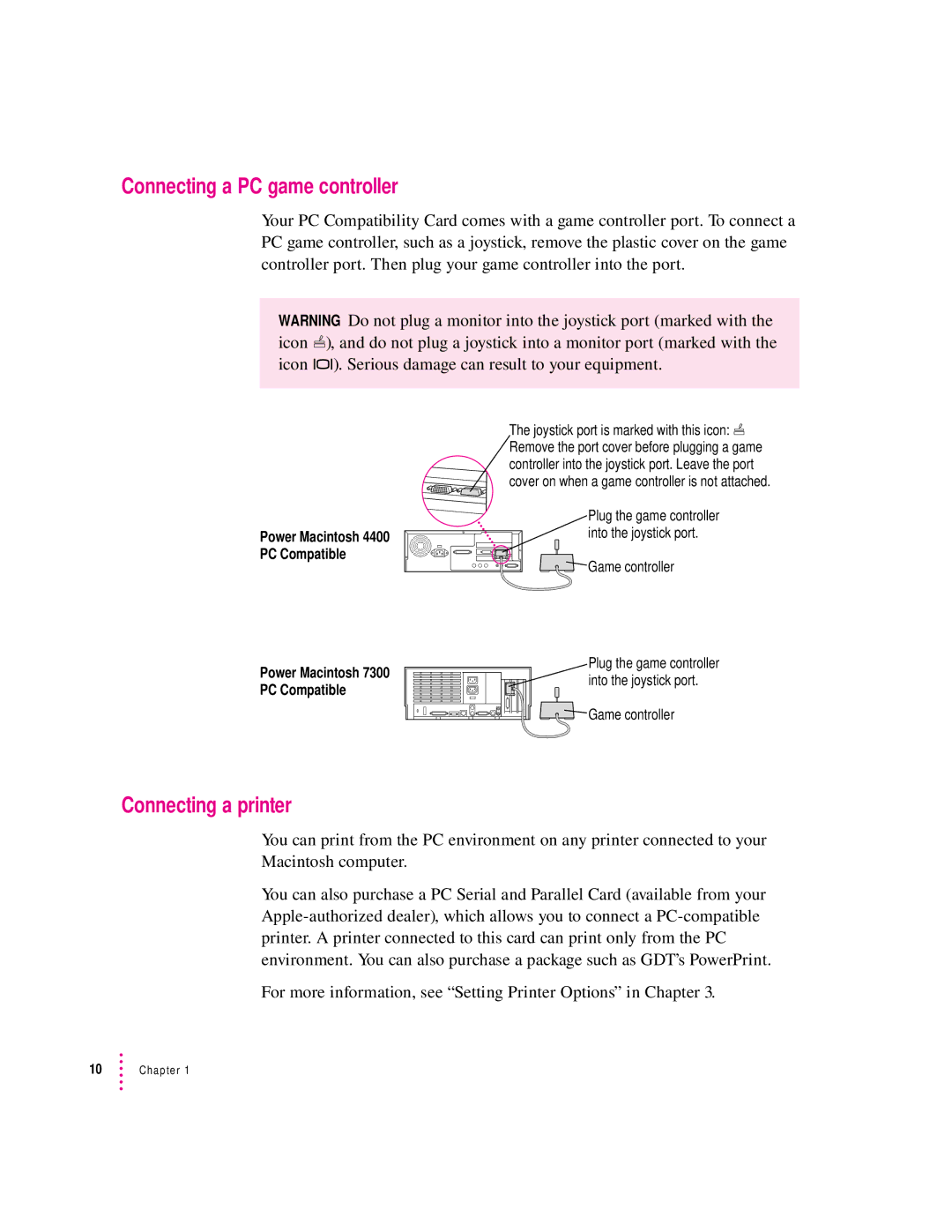
Connecting a PC game controller
Connecting a printer
Connecting a modem or other serial device
Connecting to a network
Connecting a security dongle
Page
Installing the PC Compatibility Card Software
Software is automatically installed on your hard disk
Installing the Mac OS PC Compatibility software
Click Install
Creating a drive container
Name Location
Dialog box appears
PC Setup control panel appears
Choose a location for the drive container
You can type up to 31 characters
New drive container is created
Installing Windows
Open the PC Setup control panel and click Switch to PC
Installing the PC Compatibility Card Software
If necessary, switch to the PC environment
Installing support software for Windows
To install the software, follow these steps
Follow the instructions that appear on the screen
Configuring network support in Windows
Installing PC utilities
When installation is complete, restart the PC
Installing keyboard files in Windows
Installing Sound Blaster software for Windows
Installing QuickTime for Windows
Keyboard files are located in the following directory
Installing your own PC software
Installing video software for Windows
Setting Up the PC Environment
About the PC Setup control panel
Setting Up the PC Environment
Using the PC Setup Control Strip module
Configuring monitors
Selecting and configuring monitors in Windows
You can switch to the Mac OS by typing x-Return
If this type is listed in PC Setup
Choose this type in the Models box
RAM information
Restart Windows
Setting up printing in the Mac OS
Setting printer options
Open the Extensions folder inside the System Folder
Chapter
Epson emulation and page setup options
Choose an option under Interpret Print Data as
Chapter
Setup dialog box for the printer currently selected appears
Epson font TrueType font
Resetting the default printing preferences
Select the desired page size and click OK
Properties window for the printer you have selected appears
Setting up printing in the PC environment
Spool Settings dialog box appears
Details page appears
Advanced PostScript Options dialog box appears
Configure LPT Port dialog box appears
Properties window, click Port Settings
Properties window, click the PostScript tab Click Advanced
Printing from Windows
Close the Properties window
You can use three kinds of sound in the PC environment
Configuring PC sound
Saving a printer file
PC beep sounds
Close the PC Setup control panel
Turning PC sound on and off
Configuring PC drives
Creating a single partition/bootable drive container
Creating a multiple partition/bootable drive container
Click Create
Assigning a drive to a PC-formatted hard disk
Changing a drive assignment
Using shared volumes
Open the PC Setup control panel
Click Restart PC
To set up a shared volume, follow these steps
Sharing files between the Mac OS and the PC
Chapter
If you no longer want to share a volume, follow these steps
Setting up your PC on a network
Turning off volume sharing
Turning off automatic sharing
Configuring the PC serial ports
Setting up a modem or other serial device
DB-9 DB-25 RS-232 name HSKo
Connecting a joystick
Building a custom cable
HSKi
Editing the CONFIG.SYS file
Setting up your DOS configuration files
Replace it with this line
Setting the number of drive letters
Editing the AUTOEXEC.BAT file
Working in the PC Environment
Switching with the PC Setup control panel
Switching between the Mac OS and PC environments
To switch back to the Mac OS, press x-Return
Switching with the Control Strip
Switching with a keyboard command
To set a new hot key, follow these steps
Turning the PC on and off with the PC Setup control panel
Turning the PC on and off in the Mac OS environment
Turning the PC on and off with the Control Strip
Starting the PC automatically
Restarting the PC in the PC environment
F10 F11 F12 F13 F14 F15 Lock
Using floppy disk drives and floppy disks
Restarting the PC from a floppy disk
Using CD-ROM discs and drives
Using a pointing device
Using keyboards
PC key Macintosh keyboard equivalent
Chapter
Working in the PC Environment
Using onscreen help in the PC environment
Transferring large bitmap images
Using shared folders and volumes
Using PC files in the Mac OS environment
Finder, double-click the drive container to open it
Icon opens and you have access to the files inside it
Double-click the container’s disk icon
Troubleshooting
Macintosh freezes during startup
PC Setup icon has a red slash through it at startup
Starting up
PC didn’t start up
Troubleshooting
Switching to and from the PC
There is a delay when switching between environments
Monitor problems
My monitor flashes oddly when I switch environments
Tried configuring my display and now it won’t work properly
Troubleshooting
Problems using a modem
My modem is not working correctly in Windows
Want my drive container to have more than one partition
Problems with files and disks
Can’t share all the folders I want
Shared drive is still usable
Shared folders don’t get updated in Windows
Want to change the size of my drive container
Am unable to use Microsoft Backup
Copying and pasting between environments isn’t working
Problems with information transfer
Tips for copying and pasting images
Cannot open or save my files in a shared folder
Can’t connect to a network in the PC environment
Communication and network problems
My system freezes when I am using ODI with Windows
My PC communications software doesn’t work
Can’t assign a COM port to a Macintosh serial port
Configuration problems
Sound problems
Can’t hear PC sounds
Check that the AUTOEXEC.BAT file contains this line
CONFIG.SYS for Windows 95 or Windows
CD sound went away when I switched environments
AUTOEXEC.BAT for Windows
Printing problems
Printing doesn’t work
Chapter
Can’t print a test page in Windows
Other problems
Can’t configure my pointing device
Page
What you need
Opening the computer, expansion card cover, and chassis
Disconnecting the cables
Removing the PC Compatibility Card hardware
Be sure to pull the plugs, not the cables
Remove any other cables from the PC Compatibility Card
Removing the card
Installing the port access cover
Installing the audio ribbon cable
Replacing the computer’s cover
Page
Page
PC Compatibility Card Audio cables for Scsi CD-ROM drives
Installing the PC Compatibility Card hardware
Opening the computer
Release buttons
Remove the cover from the computer
Power supply case
Remove the power cord from the back of your computer
Disconnect the power cord
Disconnecting the CD-ROM audio cable
Disconnect the audio ribbon cable from the CD-ROM drive
Flip open the expansion card cover
Support foot holds the computer’s chassis when you open it
Opening the expansion card cover and chassis
Position the support foot
Unlock the chassis release switches
You can use this tab to lift the top chassis
Support arm
Inserting the PC Compatibility Card
Prepare the first PCI expansion slot
Align the card with the first expansion slot
Insert the card
Connecting the Sound Out cable
113
Connector labeled Revsndout on the PC Compatibility Card
Processor card
Connecting the CD In cable to the card
117
Replacing the chassis and expansion card cover
Lock the release switches
Replace the support foot
Appendix B
Connecting the CD In cable to the CD-ROM drive
Make sure all connectors are firmly attached
Two-inch gap Front of computer
If you removed the security bar earlier, replace it now
Reinsert the power cable and all other equipment cables
Reconnect all equipment
Page
Appendix C Adding Memory to Your PC Compatibility Card
Open the computer
Installing memory on the card involves the following steps
Removing the card
Remove any cables from the PC Compatibility Card ports
129
Remove the Dimm from its static-proof bag
Installing the new Dimm
Handle the Dimm by its edges. Avoid touching the connectors
Make sure the Dimm lever is in the open position
Make sure the Dimm is snapped into place on both ends
Reinstalling the card
Appendix D Installing Network Client Software
ODI driver with the following protocols
Installing NetWare client software version 1.02 for Windows
NetBEUI and IPX/SPX in Windows TCP/IP in Windows
Ndis 2.0 driver with the following protocols
To start the installation process, type the following
Error message is
To switch to the disk, type the following
List of network interface controller NIC drivers appears
Select the Identification tab
Computer must have a unique identity to access the network
Click Start and choose Run from the menu that appears
Your computer scans for other machines on the network
Dialog box that appears, type
Installing TCP/IP in Windows
Installing NetBEUI and IPX/SPX in Windows
Installing Client 32 for Windows
Install NetWare Client version 1.02 for Windows
Network Configuration dialog box appears
Windows 95 will install all the necessary network components
PROTOCOL.INI
Installing Microsoft TCP/IP-32 IP protocol stack in Windows
143
Running the Network Protocol Setup Setnet utility
Type the following
Using a modem connected to the Macintosh serial port
Enter the modem information and then click Next
Installing a modem in Windows
Click Finish
Dial-up networking installation
Making a PPP connection
Page
Appendix E Configuring Video Software
About video capabilities
Installing Mpeg video support in Windows
Installing and configuring Mpeg video support
To install the Mpeg video support, follow these steps
To adjust CD-ROM caching settings, follow these steps
Optimizing Mpeg playback in Windows
To set ATI Mpeg Player properties, follow these steps
Video mode tables
Bits per pixel
MHz Depth bpp 640 x
Dram accelerator mode
800 x
1152 x
MHz Depth bpp 1024 x
1280 x
Maximum color Resolution Depth bpp
Vesa Bios Extension modes
Minimum Dram MB
Fixed-frequency monitors
Color depth bpp Resolution
Refresh rate 68.7 kHz horizontal, 75.08 Hz vertical
Refresh rate 60.2 kHz horizontal, 74.9 Hz vertical
Refresh rate 49.7 kHz horizontal, 74.55 Hz vertical
User-adjustable monitors
Refresh rate 35 kHz horizontal, 66.67 Hz vertical
Index
PC Compatibility Card-PC Utilities
DOS
Index
Index
Index
Index
ADB
Index
Index
Index
Apple Publishing System
Apple Computer, Inc
PC Compatibility Card
Apple Computer, Inc
Contents
Installing the PC Compatibility Card Software
Working in the PC Environment
Troubleshooting
Appendix a Removing the PC Compatibility Card From Your
Appendix B Reinstalling the PC Compatibility Card in Your
133
151
Index
FCC declaration of conformity
Radio and television interference
Industry Canada statement
Vcci Class 2 statement
Quick Start
Port access cover
Getting started
Switch to the PC environment by pressing x-Return
Start up the Mac OS environment
Follow the instructions on the screen to set up Windows

 ), and do not plug a joystick into a monitor port (marked with the icon ™). Serious damage can result to your equipment.
 Remove the port cover before plugging a game controller into the joystick port. Leave the port cover on when a game controller is not attached.
 Game controller