Hp StorageWorks network storage router e1200-160
Page
Contents
Configuration Overview
Serial/Telnet User Interface
FTP User Interface
Serial and Ethernet Pin Assignments
Contents
About this Guide
Prerequisites
Overview
Intended Audience
Related Documentation
Conventions
Document Conventions
Text Symbols
Equipment Symbols
Rack Stability
Rack stability protects personnel and equipment
Getting Help
HP Technical Support
HP Storage Website
HP Authorized Reseller
About this Guide
Introduction1
External Features Overview
Description
Ethernet Port
Power Indicator
Serial Port
Fibre Channel Port
Example configuration
Functional Overview
Fibre Channel to Scsi Protocol Process
Converting Fibre Channel to Scsi process
Scsi to Fibre Channel Protocol Process
StorageWorks Router
Router Specifications
LAN-free Backup and Restore
Operating Environmental Requirements
Power Requirements
Shipping and Storing Environmental Requirements
Configuration Overview
Router Default Ethernet Settings
UI Overview
Visual Manager
Serial
Telnet
FTP
Common Configuration Settings
Controller LUN Commands
Scsi Bus Configuration
Discovery Mode
Fibre Channel Port Configuration
Fibre Channel Switched Fabric Configuration
Host Device Configuration
Logical Unit Management
Auto Assigned Map
Indexed Map
Port 0 Device Map
SCC Map
Buffered Tape Writes
Configuration Overview
Visual Manager User Interface
Ports Menu,
Visual Manager Menu Tree
Main Menu
Visual Manager Access
Password Dialog Box
Visual Manager Best Practices
Main Menu
Is an example of the home
HP logo
Visual Manager User Interface
System Menu
Snmp is not supported
Reset Menu
Serial Configuration
Serial screen
Network Configuration
Network Settings
Ethernet Configuration dialog box
Snmp Configuration
Active Fabric Configuration
Is an example of the Active Fabric screen
User Configuration
Is an example of the User screen
Real-Time Clock Configuration
Real-Time Clock screen
Reset Menu
Is an example of the Reset Menu
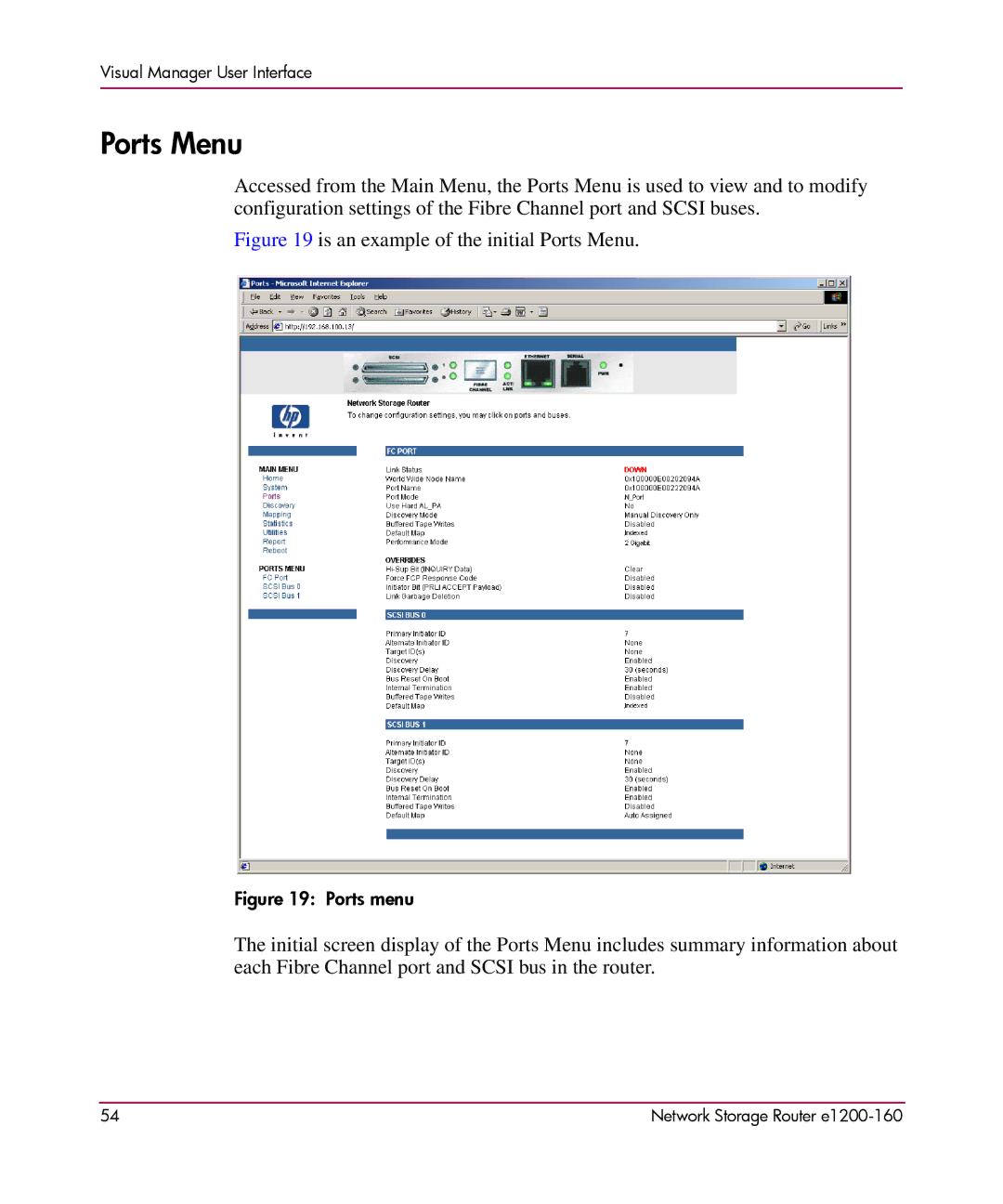
Ports Menu
Is an example of the initial Ports Menu
To make changes, modify the setting and then click Submit
Fibre Channel Configuration screen
Visual Manager User Interface
SCC
Link Garbage Deletion toggles between Enabled and Disabled
Scsi Bus Configuration screen
Discovery toggles between Enabled and Disabled
SCC
Visual Manager User Interface
Discovery Menu
Is an example of the Discovery
Mapping Menu
Common Fibre Channel and Scsi Mapping Tasks
Is an illustration of the Fibre Channel mapping screen
Fibre Channel Mapping Tasks
Viewing and Changing Fibre Channel Host Information
Host Name
Viewing and Changing Fibre Channel Map Information
Visual Manager User Interface
Scsi Mapping Tasks
Viewing and Changing Scsi Host Information
Viewing and Changing Scsi Map Information
Scsi Map Dialog box
Visual Manager User Interface
Statistics Menu
Statistics menu
Trace Settings configuration configures trace settings
Utilities Menu
Visual Manager User Interface
FTP Utility Access
Is an example of the FTP utility screen
Visual Manager User Interface
Trace Settings Configuration
Is an example of the Trace Settings screen
Is a brief description list of the trace settings
Current, Previous, and Last Assert Trace Displays
Is an example of the Current Traces screen
Clear Current Traces and Clear Assert Traces
Is an example of the Clear Current Trace Buffer screen
Event Log Configuration
Event Log Settings screen
Event Log Display
Is an example of the Event Log display screen
Clear Event Log
Clear Event Log screen
Report Menu
Report screen
Reboot Option
Reboot screen
Visual Manager User Interface
Serial/Telnet User Interface
System Utilities Menu,
Serial/Telnet Menu Tree
Telnet UI Access
Serial UI Access
Configure the serial port settings, as listed in Table
Power up Messages
Is an example of these power-up messages
Serial/Telnet UI Main Menu
Serial/Telnet main menu
Configuration Menu
Is an illustration of the Configuration Menu
Baud Rate Configuration
Is an illustration of the Baud Rate Configuration Menu
Ethernet Configuration
Ethernet Configuration menu
Serial/Telnet User Interface
Change Snmp Settings is not supported
Fibre Channel Configuration
Is an illustration of the Fibre Channel Configuration Menu
Fibre Channel Configuration Menu options
Network Storage Router e1200-160 103
Sub-screen is displayed, listing the following options
Parallel Scsi Configuration
Is an illustration of the Parallel Scsi Configuration Menu
Add Target ID or
Network Storage Router e1200-160 107
Is an example of the Device Mapping Configuration Menu
Device Mapping
Selecting the Current Map
Select Current Map screen
Displaying the Current Map
FCP Current Map Display screen
Editing the Current Map
Scsi Current Map Display screen
Changing the Name of the Current Map
Edit Map Entries for a Fibre Channel map
To scroll up and down the map entries, select P or N
Adding a Map Entry to a Scsi Map
116
Creating an entry for a Scsi map Removing Gaps in the Map
Editing the Host List for the Current Map
Host List Display for Fibre Channel maps
Each of the options is discussed in the following paragraphs
Adding a host to the host list FCP host
Editing host information on a Fibre Channel port
Displaying the Entire Device List
Is an example of editing host information for a Scsi bus
Trace and Event Settings Configuration
Is an illustration of the Entire Device screen
Configuring Trace Settings
Configuring Event Settings
Event Filter settings
Is an illustration of the System Clock Setup Menu
Save Configuration
Is an illustration of the Active Fabric Configuration Menu
Restore Last Saved Configuration
Reset and Save Configuration to Factory Defaults
System Utilities Menu
Is an illustration of the System Utility Menu
System Statistics
Viewing System Status Information
Viewing Fibre Channel Status Information
System Status menu
To refresh the screen display, select Autorepeat
Alpa
Fibre Channel Device Display
Is an illustration of the FCP Transport Queue
Viewing Scsi Status Information
Is an illustration of the Scsi Status Menu
Is an illustration of the Scsi Device Display Menu
Event Log
Is an illustration of the Scsi Resource Display
Saving Copies of the Trace Buffers using FTP
Trace Dump Menu
File will transfer from the router
Download New Firmware Option
Download Firmware menu
Serial/Telnet User Interface 144
FTP User Interface
Access the FTP User Interface UI
Backup and Restore Configuration Settings
Backing up the Router Configuration
Restoring the Router Configuration
Copy Trace Buffers
Upgrade Firmware
Basic Troubleshooting
Introducing HP StorageWorks Library and Tape Tools,
LED Indicators
Router illustration components Description
Basic Troubleshooting
Verifying Scsi Bus Configuration
Verifying Fibre Channel Port Connection
Verifying Mapping
Verifying the Router Configuration
Verifying Scsi Devices in Windows NT
Verifying Devices
Verifying the Host Configuration
Verifying Serial Port Configuration
Verifying HBA Device Driver Information
Verifying Prli Data
IPE
Software Features
Introducing HP StorageWorks Library and Tape Tools
Network Storage Router e1200-160 161
Finding Additional Information
Getting Support
Serial and Ethernet Pin Assignments
RJ-11 Serial Pin Assignments
RJ-11 Serial pin assignments
RJ-45 Ethernet Cable Pin Assignments
RJ-45 Ethernet pin assignments
Serial and Ethernet Pin Assignments 166
Controller LUN Commands
General Commands
Report LUNs Command
Inquiry Command
Router returns the LUN Parameters as defined in Table
Evpd
Xxxxxx
Controller LUN Commands 172
Addressing Methods and Table Structures
Bit/Byte
Network Storage Router e1200-160 175
SCC Scsi Controller Command Addressing Method
Auto Assigned Addressing Method
Indexed Addressing Method
FCP LUN Value
Addressing Methods and Table Structures 178
Regulatory Compliance Notices
Federal Communications Commission Notice
Class a Equipment
Class B Equipment
Designation Clarification
Network Storage Router e1200-160 181
Canadian Notice Avis Canadien
European Union Notice
Japanese Notice
Laser Safety Warnings
Bsmi Notice Laser Device
Compliance with Cdrh Regulations
Compliance with International Regulations
Laser Product Label
Laser Information
Regulatory Compliance Notices 186
Electrostatic Discharge
Grounding Methods
Index
Index
Network Storage Router e1200-160 191
Internal termination, Scsi Visual Manager UI
Visual Manager UI 66 selecting the current map
Port configuration Serial/Telnet UI
Network Storage Router e1200-160 195
126
Basic steps, listed 155 devices, verifying
198
Network Storage Router e1200-160 199
Index 200