User Guide SoundPoint IP 550 Phone
Audio
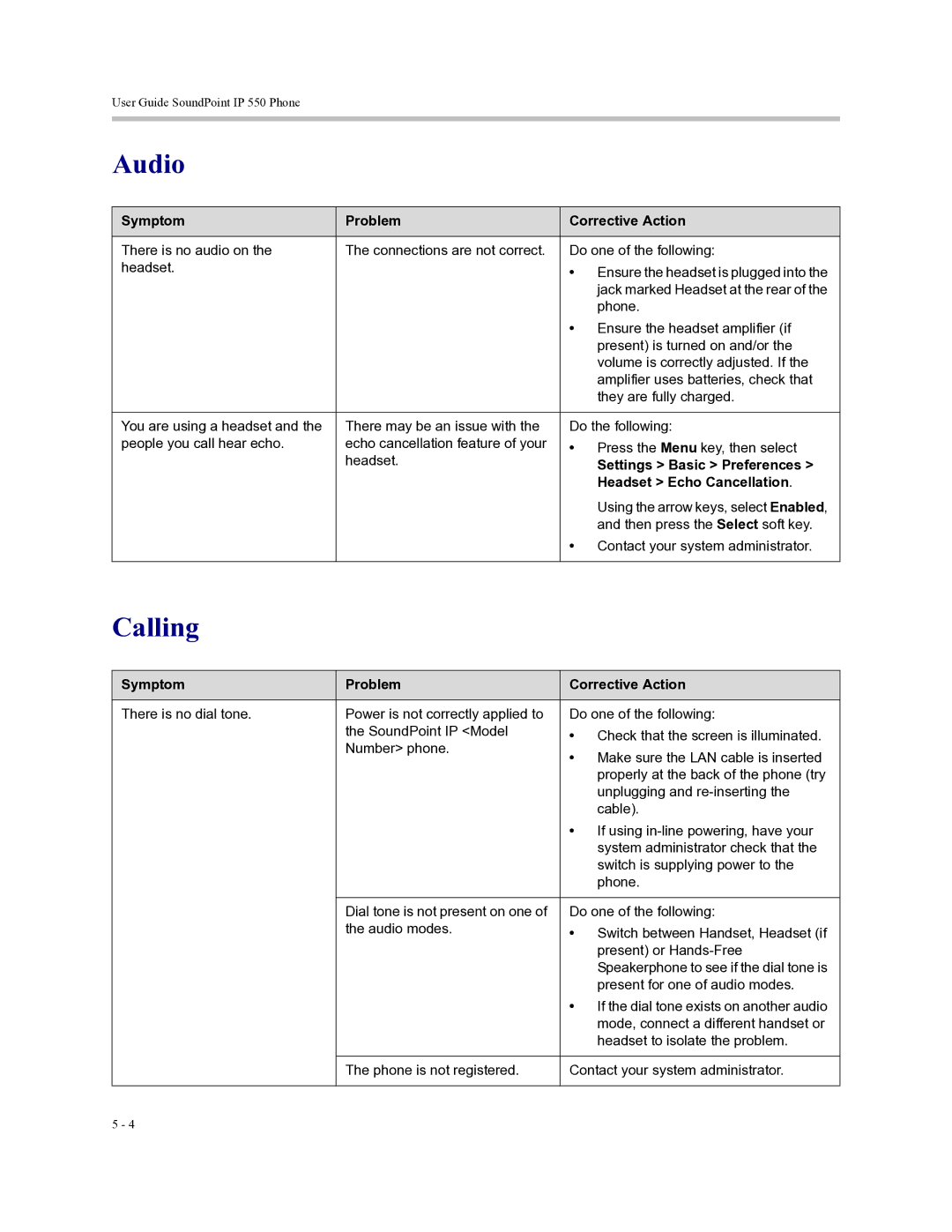
Symptom | Problem | Corrective Action |
|
|
|
There is no audio on the | The connections are not correct. | Do one of the following: |
headset. |
| • Ensure the headset is plugged into the |
|
| jack marked Headset at the rear of the |
|
| phone. |
|
| • Ensure the headset amplifier (if |
|
| present) is turned on and/or the |
|
| volume is correctly adjusted. If the |
|
| amplifier uses batteries, check that |
|
| they are fully charged. |
|
|
|
You are using a headset and the | There may be an issue with the | Do the following: |
people you call hear echo. | echo cancellation feature of your | • Press the Menu key, then select |
| headset. | Settings > Basic > Preferences > |
|
| Headset > Echo Cancellation. |
|
| Using the arrow keys, select Enabled, |
|
| and then press the Select soft key. |
|
| • Contact your system administrator. |
|
|
|
Calling
Symptom | Problem | Corrective Action |
|
|
|
There is no dial tone. | Power is not correctly applied to | Do one of the following: |
| the SoundPoint IP <Model | • Check that the screen is illuminated. |
| Number> phone. | • Make sure the LAN cable is inserted |
|
| |
|
| properly at the back of the phone (try |
|
| unplugging and |
|
| cable). |
|
| • If using |
|
| system administrator check that the |
|
| switch is supplying power to the |
|
| phone. |
|
|
|
| Dial tone is not present on one of | Do one of the following: |
| the audio modes. | • Switch between Handset, Headset (if |
|
| present) or |
|
| Speakerphone to see if the dial tone is |
|
| present for one of audio modes. |
|
| • If the dial tone exists on another audio |
|
| mode, connect a different handset or |
|
| headset to isolate the problem. |
|
|
|
| The phone is not registered. | Contact your system administrator. |
|
|
|
5 - 4