Modifying MAC Filters
Deleting MAC Filters
Interrogating DockLINK for Performance Information
Checking 10BaseT Port Statistics
Total Packets Transmitted
Total Packets Received
Checking Radio Port Statistics
Radio Port Statistics
Packet Transmission
Average Transmit Rate Packets/Sec
Total Retransmission
Packet Reception
Average Receive Rate Packets/Sec
Upgrading System Software
File to Upload
Upgrading from a Tftp Server
Address field. Do not use this selection with DockLINK
Set Tftp Server IP Address
System Software File Name
Saving or Rejecting Configuration Setting Changes
Save All Changes and Reset Radio Button
Reload Last Saved Configuration Radio Button
Reset Configuration to Factory Default Radio Button
Resetting the DockLINK
Reset
Testing DockLINK Connectivity to the Wireless Network
Setting the Frames to Send
Setting the Frame Size
Setting the Address
Frames Sent
Frames Acked
Success %
Avg Retrans
Start Button
Stop Button
Recording Important System Information
System Information
Subnet ID
Boot Software Version
Viewing the System Log
System Log
Connecting the VT-100 Terminal to the DockLINK
Managing the DockLINK Locally
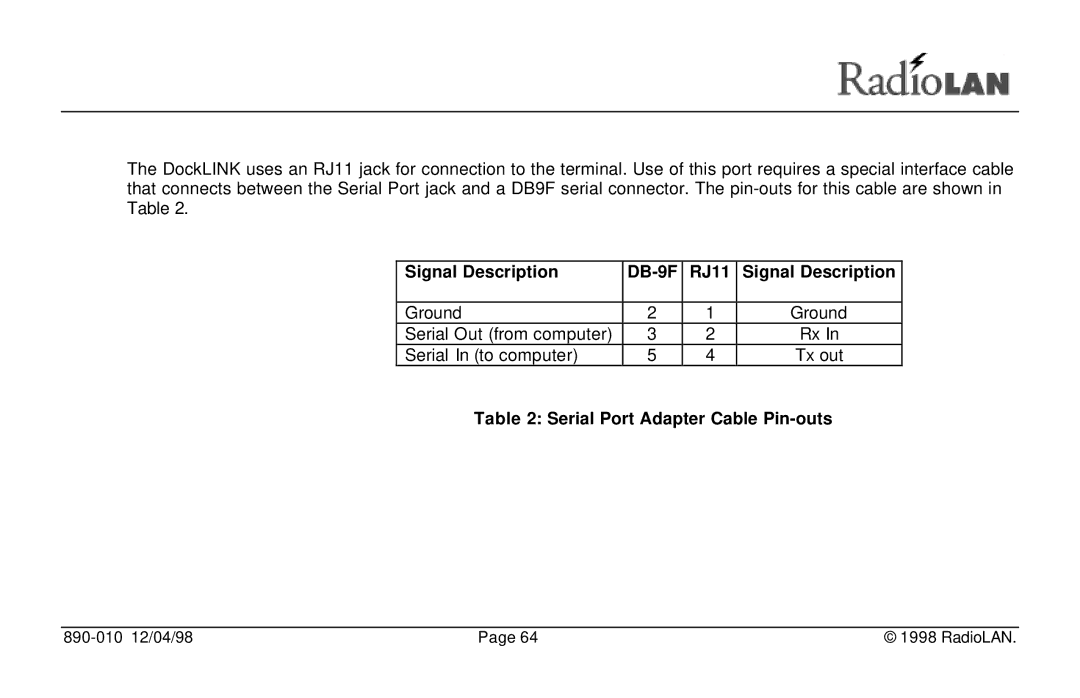
Signal Description DB-9F RJ11
Serial Port Adapter Cable Pin-outs
DockLINK Local Management
Configuring the DockLINK for use in the Dock Mode
Prompt For more information, see Station Name
Logging onto the DockLINK Configuration Screen
Serial Number
Enter User Name
Using the Main Menu
Node Discovery
System Statistics Menus
Working with the System Configuration Menu
System Configuration Menu
Port Parameters Menus Snmp Parameters
Access Security
Configuration Manager Menu Items
User Password
Menu Name Menu Item Refer to
User Logon Name
Default Gateway IP
Menu Name Menu Item Refer to IP Address
Subnet Mask
Address
Menu Name Menu Item Refer to Dhcp Operation Mode
Dock Mode
Data Encryption Mode
Enable Encryption
Encryption Key
10BaseT Port Parameters
Menu
Block NetBIOS Packets
Subnet ID
Block MAC Packets
Edit MAC Filters
Packet When Satisfied
List all Filters Configured
Address Filtering
Accept or Reject
Download Mode
Menu Name Menu Item Refer to Radio Port Statistics
Save All Configuration
Menu Name Menu Item Refer to Tftp Server IP Address
System Software Name
Perform Download
Configurations
Reset All Configuration
Ping Frame Count
Ping Frame Size
Menu Name Menu Item Refer to Perform Ping
Total Packets
Transmitted
Average Retransmission
Menu Name Menu Item Refer to System Information
System Log
Troubleshooting
Indicators
Problem No traffic passed
Problem Radio Range seems less than it should be
Access Point Agent Client Station
Glossary
Dhcp Server
Domain Gateway
IP Address MAC Address Manager
Node
Packets
Ping
Routing
Subnet Mask
Indicators
Power LED
Fault LED
10Base-T port LEDs
MDI/MDI-X switch
Status LEDs