Content Delivery Server Administration Guide
Page
Contents
Catalog Manager
Contents
Vi Administrator Guide 2005Q4
Contents
Vending Manager 129 Administrator Tasks
Contents
Administrator Guide 2005Q4
Contents
Device Capabilities
Content Pricing 241 Pricing Scenarios Glossary Index
Tables
Nokia 6310i Device Specifications 238
How This Document Is Organized
Before You Read This Document
Typographic Conventions
Related Documentation
Sun Welcomes Your Comments
Accessing Sun Documentation Online
Introduction
Sun Java System Content Delivery Server
Content Java Applications Ringtones Wallpapers
Catalog Manager
Catalog Manager Processes
Content Management
Automated Content Validation
Device Management
Account Management
Plan Management
Vending Manager
Fulfillment Manager
Administrator Guide 2005Q4
Vending Manager Processes
Administration Consoles
Browser Requirements
Reporting
Accessing the Administration Consoles
Logging in to the Catalog Manager
Start the Catalog Manager
Logging in to the Vending Manager
Enter your administrator name and password Click Log
Catalog Manager
Managing Content
Managing Content Categories
Viewing Categories
Click the Categories tab
Click a category to view its subcategories
Click Add New Category
Adding a Category
Editing a Category
Enter a name and short description of the category
Click Add Category
Click OK to close the confirmation
Deleting a Category
Content Submissions
Managing Content Types
CDS OMA DRM
Content Protection
Inapplicable Content
Using CDS DRM Agents and CDS OMA Forward Lock
2CDS DRM Agents
TitleDescription
3OMA DRM 1.0 Formats
Using OMA DRM
OMA DRM 1.0 and Non-Compliant Devices
Mime Types for OMA DRM
4Required Mime Types for OMA DRM
5DRM Options and Associated DRM Types and Content Types
Associating Content Types with DRMs
Enabling and Disabling a DRM
Pricing Content
6Content Delivery Server Pricing Models
OMA DRM
7DRM Options and Pricing Models
Pricing Options
Changing the Pricing of Content
Disassociating Content From Pricing Options
Viewing Supported Content Types and Mime Types
Adding a Content Type
Viewing Properties for a Supported Mime Type
Click OK to close the properties
Enter the following information
Editing a Content Type
Click Done when finished Click OK to close the confirmation
Select a DRM
Creating a Pricing Option
Click Done when finished
Enter a unique Pricing Option Name
Enter a unique Option ID
Click Done to complete the operation
Editing a Pricing Option
Change the following fields as needed
Deleting a Content Type
Disabling a Pricing Option
Click Done Click OK to close the Confirmation
Registering a Mime Type
Editing a Mime Type
Click the Mime type that you want to edit
Click Edit
Make the necessary changes Click Save
Click OK to close the confirmation message
Deleting a Mime Type
Managing Submitted Content
Viewing Submitted Content
8Content Status Types
To view submitted content by state, follow these steps
Administrator Guide 2005Q4
Click Edition Updates
Viewing Submitted Editions
Click the status that you want to view
Removing an Edition
Click Submit
Searching for Content
9Content Status Types
Changing the Status of Content
Click GO
Click OK to confirm the status change
Editing Content
Select Edition Updates
Changing the Status of Editions
Click Edit from the View Content Properties
10Content Delivery Server Pricing Models
Edit the content as needed, then click OK
Managing Published Content
Viewing Published Content
Viewing Published Editions
Removing Content
Click the name of the edition that you want to view
Copying or Moving Categories of Content
Navigate to the item that you want to work with
Click the title of the item
Select the categories you want to copy or move
Click Copy/Move Content
Select one or more destination categories
Click Copy or Move
Confirm or cancel the operation
Administrator Guide 2005Q4
Copying or Moving Content Items
Administrator Guide 2005Q4
Select one or more destination categories
Setting Custom Prices for Published Content
Creating Custom Prices for Content per Category
Administrator Guide 2005Q4
Change the purchase price in one of the following ways
Managing Devices
Managing Device Libraries
Viewing Device Libraries
Viewing Properties for a Specific Device Library
Click the library name
Click New Library
Adding a Device Library
Click Next
Editing a Device Library
Click OK to display the library properties
Managing Content Descriptor Templates
Deleting a Device Library
Make the necessary changes
Code Example 2-1Sample Content Descriptor Template
11Content Attributes for Content Descriptor Templates
Viewing Content Descriptor Templates
Adding a Content Descriptor Template
Click OK to display the template properties
Editing a Content Descriptor Template
Managing Device Definitions
Viewing Devices
Administrator Guide 2005Q4
On the Device Management page, click New Device
Adding a Device
Specify the following fields
Click Create New Device
Specifying Device Capabilities
Click Modify This Device
Mapping Mime Types to a Device
Activating New or Quarantined Devices
Catalog Manager
Select the Mime types that this device supports
Whether the Mime type selected supports MMS Click OK
Setting a Compatible Device
Click OK again to confirm your selections
Adding Supported Devices to Existing Content
Editing a Device
Click OK to save your changes Click OK in the confirmation
Setting the Default Device
Deleting a Device
Importing Devices
Click OK again to close the confirmation
Click Import
Exporting Devices
Managing Server Locales
Adding a New Locale
Click Create to add the locale
Deleting a Locale
Click Update
Managing Accounts
Changing a Locale
Viewing Accounts
From the Catalog Manager, click Accounts in the main menu
12Account Types
13Search and Display Operations
Click Developers or Administrators
Click an account name
Managing Vending Manager Accounts
Viewing Vending Manager Accounts
Adding a Vending Manager Account
Enter the required information
Account Password Enter a password
Editing a Vending Manager Account
Modify the fields as required, then click OK
Deleting a Vending Manager Account
Managing Developer Accounts
Viewing Developer Accounts
Adding a Developer Account
Click OK to add the Developer account
Click OK again to close the confirmation message
Editing a Developer Account
Click OK to close the information message
Managing Catalog Manager Administrator Accounts
Viewing Catalog Manager Administrator Accounts
Deleting a Developer Account
Adding a Catalog Manager Administrator Account
Modify the fields as required
Editing a Catalog Manager Administrator Account
Deleting a Catalog Manager Administrator Account
Click OK to add the Administrator account
From the Catalog Manager, click Plans in the main menu bar
Managing Plans
Managing Vending Plans
Viewing Vending Plans
Click a Vending plan name to view the properties of the plan
Adding a Vending Plan
Editing a Vending Plan
To edit a Vending plan, follow these steps
Viewing Vending Plan Members
Adding a Member to a Vending Plan
Click the Members tab
Setting the Default Vending Plan
Removing a Member from a Vending Plan
Click Add
Click OK to confirm the deletion
Deleting a Vending Plan
Viewing Profiles
Managing Developer Plans
Adding a Profile
Click a profile name
Click New Profile
Provide the information requested
Click Finish
Editing a Profile
Deleting a Profile
Viewing Developer Plans
Adding a Developer Plan
Click New Developer Plan
Select Developer Plans from the drop-down list
Editing a Developer Plan
Change the information as required, then click OK
Viewing Developer Licensees
Click Add Licensees
Adding a Developer Licensee to a Developer Plan
Setting the Default Developer Plan
Click Set Default
Removing a Developer Licensee from a Developer Plan
Deleting a Developer Plan
Getting Background Job Status
15Background Job Indicators
Click on the Background Jobs notice in the main menu bar
Getting Job Status
Examining Job Details
Clearing a Failed Job
Vending Manager
Administrator Tasks
Managing Categories
Adding a Category
From the Stocked Content tab, click Manage Categories
If you want to create a main category, go to Step
Enter a name and description of the category
Editing a Category
Deleting a Category
Managing Catalog Content
Vending Manager
1Content Status Symbols
Searching for Published Content
Viewing the Properties of Published Content
Enter the search term in the Search field
Administrator Guide 2005Q4
Navigate to the item with which you want to work
Viewing Editions of Published Content
Administrator Guide 2005Q4
When you are done viewing the Edition Properties, click OK
Setting Stocking Options
Click Auto-stocking On Click OK to save your changes
Stocking Content Manually
Click View by Title
Click the title of the content that you want to stock
Click Stock Content
Stock Content page, specify the following options
Click OK Click OK to close the Confirmation
Stocking Multiple Content Items
Stock Content page is displayed
Select the categories that you want to stock
Specify the content status and the External Content ID
Click Done
Click Stock
Clearing the Stocking Jobs list
Viewing Stocking Jobs
Stopping a Stocking Job
Checking the Status of a Stocking Job
Updating the Catalog for Stocked Content
Setting Local Pricing
Pricing for Content for a Locale
Administrator Guide 2005Q4
Click Done to enact the change
Price Update Notification
Changing the Price of Individual Content Items
Click Apply
Managing Stocked Content
Viewing Stocked Content
Searching for Stocked Content
Changing the Status of Stocked Content
Click OK to confirm you want to unstock the content listed
Unstocking Content
Editing Stocked Content
Administrator Guide 2005Q4
Editing External Content IDs
Click Submit to submit your changes
Updating Stocked Content
Copying or Moving Categories of Content
Select the categories you want to copy or move
Select one or more destination categories
Confirm or cancel the operation
Copying or Moving Content Items
Administrator Guide 2005Q4
Select one or more destination categories
Customizing Prices for Stocked Content
Vending Manager
Administrator Guide 2005Q4
Managing Bundles
Bundle Pricing
Creating a Bundle
Click Create Bundle
Specify the following information General Information
Catalog Description
External Content ID
Bundle Price
Categories
Viewing Bundle Information
Administrator Guide 2005Q4
Deleting a Bundle
Changing the Status of a Bundle
Managing Testing Content
Click on the desired content to see its properties
Editing a Bundle
Creating Customized Marketing Campaigns
Stocking Testing Content
Creating a Campaign
Specifying a Campaign Type
Click Next to specify campaign options and target audience
Specifying Campaign Options and Target Audience
Enter the name of the campaign and a description
Enter the Campaign Coupon
Choose the Subscriber Segment from the drop-down list
Specifying a Campaign Message
Enter the subject of the advertisement
Specifying Content for the Campaign
Click Next to proceed
Specifying Campaign Pricing Characteristics
Click Done to complete the campaign definition
Specifying Campaign Scheduling
Viewing Campaign Details
Administrator Guide 2005Q4
Testing a Campaign
Editing a Campaign
Click Done on the last page of the wizard
Working with Subscriber Segments
Displaying Subscriber Segments
Creating a Subscriber Segment
Open the Subscriber Segments Click New
Specify the following information
Creating a Campaign Template
Working with Campaign Templates
Editing a Subscriber Segment
Displaying Available Campaign Templates
2Properties Available for Notification Templates
Campaign ID
For MIDlets and iAppli applications only
Open the Campaign Templates
Managing Vending Manager Administrator Accounts
Viewing Vending Manager Administrator Accounts
Editing a Campaign Template
Click Add New Administrator
Adding a Vending Manager Administrator Account
Click OK Click OK again to close the Confirmation
Click an administrator name
Editing a Vending Manager Administrator Account
Deleting a Vending Manager Administrator Account
Customer Care Agent Tasks
Modify the information as required Click OK
Viewing Stocked Content
Setting the Display of Stocked Content for Subscribers
Navigate to the item that you want to examine
Viewing the Properties of Stocked Content
Managing Subscriber Accounts
Viewing Editions of Stocked Content
Viewing Subscriber Accounts
Adding a Subscriber Account
Click OK to return to the previous
Click Add New Subscriber
Click OK to close the Information
Editing a Subscriber Account
Managing Subscriber Licenses
Viewing a Subscriber ’s Download History
Click OK to save your change
Extending Trial Usage
Deleting a Subscriber Account
Issuing a Refund
Managing Subscriber Plans
Viewing Subscriber Plans
Click the plan name
Click New Subscriber Plan
Adding a Subscriber Plan
Editing a Subscriber Plan
Viewing Subscriber Plan Members
Click Add New Member
Adding Members to a Subscriber Plan
Click the plan whose list of members you want to see
Click Members
Removing Members from a Subscriber Plan
Setting a Default Plan for New Subscribers
Check the plan you require, then click OK
Deleting a Subscriber Plan
Editing Your Administrator Account
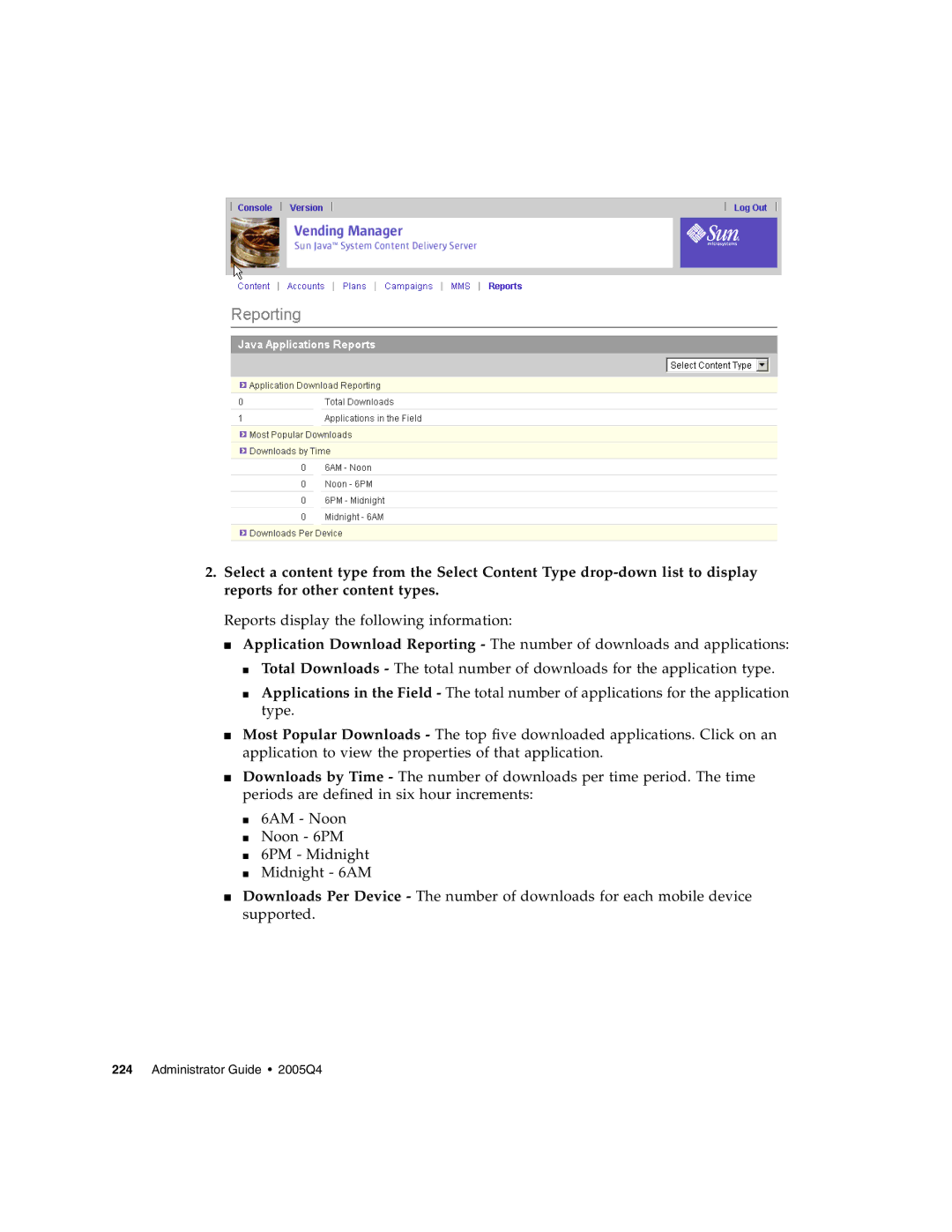
Viewing Reports
Click the My Account tab Click Edit
Administrator Guide 2005Q4
Choosing MMS as the Content Delivery System
Sending MMS Messages
Displaying MMS Messages
Enter a name for the message and the message text
Creating an MMS Message
Select one or more device types in the table
Enter the path or browse for the media file Click Load
OoptionalClick Preview to preview the media file
Click Save to save the MMS message to the server
Editing an MMS Message
Testing a New MMS Message
Testing an MMS Message
Testing an Existing MMS Message
Deleting an MMS Message
Open the MMS Messages
Click Delete Click OK to close the confirmation dialog box
Using the MMS Test Log
Administrator Guide 2005Q4
System Capabilities
Descriptions of the Capabilities
Table A-1Mandatory Capabilities
Content Delivery Server-Specific Capabilities
Table A-2Content Delivery Server-Specific Capabilities
Mandatory Capabilities
Browser Capabilities
User Interface and Software Capabilities
Table A-3User Interface and Software Capabilities
Specifying a Capability Value
Boolean
Device Specifications
List
Integer
Nokia
Table A-4Nokia 6310i Device Specifications
Table A-5Device Specifications for a User-Defined Device
Table A-6Device Specifications for a User-Defined Device
User-Defined Devices
Table A-6Device Specifications for a User-Defined Device
Table B-1Associated DRMs, Content Types, and Pricing Models
Content Pricing
Disconnected Time Sensitive
Pricing Scenarios
Table B-2Initial Pricing Set for Items 1
Table B-3Resulting Pricing for Items 1 and 2 in Scenario
Table B-4Resulting Pricing for Items 1 and 2 in Scenario
Table B-5Resulting Pricing for Items 1 and 2 in Scenario
Table B-6Resulting Pricing for Items 1 and 2 in Scenario
Table B-7Resulting Pricing for Items 1 and 2 in Scenario
Table B-8Resulting Pricing for Items 1 and 2 in Scenario
Glossary
Administrator
Content Delivery Server-Specific
Content Descriptor
Mandatory
Record Management
User Interface
Glossary
Administration Guide 2005Q4
Index
AutoCreate.newDevice property
Index
Administration Guide 2005Q4
CDS DRM
Administration Guide 2005Q4
Index
Denied
Submitted content
Index
Administration Guide 2005Q4