PREPARING YOUR COMPUTER
SVAT ELECTRONICS
now you can see
Before setting up your network connection, you have to ensure that your computer’s security settings are configured to allow you to view the footage from the DVR.
NOTE: You will need to complete the steps below for EVERY computer you wish to view the DVR from.
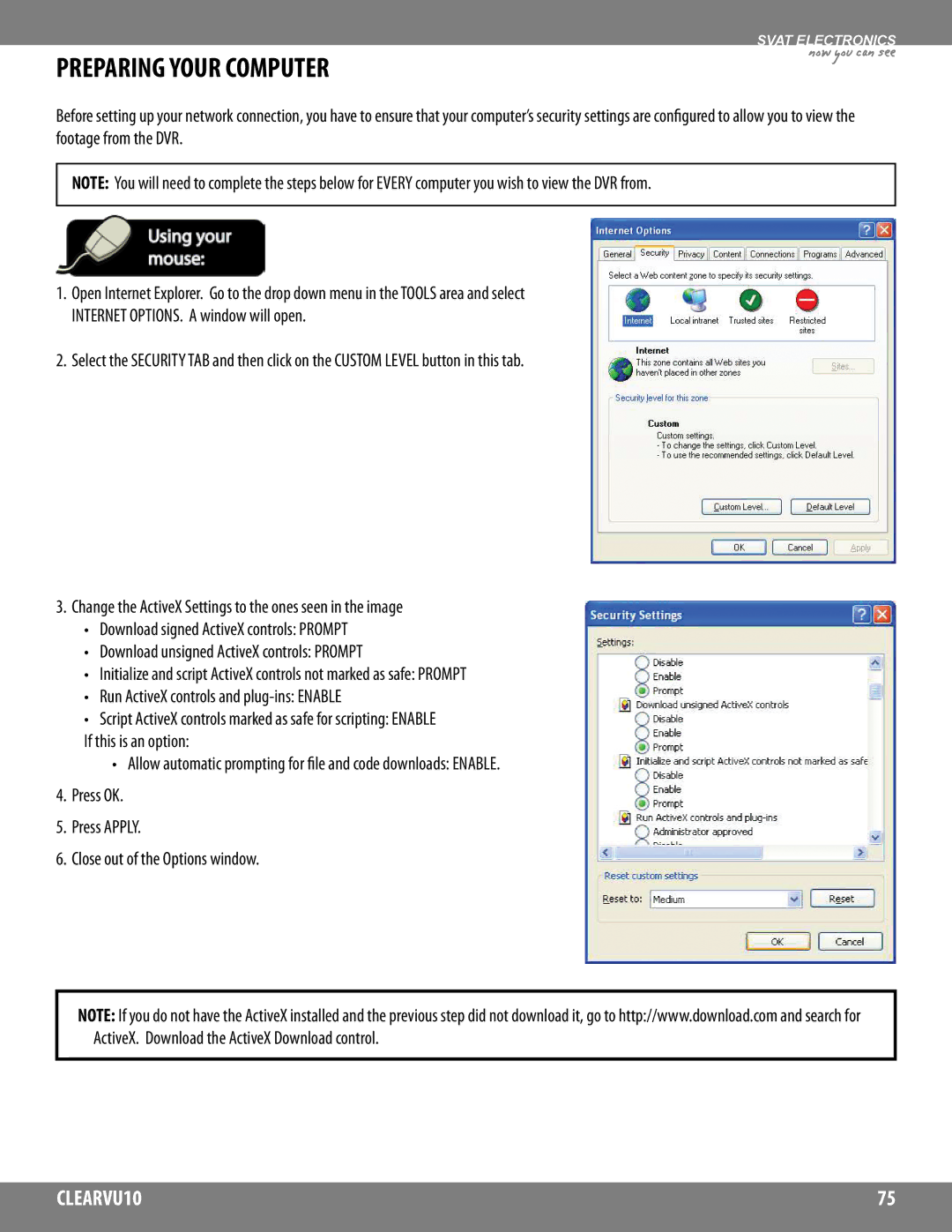
1.Open Internet Explorer. Go to the drop down menu in the TOOLS area and select INTERNET OPTIONS. A window will open.
2.Select the SECURITY TAB and then click on the CUSTOM LEVEL button in this tab.
3.Change the ActiveX Settings to the ones seen in the image
•Download signed ActiveX controls: PROMPT
•Download unsigned ActiveX controls: PROMPT
•Initialize and script ActiveX controls not marked as safe: PROMPT
•Run ActiveX controls and
•Script ActiveX controls marked as safe for scripting: ENABLE
If this is an option:
•Allow automatic prompting for file and code downloads: ENABLE.
4.Press OK.
5.Press APPLY.
6.Close out of the Options window.
NOTE: If you do not have the ActiveX installed and the previous step did not download it, go to http://www.download.com and search for ActiveX. Download the ActiveX Download control.
CLEARVU10 | 75 |
|
|