Chapter 1 Overview
Cisco Nexus 5500 Platform Switches
Se n d d o c u m e n t a t i o n c o m m e n t s t o n ex u s 5 k d o c s @ c i s c o . c o m .
Figure | Layer 3 GEM2 |
1
2
Status LED | 3 | Captive screw that locks the eject lever in a |
|
| closed position |
Ejector lever |
|
|
|
|
|
Ports
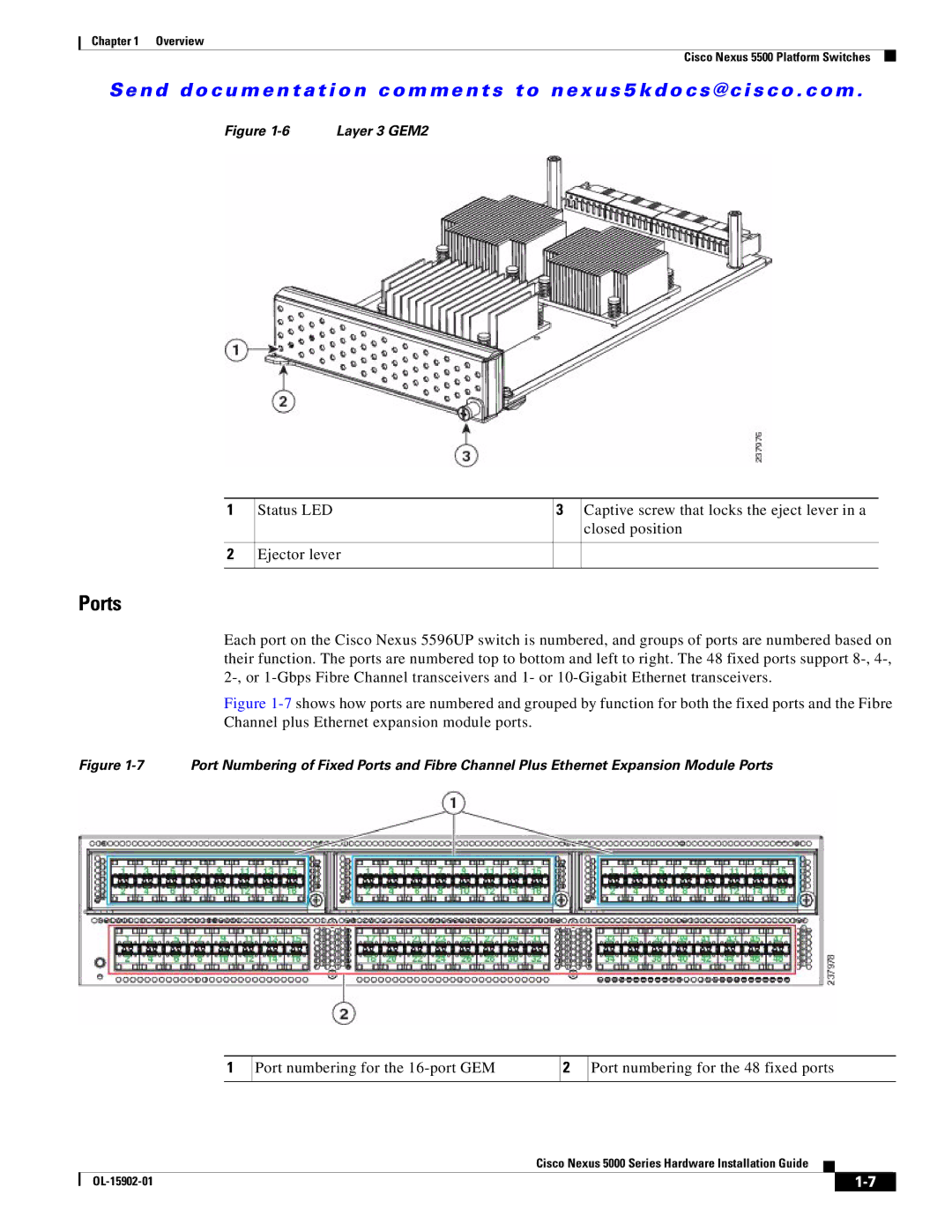
Each port on the Cisco Nexus 5596UP switch is numbered, and groups of ports are numbered based on their function. The ports are numbered top to bottom and left to right. The 48 fixed ports support
Figure 1-7 shows how ports are numbered and grouped by function for both the fixed ports and the Fibre Channel plus Ethernet expansion module ports.
Figure 1-7 Port Numbering of Fixed Ports and Fibre Channel Plus Ethernet Expansion Module Ports
1
Port numbering for the
2
Port numbering for the 48 fixed ports
Cisco Nexus 5000 Series Hardware Installation Guide
|
| ||
|
|