Using the command/response tables
The command/response tables on the next page list valid command ASCII codes, the switcher’s responses to the host, and a description of the command’s function or the results of executing the command. Except when setting audio gain/attenuation, upper and lower case characters may be used interchangeably in the command field.
ASCII to HEX Conversion Table |
• |
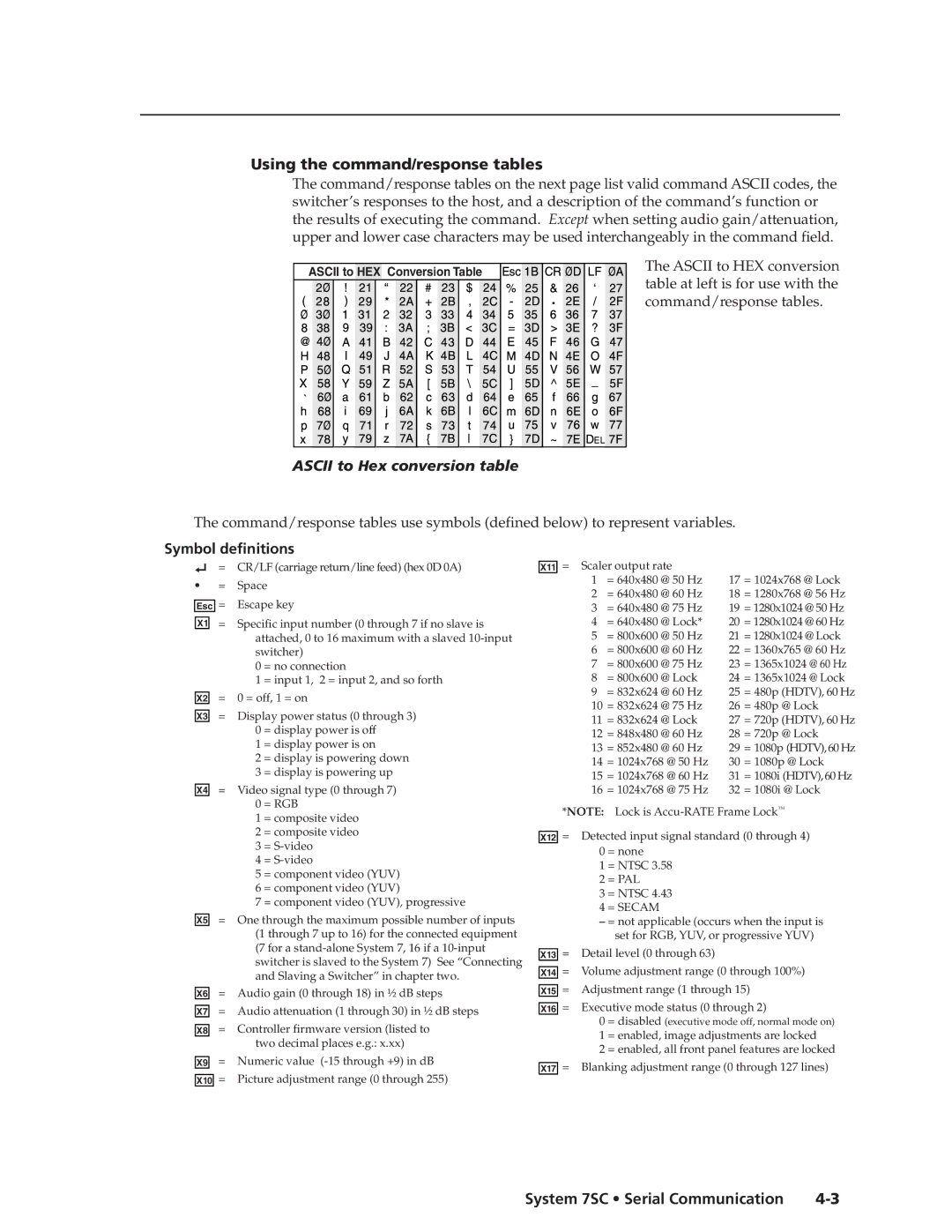
The ASCII to HEX conversion table at left is for use with the command/response tables.
ASCII to Hex conversion table
The command/response tables use symbols (defined below) to represent variables.
Symbol definitions
= CR/LF (carriage return/line feed) (hex 0D 0A)
•= Space
Esc | = | Escape key | |
X1 | = | Specific input number (0 through 7 if no slave is | |
|
| attached, 0 to 16 maximum with a slaved | |
|
| switcher) | |
|
| 0 | = no connection |
|
| 1 | = input 1, 2 = input 2, and so forth |
X2 | = | 0 = off, 1 = on | |
X3 | = | Display power status (0 through 3) | |
|
| 0 | = display power is off |
|
| 1 | = display power is on |
|
| 2 | = display is powering down |
|
| 3 | = display is powering up |
X4 | = | Video signal type (0 through 7) | |
|
| 0 | = RGB |
|
| 1 | = composite video |
|
| 2 | = composite video |
|
| 3 | = |
|
| 4 | = |
|
| 5 | = component video (YUV) |
|
| 6 | = component video (YUV) |
|
| 7 | = component video (YUV), progressive |
X5 | = | One through the maximum possible number of inputs | |
|
| (1 through 7 up to 16) for the connected equipment | |
|
| (7 for a | |
|
| switcher is slaved to the System 7) See “Connecting | |
|
| and Slaving a Switcher” in chapter two. | |
X6 | = | Audio gain (0 through 18) in ½ dB steps | |
X7 | = | Audio attenuation (1 through 30) in ½ dB steps | |
X8 | = | Controller firmware version (listed to | |
|
| two decimal places e.g.: x.xx) | |
X9 | = | Numeric value | |
| = | Picture adjustment range (0 through 255) | |
X10 | |||
X11 = Scaler output rate |
|
|
| ||
1 | = 640x480 @ 50 Hz | 17 | = 1024x768 @ Lock | ||
2 | = 640x480 @ 60 Hz | 18 | = 1280x768 @ 56 Hz | ||
3 | = 640x480 @ 75 Hz | 19 | = 1280x1024 @ 50 Hz | ||
4 | = 640x480 @ Lock* | 20 | = 1280x1024 @ 60 Hz | ||
5 | = 800x600 @ 50 Hz | 21 | = 1280x1024 @ Lock | ||
6 | = 800x600 @ 60 Hz | 22 | = 1360x765 @ 60 Hz | ||
7 | = 800x600 @ 75 Hz | 23 | = 1365x1024 @ 60 Hz | ||
8 | = 800x600 @ Lock | 24 | = 1365x1024 @ Lock | ||
9 | = 832x624 @ 60 Hz | 25 | = 480p | (HDTV), 60 Hz | |
10 | = 832x624 | @ 75 Hz | 26 | = 480p | @ Lock |
11 | = 832x624 | @ Lock | 27 | = 720p | (HDTV), 60 Hz |
12 | = 848x480 | @ 60 Hz | 28 | = 720p | @ Lock |
13 | = 852x480 | @ 60 Hz | 29 | = 1080p (HDTV), 60 Hz | |
14 | = 1024x768 @ 50 Hz | 30 | = 1080p @ Lock | ||
15 | = 1024x768 @ 60 Hz | 31 | = 1080i (HDTV), 60 Hz | ||
16 | = 1024x768 @ 75 Hz | 32 | = 1080i @ Lock | ||
*NOTE: | Lock is | ||||
X12 = Detected input signal standard (0 through 4)
0 = none
1 = NTSC 3.58
2 = PAL
3 = NTSC 4.43
4 = SECAM
–= not applicable (occurs when the input is set for RGB, YUV, or progressive YUV)
X13 = Detail level (0 through 63)
X14 = Volume adjustment range (0 through 100%)
X15 = Adjustment range (1 through 15)
X16 = Executive mode status (0 through 2)
0 = disabled (executive mode off, normal mode on)
1 = enabled, image adjustments are locked
2 = enabled, all front panel features are locked
X17 = Blanking adjustment range (0 through 127 lines)
System 7SC • Serial Communication |