VM200
Safety Instructions
VM200
Getting Started
Monitoring Signals
Scene Memory
Initializing the VM200
VM200 User’s Guide
About This Chapter
VM200
Welcome to the VM200
Using this Guide
Installing the VM200
Inputs and Outputs
Feature Summary
Audio Specifications
Midi functions
Mixer Functions
Mixer Configuration
Why a Digital Mixer?
Dual On-board Effects Processors
Four-band Parametric EQ & EQ Library
Digital I/O
About the Display and Graphic User Interface
Scene Memory
Faders
Touring
VM200
Top Panel Control Surface
2TRK in switch
PAD 26dB switches
Analog Control Section
Input selectors
LCD Display
Enter and Exit Keys
Data Wheel and Neighboring Keys
+1/ Keys
Function Keys
Midi Key
Setup Section
System Key
Current Scene Status
Key Mode Section
ROUTING/PHASE Key
CH View Key
PAIR/GROUP Key
CHANNEL/METER Key
AUX1, AUX2, AUX3, and AUX4 Keys
Fader Mode Section
EFF1 and EFF2 Keys
Channel Key
EQ on Key
EQ Library
Recall Key
Store Key
Effect Library
Eff Edit Section
Rec Buss Section
Solo Key
Scene Memory Section
Channel Control Section
Fader function
On key function
ON, SOLO, & EQ Edit Keys
On Keys
Solo key function
Solo Keys
EQ Edit key function
EQ Edit Keys
EQ Section Rotary Controls
Select Keys
2TRK
Rear Panel
+48 Phantom Power
Inputs 1 4 XLR or Phone Connectors a or B
Inputs 5 8 Phone Connectors
Inserts 1-4 Phone Connectors
75Ω On, Off Switch
Power Switch
Block
Diagram
VM200 User’s Guide
Started
Phones
VM200 System Example
Turning the VM200 On and Off
Connecting the Power Cord
Channel Layers
Few Tips on Using the VM200
Analog
Stopless Rotary Controls
Keeping It Digital
An Important Note About Word Clock Information
Channel Edit Function
Lower and Raise Faders to Initiate Sends
Reading the Display
Function Page Parameter Matrix
Examples of Other Function Pages
Lit & Flashing LED Keys
Lit & Flashing LED Keys
Connect the ST Buss OUT to the analog inputs of a recorder
Finally...Let’s Get Started
Making Connections
Lower all faders and Gain and Trim knobs on the VM200
Powering On
Adjusting the Channel Input
Press the channel 1 EQ Edit key
Adjusting the EQ
Adjusting the EQ
Press the Recall key in the Eff Library section
Audition Some Effects
Press the EFF2 key in the Eff Edit section
Recording
Press the EFF2 key in the Fader Mode section
Storing a Mix Scene
Press the 17-20 EFF RTN Page Select key
VM200 User’s Guide
Channels
Input Channels
Phantom Power for Input Channels
Insert Channels
Trim Controls
Pad Switches Input channels
Press the Exit key or the CHANNEL/METER key
Inverting the Input Phase
Input Channel EQ
Setting Channel Levels
Muting Channels
Panning Input Channels
Routing Input Channels
Feeding Outputs
Monitoring and Soloing Input Channels
REC Buss Out
ST Buss Out
Grouping Mute Channels
Pairing Channels
Digital Outs
Press the PAIR/GROUP key to display the 1CH Pair function
Grouping Faders
Press the CH View key to display the 1CH View function
Viewing Input Channel Settings
Press the EQ Edit key for the target channel
Copying Channel Settings
Press the Enter key to execute the copy operation
VM200 User’s Guide
Chapter Contents
Equalizers EQ
Adjusting the EQ
Press the EQ on key in the Selected EQ section to turn it on
Lo-Mid Hi-Mid Gain G
Bypassing the EQ
EQ Enabling Channels
Press the Enter key to confirm your selection
Press the EQ on key in the Selected EQ section
While pressing and holding down the Enter key, press
Resetting the EQ
VM200 User’s Guide
Name
EQ Preset Library List
Press the Enter key to recall the desired EQ Program
Recalling EQ Programs
Recalling EQ Programs
Press the Enter key
Storing EQ Programs
Storing EQ Programs
Editing EQ Program Titles
EQ Library Name Edit function pages
Copying EQ Settings
Copying EQ Settings
EQ Preset Library Parameters
Name Parameter Description Lo-Mid Hi-Mid Gain
Distortion of popular
Description Lo-Mid Hi-Mid Gain
VM200 User’s Guide
Monitoring Signals
MON SEL Parameter
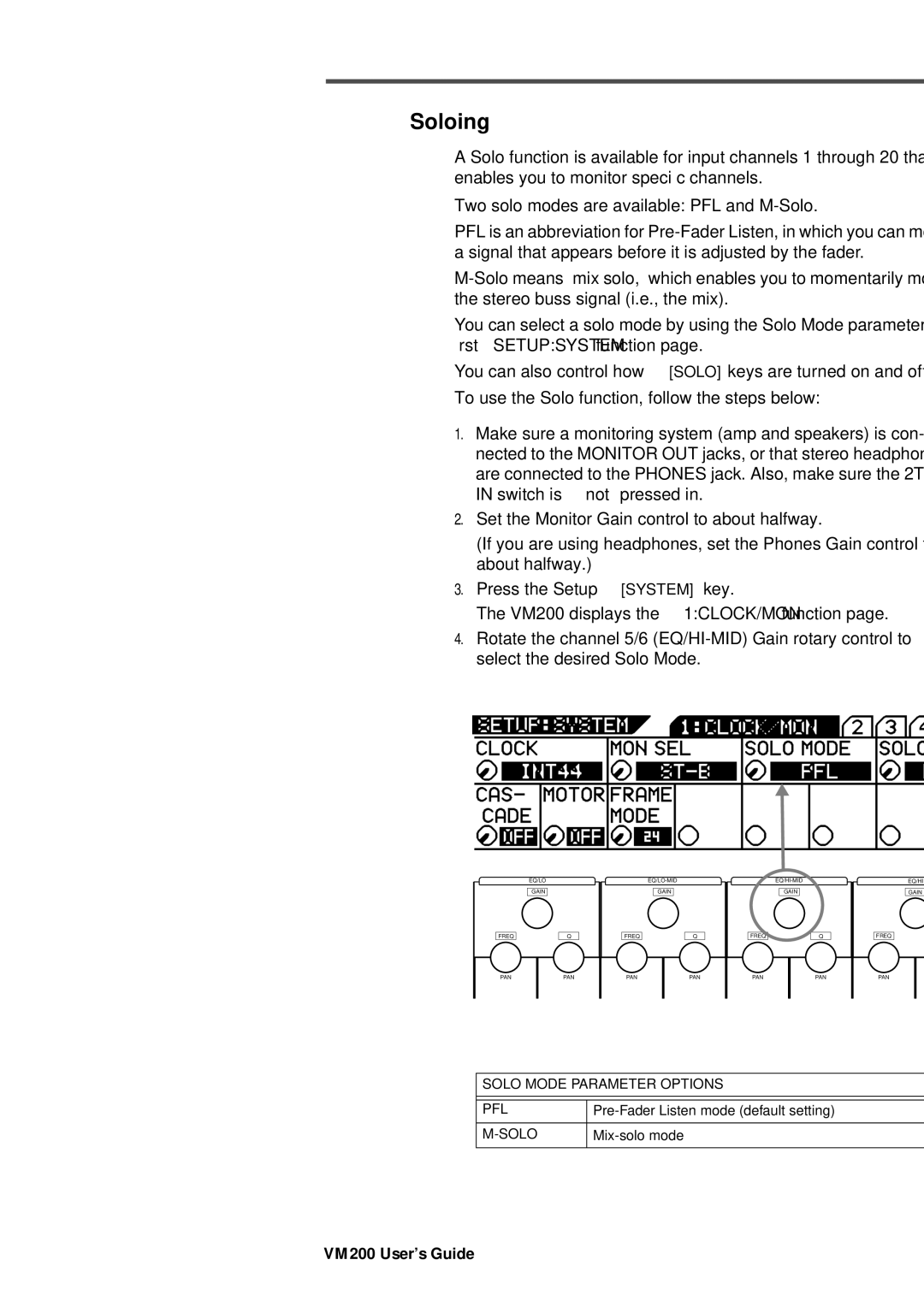
Solo Mode Parameter
Monitoring and Soloing
Two Track Input 2TRK
Monitor Outs and Phones
Monitoring
Press the Setup System key
Soloing
Solo KEY Parameter Options Latch
Selected Solo keys light up
Solo Safe Function
Press the Setup System key four times from start of cycle
Press the CHANNEL/METER key or the Exit key in most modes
Metering Signal Levels
Viewing Input/Output Level Meters
Press the CH View key
LED Display Meter L/R or ST BUSS/SOLO
Outputs
Chapter Contents
Overview
Adat OUT & S/P DIF OUT
Viewing the ST Buss OUT Meters
Using the ST Buss OUT
Monitoring the ST Buss OUT
Muting the ST Buss OUT
Setting the ST Buss OUT Level
Soloing the ST Buss OUT
Viewing the REC Buss OUT Meters
Using the REC Buss OUT
Monitoring the REC Buss OUT
Soloing the REC Buss OUT
Setting the REC Buss OUT Level
114 VM200 UserÕs Guide
Enabling AUX Sends 3 & 4 ADD. AUX Parameter
Using the AUX Sends
Monitoring AUX Sends
Viewing the AUX Send and Master Setting
Pre-fader/Post-fader AUX Sends
Sending Channel Signals to AUX Sends
Use the Master on button to turn the AUX Send on and off
Muting AUX Sends
Press the Exit key to return to Channel Edit mode
Pairing AUX Sends
Smoothing Function
Press the Enter key to confirm the setting
Viewing Buss Routing for Each Channel
122
Effects
VM200 Effects
Reverb effects
Effect Preset Library List
Effects Library
Modulation effects
Delays
Early Reflection-type Reverbs
Multi-effects
Pitch Changer
Applying Effects
Setting Effects Return
Selecting an Effects Processor
Press the CHANNEL/METER key
Routing Effects Returns
Sending Signal to Effects Processor
Pre-fader/Post-fader Effect Sends
Controlling the Sends Signals
Viewing and Adjusting the Effect Send Level
Raise the fader for the corresponding channel
Viewing and Adjusting the Effect Send Master Level
Setting the Effect Return Level
Controlling the Return Signals
Muting Effect Sends
Monitoring Effects Sends
Editing Effects
Recalling Effects Programs
Press the Store key in the Eff Library section
Storing Effects Programs
EFF Library Name Edit function pages
Press the Enter key to recall the desired Effect program
Editing Effect Program Titles
138
Early Reflection-type Effects
Effects Parameters
Reverb-type Effects
Monodelay
3CHDELAY
Dualdelay
3DCHORUS
Chorus
Monopitch
CHORUS-REVERB
Delay-Reverb-type Effects
REVERB-CHORUS
REVERB-FLANGE
Memory
What is Scene Memory?
What Can You Store in a Scene?
Scene Edit Indicator
AUX
Preset Scene Memory
Recalling a Scene Automatically at Start-up
Recalling Mix Scenes
Recalling a Scene Manually
Assign Program Change messages to scene memories
Recalling Mix Scenes Using Midi Program Change Messages
Press the System key five times
Motorized Faders
Press the Scene Memory Store key
Storing Mix Scenes
When you’ve finished naming the scene, press the Enter key
Recall Safe Function
Editing Scene Memory Titles
Specifying Recall Safe Channels
Press the System key three times
Specifying Recall Safe Parameters
Press the CHANNEL/METER key to return to Channel Edit mode
158
Connections
Digital Connections, Word Clocks, and Sample Rates
161
Word IN/OUT Connectors
Word Clock Setup
Setting the Master Word Clock
Press the System key
Recording to a Digital Multitrack Recorder or DAT
Setting the VM200 as Master or Slave
VM200 is word clock Slave
Multitrack Recording and Mastering to a DAT
Digital I/Os
Using Adat
Assigning Channels to Adat Direct SENDs
Using Adat OUT
167
Using S/P DIF OUT
Press the ROUTING/PHASE key twice
Using S/P DIF
Assigning S/P DIF Signals to Channels
Press the CHANNEL/METER key or Exit key
Cascading the VM200
172
VM200
Midi Ports
Using the VM200 with Midi
Cascading Two VM200s
Connecting Midi devices
RX CH Receive Channel
Midi Transmit and Receive Channels
TX CH Transmit Channel
Program Change TX
Program Change Messages
Program Change RX
Program Change Table
Control Change TX
Control Change Messages
Control Change RX
Control Change Table
Bulk Dump
System Exclusive Messages Fostex Exclusive
System Exclusive TX & RX
System Exclusive DevID
Set the TX CH and/or RX CH parameters to on
Using Program Change Messages to Recall Scenes
Press the Midi key
Press the Midi key twice
Editing the User Program Change Assign Table
Select a Program Change number
Select a Scene number
Program Change Assign Table Notes
Viewing the Preset Program Change Assign Table
Press the Midi key three times
Examples Using Program Change Messages
Using Control Change Messages
Select a Control Change number
Editing the Control Change Assign Table
Press the Midi key four times
Control Change Assign Table Notes
Viewing the Preset Control Change Assign Table
Press the Midi key five times
Examples Using Control Change Messages
Controlling Parameters Using Fostex Exclusive Messages
Automatic transmission in response to Bulk Dump Request
Bulk Dump
Transmitting Midi Bulk Dump Messages
Specifying the data you want to transfer
Manual transmission of Bulk Dump Messages
Receiving Bulk Dump Requests
Receiving Bulk Dump Requests
Entering MMC Send Mode
Setting the Device ID Number
MMC Midi Machine Control Send
Select an ID number for the DevID parameter
193
Press the CHANNEL/METER key or the Exit key
Frame Mode
MMC Send and Timecode
Checking the Locate Points
Transmitting the Locate Commands
Storing Locate Points
196
Initializing the VM200
Initializing the VM200
199
System Parameters Value
Default Setup Parameters
Chapter C ontents
Data
Display Warning Messages
EQ 1-8 Invalid! EQ Enable
Outputs
Specifications
Inputs
Midi IN/OUT/THRU
General
Maintenance
Maintenance
Channel Fader Gain Table
Tables & Data
Master Fader Gain
Left Right Pan
Pan Gain
Range 20.3Hz 20.2kHz 240 steps per 1/24 octave
EQ Frequency
Program Change Assign User
Program Change AssignTable 2 Preset
Program Change To Scene Memory Assignment Tables
Control Change Assign User
Control Change To Control Parameters Assignment Tables
Control Change Assign Preset
P0 InitMix
Preset Scene Parameters
P1 Recording
P2 MixDown
Control Change Bn
Midi In/Out Data Format
Motion Control Process MCP MMC Locate target
Program Change Bn
Fostex Exclusive Message
Command List
Remote Command
Setup Commands
Command Details
Channel/Buss Commands
221
Effects Commands
Bulk Dump Request
Bulk Dump & Request
Midi Device Inquiry Message
Model VM200 Version1.0
Midi Implementation Chart
Fostex Distributors List In Europe
Declaration of EC Directive
Affect of Immunity on This Equipment
227
228
Index
230 VM200 User’s Guide
VM200 User’s Guide 231
Symbols Numerics
Page
Fostex Corporation