Operators Manual for Basic Functions
EPA Energy Star MFD
USE of Recycled Paper in the Copier
Regulatory Information
Lineup of Our Manuals
User Management Guide
Network Administration Guide
Scanning Guide
Filing Guide
Before Reading This Manual
Precautions in this manual
Trademarks
Description of original/paper direction
Contents
126
101
102
112
157
Continuous feed mode 197
149
Monocolor copying 152 Hue 153 Saturation 154
208
200
202
206
Confirming Scan Job Status 272 Log List 273
Error Code 284
Replace Toner Bag Symbol 303 Jam Symbols 305
Call Service Symbol 326
346
Time for Slit glass and Main charger cleaning 332
Daily Inspection 368 Simple Troubleshooting 369
Check staple cartridge 336
387
Specifications & Options
Contents
Toshiba Quality is Second to None
Toner
Supplies / Parts
General
Features of the e-STUDIO2500c/3500c/3510c
Features of the e-STUDIO2500c/3500c/3510c
Features of the e-STUDIO2500c/3500c/3510c
When installing or moving
General Precautions
General Precautions
Other points
When using the Multifunctional Digital Color Systems
General Precautions
Position of Certification label, etc
When handling supplies
During maintenance or inspection
Poration
Disclaimer Notice
Forgery prevention function
Forgery Prevention Function/Storage of Color Copies
Storage of color copies
Preparation 2- Setting Copy Paper
Preparation 1- Turning Power On/Off
Description of Each Component
Bypass tray
Description of Each Component
Front / Right side
Reversing Automatic Document Feeder Optional, MR-3018
Paper feed cover optional
Power switch
Connector for USB storage device
Controller interface connector
Touch panel
Left side / Inner side
Platen sheet
Original glass
Toner bag
Charger cleaner
Slit glass cleaner
Touch panel contrast adjustment dial
Configuration of options
Work Table KK-3511
Saddle Stitch Finisher MJ-1030
Hole Punch Unit MJ-6101
Hole Punch Unit MJ-6004
Control panel
JOB Status button
Access button
Error lamp
Interrupt button
When fixing the angle of the control panel
Fit the latches of the stopper
Hole of the position B
Message display
Touch panel
Touch-buttons
Description of Each Component
Clearing functions selected
Adjusting the contrast of the touch panel
Enter
Setting letters
Turning power on
Preparation 1- Turning Power On/Off
When Erasing Data appears
When copying is finished
When department or user management is used
Department management
User management
Preparation 1- Turning Power On/Off
Black
Displaying the available number of copies
Turning power off Shutdown
Press the User Functions button on the control panel
Sleep Mode
Energy Saving Mode
Automatic Energy Save
To cancel the energy saving mode
Acceptable copy paper
Preparation 2- Setting Copy Paper
Feeder Paper type Paper size Maximum sheet capacity
Recommended paper
Paper type Toshiba recommendations/Manufacturer Mode
Handling and storing paper
Push the arrow part right side
Setting copy paper size change
Placing paper in the drawer
Side guide to unlock it
Push the arrow part left side to lock the side guide
Place paper in the drawers
Preparation 2- Setting Copy Paper
59, press the paper type button
Changing the setting of paper size
Drawer for special uses
Setting the drawer for special uses
Paper type Purpose Indication Reference
Preparation 2- Setting Copy Paper
Clearing the drawer for special uses
Push the drawer of the Large Capacity Feeder straight into
Placing paper in the Large Capacity Feeder optional
Pull out the Large Capacity Feeder carefully
Place paper in a and B
Proof Copy
Setting Originals
Making Copies
Bypass Copying
Acceptable originals
Setting Originals
Maximum number of sheets for scanning
Placing originals on the glass Sheet originals
Book-type originals
Use types of original 9 and 10 shown below with extra care
Place the originals straight along the side guides
Continuous feed mode
If there are more originals, set them in the same way
Single feed mode
Setting Originals
Initial Default setting
Initial Default settings
Making Copies
Place the originals
Press the Start button
Placing an original on the original glass
Place the originals
Making Copies
Control panel during scanning
Stopping the copying operation
Press the Stop button on
Scanning the next originals during copying Auto job start
Confirming auto job and canceling job in waiting
Confirming and canceling auto job
Canceling auto job
Page
Bypass Copying
Paper size Procedure
Bypass copying
Place the originals
Paper you have set on the tray is other than plain paper
Bypass Copying
Press the Start button on the control panel
Bypass Copying
Bypass copying on standard size paper step
Place the original on the original glass
Bypass copying on non-standard size paper
Using the digital keys
Recalling dimensions registered in the memory
Registering non-standard size in the memory
Proof Copy
Change the settings as required
Page
Paper Selection
Original Mode 135 Copy Density Adjustment 137
Selecting Finishing Modes 112
Duplex Copying 126
Automatic Paper Selection APS
Paper Selection
Place paper in the drawers Place the originals
When automatic paper selection is not selected
Manual paper selection
Place the originals face up
Press the Start button
Press the Full COLOR, Black or Auto Color button
Switching Color Mode
Automatic Magnification Selection AMS
Enlargement and Reduction Copying
Press the AMS button Place the originals
Specifying both original size and copy size separately
Press the Other button
Zoom / buttons
Using the zoom buttons or the one-touch zoom buttons
One-touch zoom buttons
Press the Start button
Place the original in a landscape direction
Specify the original size
Press the Custom button Key in the original size
When placing photo originals in other sizes
Press the Enter button
Selecting Finishing Modes
Type of finishing mode
Stitch Punch
Name of each part in the Finisher optional
Sort/Group copying
Press the Sort or Group button
Rotate sort mode
Press the Rotate Sort button
Staple sort mode
Saddle Stitch Finisher MJ-1030/Finisher MJ-1101
Maximum number of sheets for stapling
Image Direction
Magazine sort & saddle stitch mode booklet mode
Place paper in the drawers Select the paper size
Available conditions for saddle stitching
Paper weight Saddle stitch tray loading capacity
Press the Hole Punch button
Hole punch mode optional
Number of punch holes Available paper sizes Hole diameter
Number of punch holes and available paper sizes
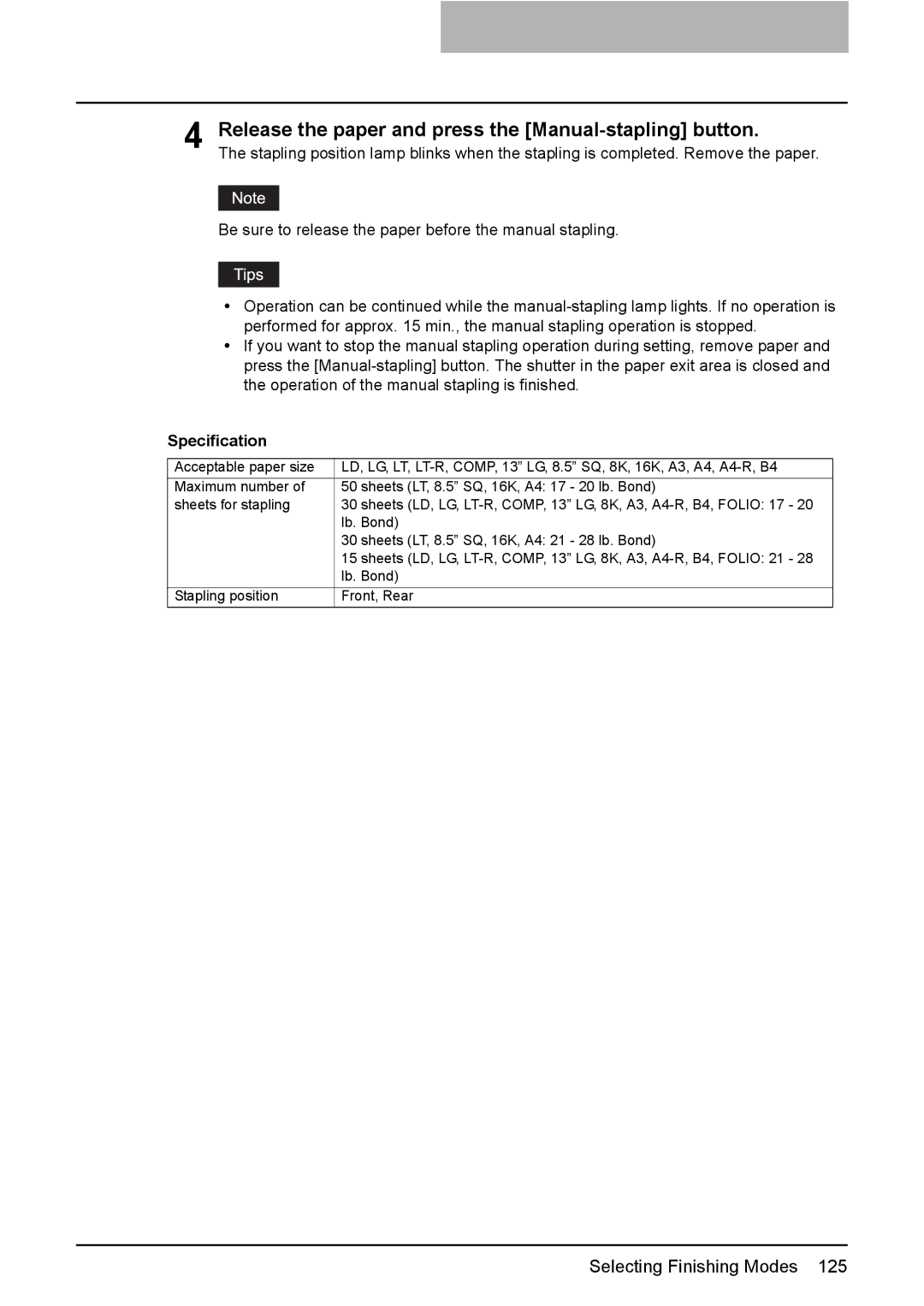
Press the Manual-stapling button
Manual stapling MJ-1101 only
Release the paper and press the Manual-stapling button
Specification
Duplex Copying
Sided original 1-sided copy default setting at installation
Press the simplex/duplex button on the basic menu
Sided original 2-sided copy
Press the 1 2 Duplex button
Press the 2 2 Duplex button
Sided original 1-sided copy
Book-type original 2-sided copy
Select the book copying type
Open and place the first pages on the original glass
Select LT copy size
Scanned pages will be copied For setting image shift, see
Auto color
Original Mode
Full color
Black
Full color Black Auto color
Automatic copy density mode
Copy Density Adjustment
Manual copy density mode
146
Monocolor copying 152 Hue 153 Saturation 154
149
Color Balance Ymck Adjustment
Canceling the color balance adjustment
Button of the color to obtain the desired color
RGB Adjustment
Canceling RGB adjustment
Balance. Then press the Enter button
One-Touch Adjustment
Canceling the background adjustment
Background Adjustment
Sharpness
Twin Color Selectable
Twin Color 2-Color Copy
Twin Color 2-Color Copy
Twin Color 2-Color Copy
RED & Black
Canceling color balance adjustment
Twin Color 2-Color Copy
Red/Black area adjustment
Red color balance adjustment
Monocolor copying
Hue
Canceling hue adjustment
Saturation
Canceling saturation adjustment
167
157
163
165
198
200
202
197
Creating a right or left margin
Image Shift
Image Shift button
Then press the Enter button
Press the Left or Right button
Press the TOP or Bottom button
Creating a top or bottom margin
Press the Enter button
Creating a bookbinding margin
Press the Enter button
Edge Erase
Press the Start button
Touch panel
Book Center Erase
Place a book original on the original glass
Dual
Dual
2IN1 / 4IN1
170 2IN1 / 4IN1
Press the 1 Side or 2 Side button
Example of copying with the Saddle Stitch Finisher optional
Magazine Sort
Select the paper type
Example of copying a 12-page document
Button
Trimming / Masking
Editing
Editing
Press the Start button
Editing button
Mirror image
Press the Mirror button
Press the NEG/POS button
Negative/Positive reversal
XY Zoom
Press the SET button. Then set the reproduction ratio for Y
Place the cover sheet
Cover Sheet
Place paper other than cover paper in the drawers
Sheet button
Press the Start button
Place the special sheets of paper
Sheet Insertion
Press the Copied or Blank button
Press the Start button
Time Stamp
Number
Press the Start button
JOB Build
Place the originals of the 1st job
After all the originals have finished being scanned, confirm
Number of copies on the menu and change if needed
Press the JOB Finish button on the basic menu
Image Direction
Press the Enter button
Book Tablet
Press the ADF button
ADF / Sadf
Press the Sadf button
Place the originals one by one
Full Image
Press the Start button
Press the Edit button to enter the edit menu. Then press
Image Repeat
Image Repeat
Turn over the original
Deleting Folders or Documents 226
Filing
Public box
Filing
User box
Filing
Creating User Boxes
Press the BOX Name button, and then enter the box name
Key in the password in Retype Password
User box is created
Changing Data of User Boxes
Enter the new box name
Box settings are updated
Deleting User Boxes
Box is deleted
Storing Documents in e-Filing
When the password entry menu is displayed
To store the document in the folder
Storing Documents in e-Filing
Press the Start button
Printing the whole document
Printing Stored Documents
Press the Print button
Select the document to be printed
To stop printing a stored document during the operation
Key in the number of the first
Test printing
Printing the stored document after changing the settings
Set the printing modes as required
Deleting Folders or Documents
To delete a document in the folder
Perform deletion
Page
Recalling Templates 254
Template 230
232
246
Template in Useful Template
Template
Button Function *1
Template using the copying function Button Function *1
Template using the scanning function Button Function *1
Template using the e-Filing function
Registering a template in the public template group
Registering User Groups and Templates
Set every function you want to include in the combination
Letter entry menu is displayed
Registering User Groups and Templates
Registering User Groups and Templates
Registering User Groups and Templates
Press the Save button
Registering the new user group
Press the Name button, and then enter the user group name
Regis
Registering a template in the user group
Press the Enter button
Registering User Groups and Templates
Registering User Groups and Templates
Press the Save button
Changing the data of a user group
Changing Data of User Groups and Templates
Press the Enter button
Data of the user group are changed
Changing the data of a template
When the user group is selected
Changing Data of User Groups and Templates
Changing Data of User Groups and Templates
Data of the template are changed
Recalling Templates
When recalling a template in a public group
Press the desired template button
When recalling a template in a user group
Press the Enter button
Press the Start button
Deleting a user group
Deleting User Groups or Templates
Delete OK? appears. Press the Delete button
Deleting a template
Deleting User Groups or Templates
When the user group is selected
Selected template is deleted
Page
Print Status Display 281
Error Code 284
Job Status 266 Confirming Print Job Status 267
Confirming Scan Job Status 272 Log List 273
Job Status
Press the JOB Status but- ton on the control panel
Confirming Print Job Status
Print jobs
Displaying print job list
Delete button
Deleting print jobs
Displaying invalid queues
When using department codes
Press the Invalid button
Keying in correct department code to print
Then press the Delete button
Deleting invalid print jobs
Deleting scan job
Confirming Scan Job Status
Log List
Confirming job history in log list Print log
Journal
Send log
Receive log
Scan log
Following information can be registered from the Scan log
Registering into address book from log lists
Press the Send or Receive or Scan button on the log menu
Following information can be registered from the Send log
First Name or Last NAME, and either of FAX NO. or E
Press the Entry button
Press the Send or Receive button on the log menu
Printing journals send/receive log list
Press the Journal button
Start button
Releasing print job errors
Print Status Display
Press the blinking JOB STA- TUS button
Printing by placing appropriate size of sheets in the drawer
Print Status Display
Fax / Internet Fax Error code Problem What to do
Error Code
Error code Problem What to do
300, or 400 x 400 dpi
Scan Job Error code Problem What to do
Save as File
Contact your service representative
Printer
RFC related Error code Problem What to do
Error Code
Page
Jam Symbols 305
Blinking Graphic Symbols 294
Replace Toner Cartridge Symbol 296
Replace Toner Bag Symbol 303
Blinking Graphic Symbols
Drawer Display on the Touch Panel
When more than one color of toner runs out
Replace Toner Cartridge Symbol
When the black toner runs out
When the yellow, magenta or cyan toner runs out
Recommendation for original toner
Replacing the toner cartridge
Slit glass cleaner is placed
Cleaning the slit glasses
Inside the front cover. Press
Remove the cap
Install the cap
Cleaning the chargers
Insert the charger cleaner straight until it stops
Open the front cover Pull the toner bag out care- fully
Replace Toner Bag Symbol
Remove lids from the side of the toner bag
Replace Toner Bag Symbol
Misfeed in the Reversing Automatic Document Feeder optional
Jam Symbols
Raise the lever, and then open the upper cover
Remove the original under the guide plate
Transport guide, and then
Raise the guide plate under
Document Feeder
Open the cover Remove any misfed paper
Misfeed in drawer feeding area
Close the cover
Misfeed in the Large Capacity Feeder optional
Misfeed on the bypass tray
Misfeed in the Paper Feed Pedestal optional
Pull out misfed paper on the bypass tray
Misfeed in the jam releasing cover
Misfeed in the automatic duplexing unit
Openunit. the automatic duplexing
Misfeed in the fuser unit
Open the jam releasing cover
Jam Symbols
Close the Bridge unit cover
Misfeed in the Bridge Unit optional
Paper misfeed at the upper tray
When installing the Hole Punch Unit optional MJ-6101
Paper misfeed at the lower tray
Close the cover of the Bridge Unit Close the upper tray
Jam Symbols
When installing the Hole Punch Unit optional MJ-6101
Open the front cover of the Hole Punch Unit
Raise the Hole Punch Unit,
Misfeed in the Saddle Stitch Unit optional
Jam Symbols
Jam Symbols
Call Service Symbol
Check staple cartridge 336
Time for periodic maintenance 353
Toner near Empty 329
332
364
Reboot the machine 365
Press the User Functions button
Toner near Empty
When this Message Appears
Press the Finish button Press the YES button
Replaced
Cleaning the slit glass
Time for Slit glass and Main charger cleaning
Open the front cover
Remove the cap
Install the cap
Cleaning the chargers
Finisher optional MJ-1101
Check staple cartridge
Stapler
Install the staple cartridge onto
Close the front cover of finisher
Finisher optional MJ-1030
Install a new staple case into the staple cartridge
Saddle Stitch Unit toward
Check staple cartridge in the Saddle Stitch Unit
Pull the handle of the stapler
Take out the empty staple car- tridge
Installtridge.the new staple car
Close the front cover of the finisher
Examine stapler
Do not touch the stapling area. The stapler could injure you
Remove any jammed staples
Close the front cover of the finisher
Ready Check Stapler
Examine stapler in the Saddle Stitch Unit
Push the knob 2 to return it to
Its original position
Close the front cover of the finisher
Check the following 2 items to perform test stapling
Ready Check Saddle Stitch Stapler
Follow steps 1 to 6
Dle Stitch Unit
Hole Punch Unit optional MJ-6101, MJ-6004
Ready Hole Punch Dust BIN is Full
Power Failure
Time for periodic maintenance
Check paper size setting on control panel for drawer N
During copying using a drawer
Place the paper removed in in the drawer
Message on the touch panel
Press the drawer button corresponding to the one mentioned
Check paper size setting on control panel for drawer N
Page
Check paper size setting on control panel for drawer N
Job is resumed
Check paper size setting on control panel for drawer N
Press the JOB Status but- ton on the control panel
Cannot print this paper size Select the other drawer
Cannot print this paper type Set the other paper type
Reboot the machine
Page
Daily Inspection 368 Simple Troubleshooting 369
Maintenance
Daily Inspection
Paper jamming occurs frequently
Simple Troubleshooting
Display does not change when buttons or icons are pressed
Equipment does not start
Image trouble
Functions cannot be set
Image density is too low
Image density is too high
Simple Troubleshooting
Page
Combination Matrix 1/2 382 Combination Matrix 2/2 383
Image Quality Adjustment Combination Matrix 384
Combination Matrix 1/2 384 Combination Matrix 2/2 385
OPC
STUDIO2500c/3500c/3510c Specifications
Black Color White
Continuous copying speed e-STUDIO2500c
Media type
Paper size Feeder
Full COLOR, Twin COLOR, Mono COLOR, Image Smoothing
Paper Feed Pedestal 1 drawer type
Specifications of Options
Reversing Automatic Document Feeder
Large Capacity Feeder
Lower Tray
Finisher MJ-1101
Tray loading capacity of Finisher MJ-1101
Upper Tray
MJ-1030 with mixed paper loaded
Saddle Stitch Finisher MJ-1030
Tray loading capacity of Saddle Stitch Finisher MJ-1030
MJ-1030 with mixed paper not loaded
Hole Punch Unit MJ-6004 Series
Hole Punch Unit MJ-6101 Series
Bridge Unit
Packing List
Combination Matrix 1/2
Copying Function Combination Matrix
Combination Matrix 2/2
Image Quality Adjustment Combination Matrix
Image Quality Adjustment Combination Matrix
Black Full color Auto color Smoothing Image Color
Page
Numerics
Index
32, 112, 338
276
240
FC-2500C/3500C/3510C/GA-1210 OME06014200
With GA-1210