Using MFP menus

Menu item

Purpose

Values and descriptions

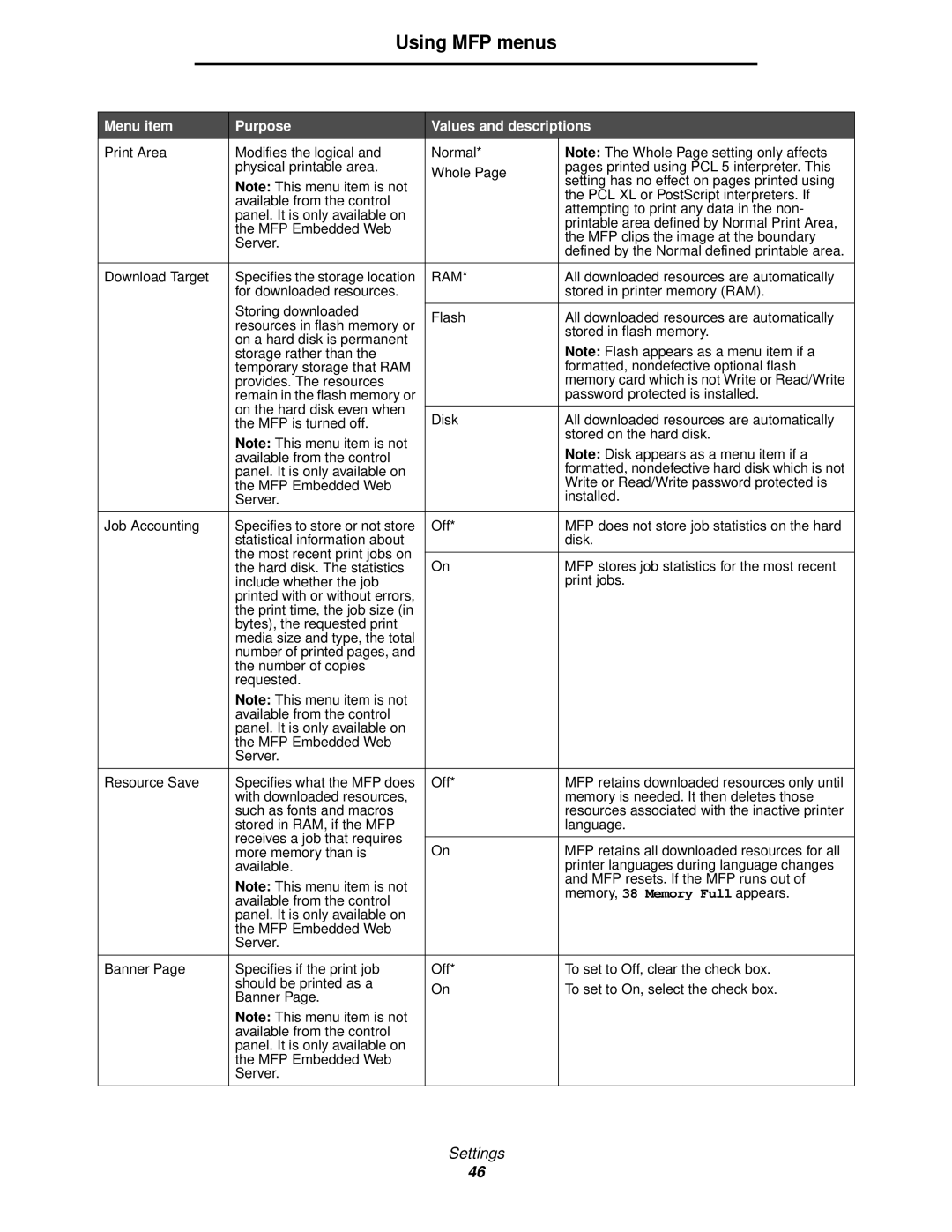
Print Area

Modifies the logical and

Normal*

Note: The Whole Page setting only affects


physical printable area.

Whole Page

pages printed using PCL 5 interpreter. This


Note: This menu item is not

setting has no effect on pages printed using


the PCL XL or PostScript interpreters. If


available from the control


attempting to print any data in the non-


panel. It is only available on


printable area defined by Normal Print Area,


the MFP Embedded Web


the MFP clips the image at the boundary


Server.


defined by the Normal defined printable area.


Download Target

Specifies the storage location

RAM*

All downloaded resources are automatically


for downloaded resources.


stored in printer memory (RAM).


Storing downloaded


Flash

All downloaded resources are automatically


resources in flash memory or


stored in flash memory.


on a hard disk is permanent


Note: Flash appears as a menu item if a


storage rather than the


temporary storage that RAM


formatted, nondefective optional flash


provides. The resources


memory card which is not Write or Read/Write


remain in the flash memory or


password protected is installed.


on the hard disk even when


Disk

All downloaded resources are automatically


the MFP is turned off.


Note: This menu item is not


stored on the hard disk.


Note: Disk appears as a menu item if a


available from the control


panel. It is only available on


formatted, nondefective hard disk which is not


the MFP Embedded Web


Write or Read/Write password protected is


Server.


installed.


Job Accounting

Specifies to store or not store

Off*

MFP does not store job statistics on the hard


statistical information about


disk.


the most recent print jobs on


On

MFP stores job statistics for the most recent


the hard disk. The statistics


include whether the job


print jobs.


printed with or without errors,


the print time, the job size (in


bytes), the requested print


media size and type, the total


number of printed pages, and


the number of copies


requested.


Note: This menu item is not


available from the control


panel. It is only available on


the MFP Embedded Web


Server.


Resource Save

Specifies what the MFP does

Off*

MFP retains downloaded resources only until


with downloaded resources,


memory is needed. It then deletes those


such as fonts and macros


resources associated with the inactive printer


stored in RAM, if the MFP


language.


receives a job that requires


On

MFP retains all downloaded resources for all


more memory than is


available.


printer languages during language changes


Note: This menu item is not


and MFP resets. If the MFP runs out of


memory, 38 Memory Full appears.


available from the control


panel. It is only available on


the MFP Embedded Web


Server.


Banner Page

Specifies if the print job

Off*

To set to Off, clear the check box.


should be printed as a

On

To set to On, select the check box.


Banner Page.


Note: This menu item is not


available from the control


panel. It is only available on


the MFP Embedded Web


Server.


Settings

46

Page 46
Image 46
Lexmark X644E manual Ram

X644E specifications

The Lexmark X644E is a multifunction printer designed for businesses seeking reliable performance and advanced features. This model is particularly well-suited for medium to large workgroups, offering an excellent balance between functionality and efficiency.

One of the standout features of the X644E is its multifunction capabilities, which include printing, scanning, copying, and faxing. This all-in-one device simplifies office workflows and reduces the need for multiple machines, saving valuable space. The X644E can produce high-quality black and white prints at speeds up to 45 pages per minute, ensuring that even large volumes can be handled without sacrificing performance.

The printer utilizes Lexmark's Advanced Laser Technology, which optimizes print quality and delivers sharp, professional documents. Its resolution of up to 1200 x 1200 dots per inch ensures that text is crisp and images are clear, making it ideal for producing business reports, presentations, and legal documents. The printer also supports various media sizes and types, including envelopes, labels, and heavier stock, providing versatility for different printing needs.

Another key characteristic of the X644E is its user-friendly interface. The device features a large color touchscreen that simplifies navigation and offers easy access to settings and features. Users can quickly select functions, adjust print settings, and manage jobs seamlessly.

The X644E supports network connectivity, allowing multiple users to access the printer simultaneously. It is compatible with both wired and wireless connections, providing flexibility for different office setups. Additionally, mobile printing capabilities enable users to print documents directly from their smartphones and tablets, enhancing convenience.

Security is a significant concern for businesses, and the Lexmark X644E addresses this with robust features. It includes secure printing options, password protection, and user access controls, ensuring that sensitive information remains protected.

In terms of cost-efficiency, the X644E utilizes high-capacity toner cartridges, reducing the frequency of replacements and lowering overall printing costs. This feature is particularly beneficial for organizations looking to optimize their printing budgets.

Overall, the Lexmark X644E stands out as a versatile and powerful multifunction printer. With its high-speed printing, advanced technologies, user-friendly interface, and security features, it meets the demands of modern office environments, making it a solid choice for any business looking to enhance productivity and efficiency.