Selecting Internal Amplifier Commands ADVANCED/EXPANDED
Placing Commands Onto the Virtual Keypad
Selecting RS232 Command Palettes ADVANCED/EXPANDED
Placing Commands on the Virtual Keypad Basic
Programming Sequences Macros
Button Edit Pop-Up Menu
Editing Buttons on the Virtual Keypad
Editing Commands in the Macro Command List Window
Editing Commands
Zone 1 thru
Programming Power Management and Sense Trigger Codes
Programming Power Management
Basic Power Management
Programming Sense Trigger Codes ADVANCED/EXPANDED
Programming Sense Triggers
Testing Commands Under Power Management and Sense Triggers
Name of Zone ADVANCED/EXPANDED
Zone Options Configuration
Default settings set in Basic Mode are as follows
RC68 Code Group
PRE AMP Volume Adjust Settings ADVANCED/EXPANDED
IR Loop Back Settings ADVANCED/EXPANDED
Configuring Commands for IR in Zone
Transferring the Project
Controller Options Programming
Zone Audio Input
BACK-LIGHT Control
Mode of Operation
IR Routing
Expanded Options
RS232 Settings
Monitor Lockout Mode Factory default Disabled
Monitor Lockout Mode
Zone Linking Programming
Dynamic Zone Link Mode Factory default Disabled
Link ALL Static
RS232 Input Translator
Link ALL Dynamic
Clear ALL
Programming IR Commands and Sequences
IRS232 Input Translator
RC68 IR Command Macro Window
RC68+ IR Code Triggered Sequencer
Programming Internal Amplifier Commands
Internal Amplifier Command Window
Using Internal Amplifier Commands
Zone Expansion Connecting Multiple MRC88 Controllers
Internal Amplifier Commands
Physical Connections in Expanded Mode
Programming in Expanded Mode
Enabling Expanded Mode
RS232 Control While in Expanded Mode
Sources 1 through
Transferring a Project to the MRC88
Uploading MRC88 Projects
Saving and BACKING-UP Files
Cold Firmware Upgrade
Firmware Upgrade Optionis
Warm Firmware Upgrade
Downloading Firmware Files from the WEB
Tweaking the System
Teaching a HAND-HELD Remote to Operate the MRC88 System
Making Fine Adjustments
Trimming Source Audio Input Levels
Zone Adjustments
Keypad Adjustments
Accessing Tier 2 Commands
Powering the Zone on and OFF
Setting the Volume
Source Slection and Control
System Status BASIC/ADVANCED
Zone Settings
Audio Adjustments BASIC/ADVANCED/EXPANDED
Dynamic Monitor Lockout Parental Control ADVANCED/EXPANDED
Expanded
RS232 Control
7PR1+
?5SS+
?5SS3+
Commands
AO+
Queries
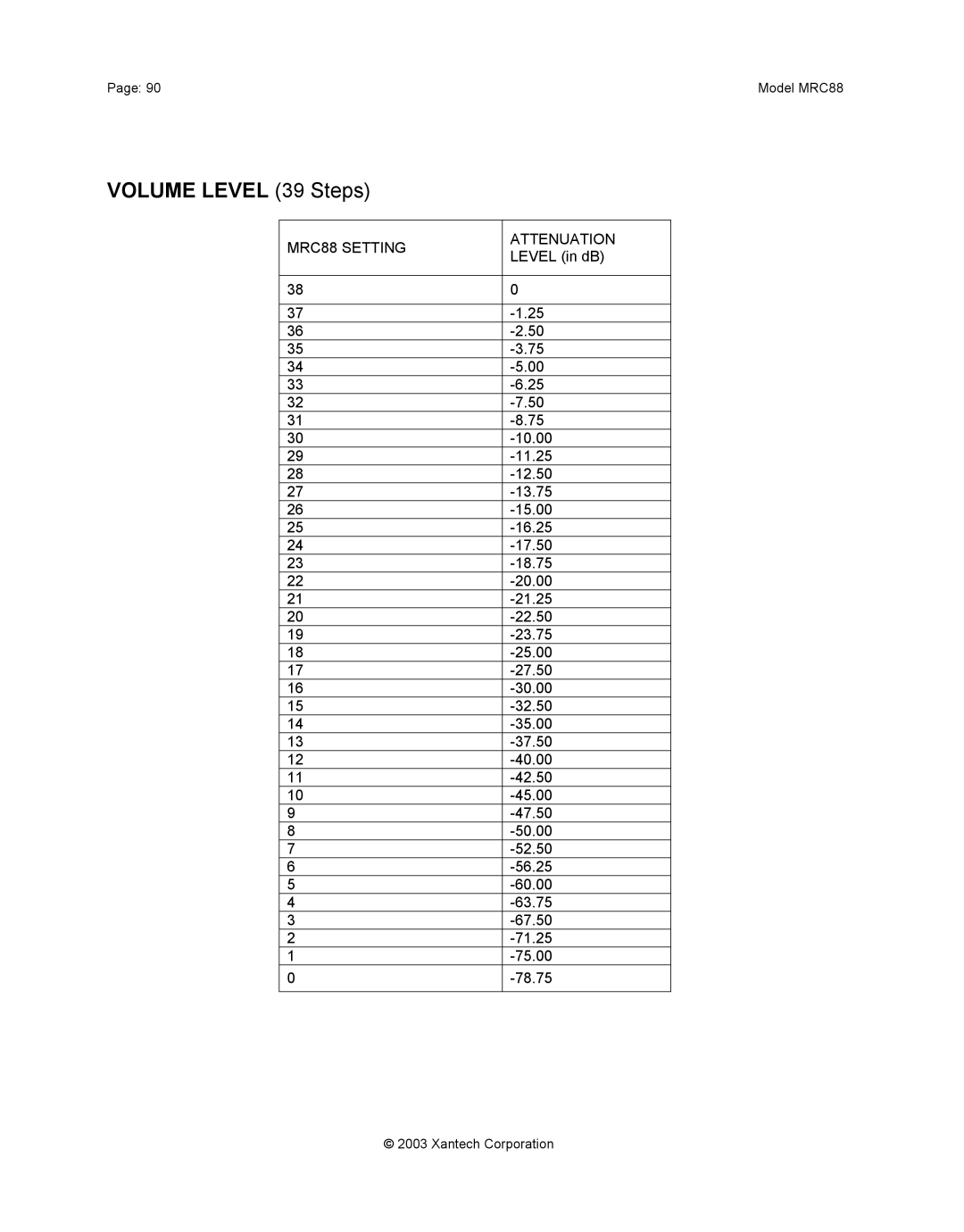
Volume Level 39 Steps
Keypad Button ID
+14
MRC88 Setting
Level in dB
+12
Left Speaker Right Speaker MRC88 Setting Attenuation
Balance Level
Troubleshooting
Problem Probable Cause and Solution
Model MRC88Page
96Model MRC88
RS232 and Expansion PIN OUT Information
GND
Video
Specifications
Certifications
IR Sensor
Model MRC88
Model MRC88 Xantech Corporation
Xantech Corporation
Bradley Avenue, Sylmar CA Phone 818.362.0353 fax