Contents
PDR-555RW
Class Laser Product
PRE1269 En/Fr
Vorsicht
Contents
Sommaire
Inhalt
Indice
Précautions Générales D’UTILISATION
Vorsichtshinweise ZUR Handhabung
Precauzioni PER L’USO
Features
Particularités
Merkmale
Caratteristiche
Checking Accessories Vérification DES Accessoires
Einlegen der Batterien in die Fernbedienungs-Einheit
Überprüfung DER Zubehörteile Controllo Accessori
Caricamento delle batterie nel telecomando
Discs usable with this unit
Discs
Disques
Disques utilisables avec cet appareil
Dischi utilizzabili in questo apparecchio
Dischi
Discs, die mit diesem Gerät verwendet werden können
Hinweise zum Copyright
Disques
Discs
Disque CD-RW
Dischi
Dischi di tipo CD-RW
Manipulation des disques A, B
Handling of disc A, B
Discs Disques
Handhabung der Discs A, B Come maneggiare i dischi A, B
Raccordements À UN Autre Appareil
Digital signal connection
Connection with Other Equipment
Raccordements pour les signaux numé Riques
Anschluß des Digitalkabels
Anschluss VON Anderen Geräten
Collegamento CON Altri Componenti
Collegamenti digitali
Optical sockets are delicate
Connection of power cord
Digital input/output coaxial terminal cap
Les prises optiques sont fragiles
Cappuccio terminale digitale di ingresso uscita coassiale
Vorsichtshinweise für die Verwendung von Glasfa Serkabeln
Fare attenzione ai cavi a fibre ottiche
Optische Steckbuchsen sind empfindlich
Analog signal connection
Raccordements pour les signaux analo Giques
Collegamento segnale analogico
Anschluß des Analogkabels
Anschluß der Eingangs- und Ausgangskabel
CONTROLS, Connectors and Indicators Front Panel
Lights when the track number manual writing is possible
COMMANDES, Connecteurs ET Témoins Face Avant
Phones Level
BEDIENUNGSELEMENTE, Stecker UND Anzeigen Frontplatte
POWER-Schalter
PRE1269 Ge
Riproduzione Acceso in verde Cancellazione
COMANDI, Connettori ED Indicatori Pannello Anteriore
Interruttore di attivazione Power
Indicazione della funzione in corso
Functions of the remote control unit
CONTROLS, Connectors and Indicators Remote Control Unit
Remote controllable range
Portée de la télécommande
COMMANDES, Connecteurs ET Témoins Télécommande
Rôle des touches de la télécommande
Précaution d’emploi de la télécommande
Wirksamkeitsbereich der Fernbedienung
Funktionen der Fernbedienungs-Einheit
Vorsichtshinweise für die Verwendung der Fernbedie- nung
Tasti di registrazione ¶ REC Consultare in proposito pagg e
Funzioni del telecomando
Gamma del telecomando
÷ Puntare il telecomando e premere i suoi tasti
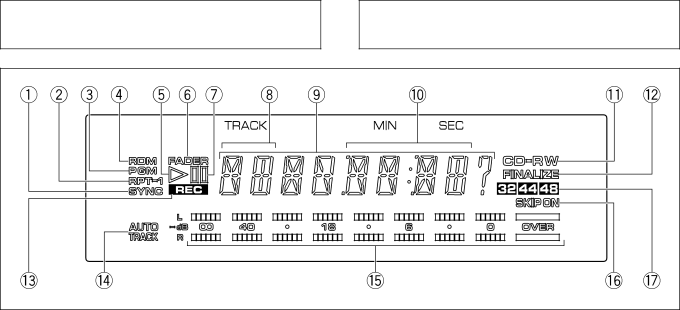
Display Panel
Afficheur
Display
Display Panel
Switching the time display
Affichage des temps
Afficheur
Display
Umschalten der Zeitanzeigen
Cambio del display del tempo
IL Display
Loading/unloading a disc
Disc LOADING/UNLOADING Mise EN Place OU Retrait D’UN Disque
Mise en place ou retrait d’un disque
Einlegen/Herausnehmen einer Disc
Come si caricano e si estraggono i dischi dall’unità
Modes of Recording Modes D’ENREGISTREMENT
Aufnahmebetriebsarten Modi DI Registrazione
Modes of Recording Modes D’ENREGISTREMENT
This unit is a recorder for writable compact discs
Aufnahmebetriebsarten Modi DI Registrazione
Vorsicht
Press the Digital Synchro button
Commandez la lecture sur l’appareil source
Select the input to be recorded with the Input Selector
Start playing the source player
Premere il tasto Digital Synchro
Drücken Sie die Digital SYNCHRO-Taste
Schalten Sie das Ursprungsgerät auf Wiedergabe
Dare inizio alla riproduzione
DAT
Vorsichtshinweise zu Digitalaufnahmen von
Precauzioni per la registrazione digitale da un
Press the Digital Synchro button twice
Appuyez deux fois sur la touche Digital Synchro
Drücken Sie die Digital SYNCHRO-Taste zweimal
Premere due volte il tasto Digital Synchro
BlinksBlinks
Recording 3 Automatic Finalization Recording
After recording, press the stop 7 button to end recording
ClignoteClignote
Diese Anzeige blinkt
LampegiaLampegia
Press the Record REC ¶ button s
Recording 4 Manual DIGITAL-SOURCE Recording
Appuyez sur la touche Record REC 
Auch das Ursprungsgerät auf Wiedergabe
Drücken Sie die Record REC ¶-Tasten
Premere il tasto Record REC 
Réglez le niveau d’enregistrement. Reportez- vous à la
Press the pause 8 or play 3 button
Au moyen du sélecteur Input SELECTOR, choisissez Analog
Appuyez sur la touche de pause 8 ou de lecture
Drücken Sie die Pause 8-Taste oder die Wiedergabe-Taste
Wählen Sie den ANALOG-Eingang mit dem
Premere il tasto di pausa 8 o di riproduzione
Recording level adjustment
Réglage du niveau d’enregistrement
Einstellen des Aufnahmepegels
Regolazione del livello di registrazione
Scms Serial Copy Management System
Case a copy inhibit signal is detected during recording
Scms
Play the source player
Scms sistema di prevenzione della duplicazione Del segnale
SCMS-FUNKTION
Sistema Scms
Riprodurre il segnale
Recording from the middle of a disc
Convenient Functions for Recording
Utilisation d’un disque partiellement enregistré
Aufnehmen auf eine teilweise bespielte Disc
Registrazione da un punto intermedio di un disco
Convenient Functions for Recording
Fonctions Commodes Pour L’ENREGISTREMENT
Nützliche Aufnahmefunktionen
Convenienti Funzioni DI Registrazione
To pause recording a Pour interrompre l’enregistrement a
Einfügen einer unbespielten Leerstelle B
Vorübergehendes Unterbrechen der Aufnahme a
Pausa della registrazione a
Beginn einer Aufnahme mit einer Einblendung C
Convenient Functions for Recording
Manual
Press the Skip ID SET button
Setting skip ID to a track Track skip
Skipping Undesired Tracks
To set the skip ID, press the Skip ID SET button again
Premere il tasto Skip ID SET
Registrazione di segnali di evitamento brani
Drücken Sie die Skip ID SET-Taste
Skip und SET? werden abwechselnd angezeigt
Skipping Undesired Tracks
Pour Ignorer Certains Plages Musicales
Überpspringen VON Unerwünschten Titeln
Salto DI Brani Indesiderati
Les indications Skip et CLEAR? s’affichent alternativement
Clearing skip ID of a track
Skip and CLEAR? are displayed alternately
RW qui ont été achevés
Löschen der Übersprungmarkierung eines Titels
Cancellazione di segnali di evitamento di brani
Skip und CLEAR? werden abwechselnd angezeigt
Qu’est-ce que l’achèvement d’un disque?
What is finalization?
Finalization procedure
Méthode pour l’achèvement d’un disque
Cos’è la finalizzazione?
Was versteht man unter Abschlußeingabe?
Vorgehensweise für die Aufzeichnung der Abschlußeingabe
Procedura di finalizzazione
Making a Recorded Disc Playable on a CD Player Finalization
Attenzione
Erasing CD-RW only
Effacement CD-RW Seulement
Cancellazione Solo PER IL CD-RW
Löschen NUR CD-RW
ALL Tracks Erasing takes approx minutes for finalized CD-RW
Erasing CD-RW only Effacement CD-RW Seulement
Löschen NUR CD-RWCANCELLAZIONE Solo PER IL CD-RW
ALL Disc Erasing takes recordable time plus 5 minutes
Erasing CD-RW only
Löschen NUR CD-RW
Cancellazione Solo PER IL CD-RW
Halten Sie die ERASE-Taste ca Sekunden lang gedrückt
Playback Ecoute D’UN Disque
Starting playback Commande de l’écoute
Playing from the desired track Direct track se- lection
Inizio della riproduzione
Wiedergabe Riproduzione
Beginn der Wiedergabe
Wiedergabe eines gewünschten Titels direkte Titelwahl
Recherche d’une plage musicale a
Searching an adjacent track Track search a
Searching the desired point Manual search B
Recherche manuel d’un passage musical B
Ricerca di un brano a
Aufsuchen eines benachbarten Titels Titelsuche a
Aufsuchen einer gewünschten Stelle manueller Suchlauf B
Ricerca di un passaggio desiderato di un brano B
Playback
Commande de l’afficheur C
Turning the display off C
Ausschalten des Displays C
Wiedergabe
Per spegnere il display C
Ecoute répétée des plages musicales Lecture répétée
Playing tracks repeatedly Repeat playback
Fade-in/fade-out during playback
Ecoute avec fondu sonore à l’ouverture ou à la fermeture
Ripetizione della riproduzione
Apertura/chiusura in dissolvenza della riproduzione
Ein-/Ausblenden während der Wiedergabe
Controllo della durata di ciascun brano
Skip playback
Skip playback procedure
Omission de plages musicales pendant la lecture
Vorgehensweise bei Übersprung-Wiedergabe
Übersprung-Wiedergabe
Riproduzione con evitamento di brani indesiderati
Au moyen des touches numérotées, choisissez
Programming tracks
Program reservation
Track No Total playing time of program
Programmreservierung
Programmieren von Titeln
Programmazione dei brani
Prenotazione della riproduzione
Clearing a track from the program
Clearing the entire program
Effacement du contenu du programme
Checking the programmed tracks
Löschen des gesamten Programms
Cancellazione di un intero programma
Cancellazione di un brano dal programma
Löschen eines Einzeltitels aus dem Programm
Select the new track number with the numeric buttons
Replacing a track in the program
Modification du contenu d’une étape du programme
Other tracks can also be replaced by repeating steps 1
Wählen Sie die neue Titelnummer mit Hilfe der Zifferntasten
Auswechseln eines Titels im Programm
Sostituzione di un brano del programma
Scegliere un nuovo numero di brano con i tasti numerici
Character Message List
Message Description Ref.
Liste DES Messages
Messages Significations
Liste DER Zeichenanzeigen
Anzeige Beschreibung Referenzseite
Elenco Messaggi DEL Display
Messaggio Descrizione Pagine di Riferimento
Been set
Index
Term Function Ref.
Track being recorded by one Digital synchro recording
Termes Significations
Glossaire
Disque CD-RW Disque compact ré-enregistrable
Bezeichnung Funktion Referenzseite
Scrivere una volta
Termine Funzione Pagine di Riferimento
Compact disc, CD-R o CD-RW Danni ai dischi
Proibita Registrazione
Information messages related to recording operation
Troubleshooting
Self-diagnostics
Information messages related to playback operation
Remedy
Symptom
Cause
Messages en rapport avec l’enregistrement
Fonction d’autodiagnostic
Guide DE Dépannage
Messages en rapport avec la lecture
Symptômes
Causes probables Actions correctives
Mitteilungen, die sich auf den Aufnahmevorgang beziehen
Störungsbeseitigung
Selbstdiagnose
Mitteilungen, die sich auf den Wiedergabevorgang beziehen
Symptom Ursache Abhilfe
Messaggi legati alla registrazione
Diagnostica
Autodiagnosi
Messaggi legati alla riproduzione
Problema Causa Rimedio
Caractéristiques Techniques
Specifications
Accessoires
Généralités
Technische Daten
Dati Tecnici
France tapez 36 15 Pioneer