Page
Laser Class 700 Series Facsimile Guide
With Cover Sheet Editor
Manuals for the Machine
Appendix
How This Manual Is Organized
Contents
Sending Documents
Using Speed Dialing
Receiving Documents
Using the Machine as a Copier
Special Sending/Receiving Features
Using a Relay Network
Using Confidential Mailboxes
Using Polling
Summary of Important Settings
Other Special Features
Troubleshooting
Printing Reports and Lists
Appendix
Glossary -7 Index
Documents You Can Scan
Press Data Registration
How to Use This Manual
Symbols Used in This Manual
Keys Used in This Manual
Xii
Illustrations Used in This Manual
Location
Power Requirements
Legal Notices
Users in the U.S.A
Xiv
Connection of the Equipment
CF-PL Facsimile GuideUSEN HT1-2188-000-V.1.0
Xvi
Xvii
Users in Canada
Xviii
Avis
Xix
Super G3
Trademarks
Copyright
Disclaimers
Before You Start Using This Machine
UHQ Ultra High Quality Image
Main Features
Full Support of ITU-T Subaddresses and Passwords
Improved Speed
Receiving in Memory If You Run Out of Paper or Toner
Variety of Send and Receive Features
Automatic Dialing
ECM Send and Receive
Delayed Sending
Dual Access
Better Security with PIN Codes
JBIG, Improved Image Data Compression
Jbig
One-Touch Panels Closed
Operation Panel Parts and Functions
Counter Check
Speaker Volume Switch
Error Lamp
Printer Operation Panel
LCD Display
Resolution
Monitor
Delete File
One-Touch Panels Opened
Space
Password
Delete
Return
Using the Menus
General Guidelines for Registering Information
Press Data Registration
Set to go to the next level
Press Stop to return to the Standby mode
Press or to display the name of the desired menu title
Press or until the name of the menu you want to open
Letter or number
Press to change the entry mode
Entering Names for Registration
Press the appropriate key on the numeric keypad to enter a
Press or to move the cursor to the left or right to
To complete entering the name for registration, press Set
Operation Panel Key Summary Table
Keys for Registering Information
Key Description
Registering Required Sender Information
Things You Must Do Before Using This Machine
What Is Sender Information?
Press Set
Open all three one-touch speed dialing panels
Use 24-hour notation to enter the time e.g., 100 p.m. as
Open all three one-touch speed dialing panels
Press or until 3.FAX Settings appears press
Set Press or until 1.USER Settings appears press
Set Press or until 1.TEL Line Settings appears
Menu
Press or until 1.USER TEL NO. appears press
Checking and Setting the Telephone Line
Press Stop to return to the Standby mode
Set
Press or until 1.USER Settings appears press
Telephone line type is set
Registering a Sender’s Name
Registering Sender’s Names
Before You Start Using This Machine
If you select Other FAX Numbers
If you select User TEL Number
To change the sender’s name
When you are finished making changes, press Set
Press or until 1.SENDER Name REG. appears
Press Set
28Things You Must Do Before Using This Machine
Using the Optional Dual Line
Disabled Feature Description
How the Two Telephone Lines Operate
Registering Telephone Numbers for the Lines
Press or until 2.TEL Line TYPE. appears press
Press or until 3.TX Start Speed appears press Set
Press or to select Touch Tone or Rotary Pulse press Set
Press or until 2. Line 2 appears press Set
Setting the TX Line Priority
34Using the Optional Dual Line
Mode
Switching Between the Two Lines
Press or to display the desired setting press Set
When you are finished, press Stop to return to the Standby
36Using the Optional Dual Line
Using Speed Dialing
Dialing, use the numeric keys to enter the number
When you come to a step that asks you to enter a number for
Read This Before Entering Telephone Numbers
Entering Pauses for Dialing
Adjusting the Length of a Pause
4Read This Before Entering Telephone Numbers
Coded Speed Dialing
What Is Speed Dialing?
Access Code Dialing
One-Touch Speed Dialing
Setting Up One-Touch Speed Dialing
Press or until 1.TEL Number Entry appears
Enter the telephone number up to 120 digits using
Press or until the one-touch speed dialing key’s
Number that you want to register appears press Set
To stop here and register another key
To end the procedure and return to the Standby mode
Press or to select a preset time number 1 to 5 press Set
TX Type appears press Set
100 p.m. as 1300 press Set
Key, press Data Registration
If you want to set the transmission type, press or until
Setting Description
Press or to select the desired transmission speed
If you experience transmission errors during long distance
Until 5.TX Speed appears press Set
If you want to change the transmission speed, press or
Press or until 6.ECM appears press Set
If you want to select a telephone line for outgoing fax
Appears press Set
If you select ‘FIXED’
Press or to select a sender name press Set
Setting Up Coded Speed Dialing
16Setting Up Coded Speed Dialing
Access Code appears press Set
Enter a name up to 16 characters long using the numeric
Press or until 3.OPTIONAL Setting appears
If you want to set an access code, press or until
100 p.m. as Press Set
Enter an access code from two to five digits using
Press or to select a preset time number 1 to 5 press
If you want to set the time for the transmission, press or
Press or to select the desired transmission type press Set
Designates the transaction as a transmission to a
Press or to select the desired transmission speed press Set
If you want to turn ECM Error Correction Mode ‘ON’ or ‘OFF’
Press or to select ‘ON’ or ‘OFF’ press Set
Press or to select Auto or Fixed press Set
Press or to select a sender name press Set
Setting Up Group Dialing
Register all the destinations for the group
When you are finished registering destinations, press Set
Dialing code that you want to set as the group dial press
Press or until 1.DSTN TEL/ID appears press Set
26Setting Up Group Dialing
Or until 2.TX Time Settng appears press Set
Press or to select a preset time number 1 to 5 press
28Setting Up Group Dialing
Setting Up the Access Code Key
Other
Make sure that 2.NO of Characters is displayed press Set
Using CF-PL Facsimile GuideUSEN HT1-2188-000-V.1.0
Press the desired one-touch speed dialing key
Using Speed Dialing
Using One-Touch Speed Dialing
Place your documents on the machine
Using Speed Dialing
Using Coded Speed Dialing
Using Group Dialing
36Using Speed Dialing
Numeric keys
Using Access Code Dialing
Press the access code key that you have set
Enter the access code from two to five digits using
38Using Speed Dialing
first letter of the name of the party you are searching for
Using Directory Dialing
Directory 2 Press Directory
Press a key on the numeric keypad which corresponds to
Press or to scroll through the other names press Set
Sending Documents
Preparing the Document
Setting a Document for Sending
Extension Tray
Setting the Document on the Machine
Adjust the document guides to fit the width of your document
Place your document face up in the document feeder tray
Scanning a Document into the Memory for Polling Sending
Press or until 5.ERASE After TX appears press
Set Press or to display on or OFF press Set
Enter the two digit number of the polling box using
Press Advanced Communication press Set twice
Or until you see the sender’s name you want to use
You can also press or to select the polling box number
Changing the Polling Box Settings
Change using the numeric keys press Set
Enter the password up to seven digits using the numeric
Set or until 4.POLLING BOX appears press
Press or to display the setting you want to change
To the Standby mode
Deleting a Polling Box
Enter the two digit number of the polling box you want to
Delete using the numeric keys press Set
Special Sending/Receiving Features
Transferring Documents
Before You Setup Document Transfer
Setting Up the Machine for Document Transfer
Press a one-touch speed dialing key, or Coded Dial
File Name
Select Days
Time Setup
Start Time
Everyday
Seven digits using the numeric keys press Set
Turning the Transfer Mode on and OFF
Transfer, on p
Changing the Transfer Settings
If you have not previously set a password, proceed to step
On p
8Transferring Documents
Setup file using the numeric keys press Set
Canceling the Transfer Settings
Using Memory Lock
Setting a Time and Password for Memory Lock
Press or until 3.FAX Settings appears press Set
MEM Lock Password
Report
Output no
Output YES
If a memory lock password has been set, enter the password
Turning Memory Lock on
Press Memory Reception
If a memory lock password has been set, enter the memory
Lock password using the numeric keys press Set
Turning Memory Lock OFF and Printing Documents
Check the LCD display messages
When the Machine Displays Received in Memory
16When the Machine Displays Received in Memory
Menu is displayed below
Printing a Memory List
Press or to display the transaction number
If you have set a password for the document stored
Memory, enter the password up to seven digits using
Printing a Document in Memory
Printing starts
Sending a Document in Memory to a Different Destination
Press or until 4.RESEND Document appears
Press or to select the document you want to send
You can also use the numeric keys to select a sender’s name
Name appears on the LCD display
Press Delete File
Enter the password using the numeric keys press Set
Erasing a Document from Memory
Deleting a Document with the Delete File Key
Document that you want to delete press Set
Deleting a Document with the Memory Reference Key
Press to delete the selected document
Press or until 5.DELETE Document appears
24Erasing a Document from Memory
What Happens to the Memory After a Power Failure?
About the Backup Battery
How Your Registered Data Is Protected
26What Happens to the Memory After a Power Failure?
10-1
Other Special Features
Using the Telephone
When you hear the dial tone, specify the destination
Pick up the handset, or press Hook
10-3
Tone Dialing on a Pulse Line
Dial the telephone number of the information service using
10-5
Setting a PIN Code
Setting Up and Using PIN Codes
10-7
Dialing with a PIN Code after the Number
10-9
Using the numeric keys
Dialing with a PIN Code before the Number
PIN code is not displayed as you enter it
Enter the telephone number using the numeric keys press
10-11
Setting PIN Code Access for Speed Dialing
Three digit code
Using Speed Dialing with PIN Code Access
Forced PIN Code Access
Enter the PIN code up to 20 digits using the numeric keys
10-13
Dial the telephone number using the numeric keys, press a
Digit code
Speed dialing key, or press Coded Dial followed by a three
Setting Up the Program One-Touch Key
Press or until 6.PROG 1-TOUCH KEY appears press Set
10-15
Confidential
Delayed TX
Print
Sender Name
10-17
Setting Up the Stamp Feature
Setting Up and Using the Optional Stamp Feature
10-19
Setting Up the Stamp Action
Press or until 4.FAX Default appears press Set
Press or until 5.TX Stamp appears press Set
DIRECT&MEMORY
10-21
Turning the Stamp Feature ON/OFF
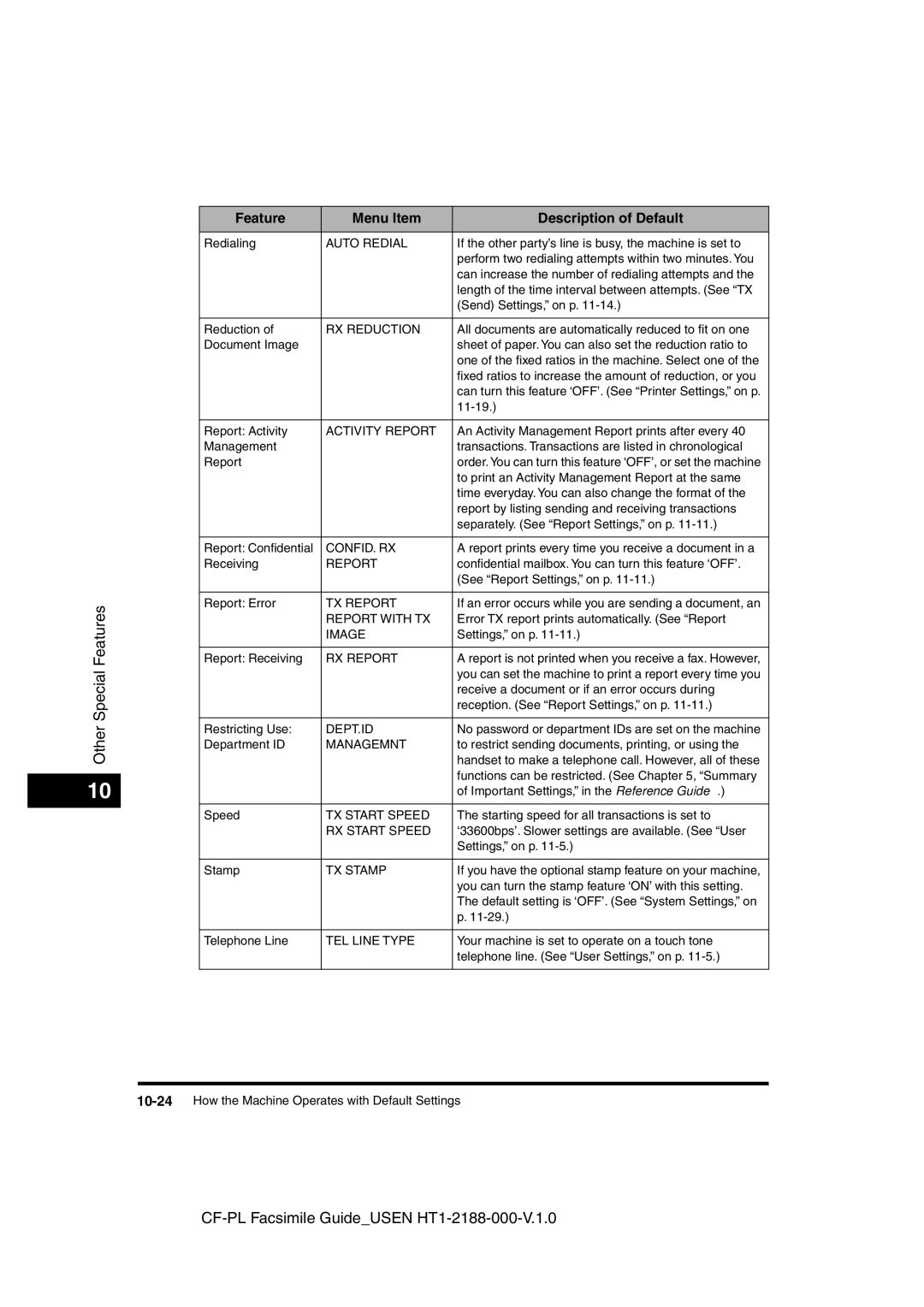
Feature Menu Item Description of Default
How the Machine Operates with Default Settings
Energy Saver
Offhook Alarm
ECM TX
ECM RX
CONFID. RX
Auto Redial
RX Reduction
Activity Report
10-25
User TEL no
Unit Name
10-26How the Machine Operates with Default Settings
11-1
Summary of Important Settings
Opening the Additional Functions Menu
11-3
Summary of User Data Settings
TX Send Settings
RX Receive Settings
LAN Settings
User Settings
Setting Procedure
11-5
Rotary Pulse
Setting Item Description
TEL Line Settings
Touch Tone
11-7
Other FAX Numbers
Prog 1-TOUCH KEY
Print Report
11-9
SENDER’S Name SET
Memory Reference
Line
Report Settings
Press or until 2.REPORT Settings appears
11-11
Print Error only
Report with TX Image
CONFID. RX Report
Report Print Time
11-13
Auto Print
Daily Report Time
Press or until 3.TX Settings appears press Set
TX Send Settings
Erase Failed TX
11-15
NECESS. PIN Code
Stamp Action
Direct & Memory TX
Direct TX
11-17
RX Receive Settings
Remote RX ID
Receive Mode
Auto RX
Manual RX
Printer Settings
Press or until 5. Printer Settings appears
11-19
# of Copies
11-21
File Settings
SET BOX #
Setup File
11-23
Confidntl Mailbox
Relay TX Group
TEL=
SET RLY Group TX#
Preset Polling
11-25
Change Data
TX Password
Polling BOX
Erase After TX
Transfer
11-27
File
11-29
System Settings
Memory Lock RX
System Settings Password
Phone NO. Check
11-31
Standard
FAX Default
Resolution
TX Mode
11-33
11-34System Settings
12-1
Printing Reports and Lists
Printing the Speed Dialing Lists
One-Touch Speed Dialing List
Coded Speed Dialing List
One-Touch Speed Dialing List Detail
Coded Speed Dialing List Detail
Group Dial List
Regulartx
Access Code List
12-5
Printing the User’s Data List
Open all three one-touch speed dialing panels press Report
Press or until 3.USER Data appears
12-7
Press Set to start printing
PGS
Reports
ST. Time
Time USE
Printing the Activity Management Report
Activity Management Report
Activity Management Report TX/RX Separate
Department ID Report
Press Report Set
Error Report TX
Activity Reports
Transmission TX Report
Transmission TX Report with First
Error Report RX
Multi-Transaction Report
Reception RX Report
Relay Broadcast Report
Confidential Receive Report
Cancel Report Printing
Press or until 6.CANCEL Report appears press Set
12-15
Confidential Mailbox List
Memory Lists
12-17
Document Memory List
Memory Clear Report
Press or until 4.DOC. Memory List appears
12-18Memory Lists
13-1
Troubleshooting13
Error Code Table Listed by Number
13-3
See Dialing Long Distance with Regular Dialing, on p
13-5
Are using are correct
13-7
# Already in USE
List of LCD Display Messages Alphabetical List
13-9
Check Printer Cover
Memory Full
13-11
Not FOUND, TRY Again
Received in Memory
13-13
TX Limit Reached
Sending Documents
When Trouble Occurs
Maintenance, in the Reference Guide
13-16When Trouble Occurs
Troubleshooting
Receiving Documents
Copying Documents
Other Troubles
Line, on p
13-22When Trouble Occurs
14-1
Appendix
Operation
Dial Features
Copier Features
Specifications
Receiving
Telephone Features
Fax Features
Transmitting
Document Thickness
Documents You Can Scan
Document Media to Avoid
Specifications for Paper Documents
14-5
Document Size
Letter/Legal
Scanning Area
Printing Area
Ledger
Glossary
Confidential receiving
Confidential mailbox password
Coded speed dialing
Confidential mailbox
Destination label
Default
Delayed transmission
Density control
Document feeder tray
Dual-Line Upgrade Kit
Document
Document density
Error lamp
Fine
Group dialing
Manual receiving
Use/Memory lamp
Jack
Long distance dialing
Memory file
Memory reception password
Manual sending
Memory broadcast
Numeric keys
Normal mode
Multitransaction
Noise
Polling box
Preset polling box
Pause time
PIN code
Regular dialing
Reduction mode
Pulse
Registering
Resolution
Scanning area
RX password
Restricted reception
Rotary pulse
Standard
Switchboard
Timer sending
Tone/pulse setting