LC-100 + Colour
EC Council Directive 73/23/EEC and 93/68/EEC of 22 July
Direktive des EG-Rats 73/23/EEC und 93/68/EEC vom 22. Juni
About this manual
Propos de ce manuel
Über dieses Handbuch
Informazioni sul manuale
Contents
Table des matières
Inhaltsverzeichnis
Indice
Using the Printer with Windows
Kapitel 4 Drucker-Installationsprogramm
Annexe F Guide de fonctionnement du panneau
Appendice C Uscite terminali interfaccia
Printer Setup
Chapitre 1 Installation de l’imprimante
Choix d’un emplacement pour l’imprimante
Choosing a place for the printer
Kapitel 1 Drucker-Setup
Capitolo 1 Installazione della stampante
Wahl eines Aufstellungsorts für den Drucker
Scelta di una collocazione per la stampante
Unpacking the printer
General guide
Déballage de l’imprimante
Schéma de l’imprimante
Auspacken
Allgemeine Anleitung
Installing the platen knob
Opening the front cover
Installazione della manopola del rullo
Montage de la molette du cylindre
Ouverture du capot avant
Befestigung des Walzendrehknopfes
Installing the ribbon cassette
Einsetzen der Farbbandkassette
Mise en place de la cartouche de ruban
Inserimento della cartuccia del nastro
Page
Page
Installing the paper guide
Removing the ribbon cassette
Installation du guide-papier
Installazione della guida della carta
Retrait de la cartouche de ruban
Entnehmen der Farbbandkassette
Connecting to a power outlet and turning power on and off
Vorsicht
Loading fanfold paper
Papier einlegen
Chargement du papier
Caricamento della carta
Page
Remarque
Printing on fanfold paper
Drucken auf Endlospapier
Impression sur du papier continu
Stampa su carta in modulo continuo
Parking fanfold paper
Unparking fanfold paper
Mise en attente du papier continu
Remise en circulation du papier continu
Die Papier-Park Funktion
Fortsetzung des Endlospapier-Druckbetriebs
Parcheggio della carta in modulo continuo
Riattivazione della carta in modulo continuo
Using the tear-off function
Utilisation de la fonction de découpe
Verwendung der Abreißfunktion
Uso della funzione di taglio
Connecting to your computer
Anschluß an den Computer
Connexion de l’imprimante à votre ordinateur
Collegamento al computer
Chapitre 2 Utilisation du panneau de commande
Switching between on-line and off-line
Control Panel Operations
Alternance entre l’état en ligne et hors ligne
Kapitel 2 Bedienfeld
Capitolo 2 Uso del pannello comandi
Umschalten zwischen Online- und Offline-Betrieb
Alternazione tra on-line e off-line
Entering the Font Lock Mode
Utilisation du panneau de commande
Mode de verrouillage de la police
Selecting a font
Wahl einer Schriftart
Einstellen des Schriftart-Sperrmodus
Selezione del font
Attivazione del modo font bloccato
Setting the character pitch
Entering the Pitch Lock Mode
Mode de verrouillage du pas
Réglage du pas des caractères
Einstellen des Zeichenabstands
Einstellen des Zeichenabstand-Sperrmodus
Selezione del passo di stampa dei caratteri
Attivazione del modo passo di stampa bloccato
Line feed
Paper eject cut-sheet paper
Form feed fanfold paper
Micro feed
Zeilenvorschub
Blattauswurf Einzelblattpapier
Blattvorschub Endlospapier
Papier-Park Funktion
Setting the top of form position
Selecting the Quiet Print Mode
Sélection du mode d’impression silencieux
Tear-off function fanfold paper
Einstellen des Blattanfangs
Abreißfunktion Endlospapier
Einstellen des Leisedruckmodus
Selezione della posizione di inizio stampa
Changing the auto load position
Changement de la position de chargement automatique
Änderung der automatischen Papiereinzugposition
Cambiamento della posizione di caricamento automatico
Sauvegarde des réglages du panneau de commande
Saving a macro
Clearing the printer’s buffer
Vidage de la mémoire tampon de l’imprimante
Speichern der Bedienfeldeinstellungen
Löschen des Druckerspeichers
Memorizzazione delle regolazioni del pannello comandi
Liberazione del buffer della stampante
Initializing the printer
Réinitialisation de l’imprimante
Initialisierung des Druckers / Reset
Inizializzazione della stampante
Using the EDS Mode
Chapitre 3 Utilisation du mode EDS
Kapitel 3 Verwendung des EDS-Modus
Capitolo 3 Uso del modo EDS
Selecting a switch
Selecting a bank
Sélection d’une banque
Sélection d’un commutateur
Wahl einer Gruppe
Wahl eines Schalters
Selezione di un gruppo
Selezione di un interruttore
Changing a switch setting
Printing the current switch settings
Exiting the EDS Mode
EDS Mode Settings
Änderung der Schaltereinstellung
Ausdrucken der gegenwärtigen Schaltereinstellungen
Verlassen des EDS-Modus
EDS-Modus-Einstellungen
Switch 3 RAM Usage
Switch 4 Automatic Sheet Feeder
Switch 5 Paper Out Detector
Switch 6 CR Centering
Schalter 3 RAM-Verwendung
Schalter 4 Automatischer Einzelblatteinzug
Schalter 5 Papier-Ende-Sensor
Schalter 6 Zentrierung mit CR
Switch 4 Auto LF with CR
Switch 5 Zero Style
Switch 6 Reserved
Switch 1 Print Mode
Schalter 5 Null-Darstellung
Schalter 6 Reserviert
Schalter 1 Druckmodus
Schalter 2 Druckbereich
Switch 6 Quiet
Switches 1, 2, 3, 4 Page Length
Switches 5, 6 Ribbon Select
Commutateur 6 Mode d’impression silencieux
Schalter 6 Leisedruck
Schalter 1, 2, 3, 4 Seitenlänge
Schalter 5, 6 Farbbandwahl
Interruttore 6 Stampa silenziosa
Bank E
Gruppe E
Switch 1 NLQ Font Selection
Character Set
Schalter 1 NLQ-Schriftartwahl
Interruttore 1 Selezione font NLQ
User Setup Utility
Installing the User Setup Utility
Installation de l’utilitaire d’impression
Chapitre 4 Utilitaire d’impression
Kapitel 4 Drucker-Installationsprogramm
Capitolo 4 User Setup Utility
Installierung des Drucker-Installationsprogramms
Installazione di User Setup Utility
Page
Scelte Installazione
Starting up the User Setup Utility
Changing the General, Font, Paper and Adjust Settings
Exploitation de l’utilitaire d’impression
To select a window
Starten des Drucker-Installationsprogramms
Lancio di User Setup Utility
Wahl eines Fensters
Per selezionare una finestra
Adjusting the dot alignment
Réglage de l’alignement des points
Änderung des Bidirektionalen Druckertests
Regolazione dell’allineamento dei punti
Saving setup data in a configuration file
Changing the printer port
Changement du port de l’imprimante
Sauvegarde des données dans un fichier de configuration
Speichern der Einstelldaten in einer Konfigurationsdatei
Änderung der Schnittstelle
Cambiamento della porta stampante
Importing setup data from a configuration file
Returning to default settings
Exiting the User Setup Utility
Using the Help menu
Verlassen des Drucker-Installationsprogramms
Ritorno alle impostazioni default
Uscita da User Setup Utility
Einlesen von Einstelldaten aus einer Konfigurationsdatei
Using the Printer with Windows
Setting up for printing with Microsoft Windows
Chapitre 5 Utilisation de l’imprimante sous Windows
Configuration de l’impression sous Microsoft Windows
Grundeinstellung Setup zum Drucken unter Microsoft Windows
Installazione della stampante sotto Microsoft Windows
Kapitel 5 Einsatz des Druckers unter Windows
Capitolo 5 Utilizzo della stampante con Windows
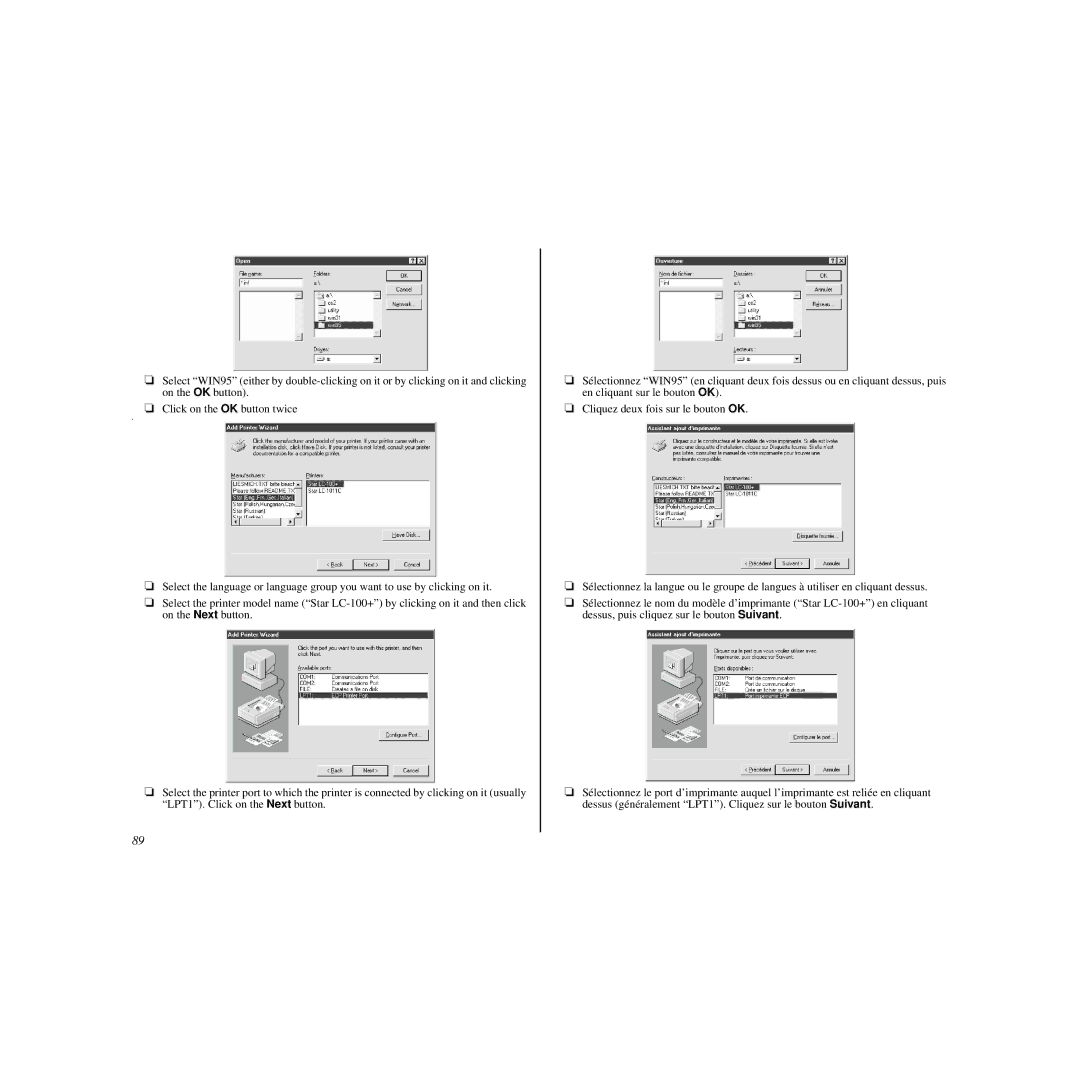
Dans la liste des Répertoires, sélectionnez WIN
Page
Remarque
Hinweis
Getting ready to print
Préparation à l’impression
Vorbereitung für den Druck
Impostazione della stampante
Printing a document
Impression d’un document
Drucken eines Schriftstücks
Stampa di un documento
Installing TrueType fonts
Installation des polices TrueType
Installieren von TrueType-Schriftarten
Installazione dei caratteri TrueType
Selecting fonts in Windows applications
Sélection des polices dans les applications Windows
Wahl von Schriftarten in Windows-Anwendungen
Chapitre 6 Utilisation de l’imprimante sous Windows
Setting up the printer in Windows
Configuration de l’imprimante sous Windows
Installazione della stampante sotto Windows
Kapitel 6 Drucker mit Windows 95 anwenden
Capitolo 6 Utilizzo della stampante con Windows
Einstellung des Druckers für Windows
Page
Page
Page
Page
Remarque
Hinweis
Preparing to print
Préparation en vue d’impression
Preparazione per la stampa
Ausdruck vorbereiten
Eigenschaften
Propriétés
Hinweis
Impression de document
Remarque
Ausdruck eines Dokumentes
Hinweis
Installation de polices TrueType
Cliquez sur la commande Installer la nouvelle police
Selezionare il comando Installa nuovo tipo di carattere
TrueType Fonts installieren
100
101
102
Using the Printer with OS/2 Warp
Setting up for printing with OS/2 Warp
Chapitre 7 Utiliser l’imprimante avec le logiciel OS/2 Warp
Configurer l’impression avec le logiciel OS/2 Warp IBM
Installazione della stampante sotto OS/2 Warp
Kapitel 7 Der Einsatz des Druckers unter OS/2 Warp
Capitolo 7 Utilizzo della stampante con OS/2 Warp
Einrichtung für den Druck unter IBM OS/2 Warp
Imprimer un document
Préparer l’impression
105
Druck eines Dokumentes
Druckvorbereitungen
106
Using the Printer with MS-DOS
Setting up for printing with MS-DOS
Chapitre 8 Utilisation de l’imprimante avec MS-DOS
Réglage pour l’impression avec MS-DOS
Kapitel 8 Verwendung des Druckers mit MS-DOS
Capitolo 8 Uso della stampante con MS-DOS
Einstellen zum Drucken unter DOS
Predisposizione per la stampa con MS-DOS
109
110
Paper Handling
Chapitre 9 Manipulation du papier
Selecting paper types
Sélection du papier
Kapitel 9 Papierhandhabung
Capitolo 9 Gestione della carta
Wahl der besten Papiersorte
Selezione dei tipi di carta
Adjusting for paper thickness
113
Réglage de l’épaisseur du papier
Einstellung der Papierstärke
Regolazione per lo spessore della carta
114
Manual sheet feeding
Automatic fanfold feeding
115
Alimentation automatique du papier continu
Alimentation manuelle feuille à feuille
Automatische Endlospapierzufuhr
Manueller Einzelblatteinzug
Suppression des bourrages de papier
Clearing paper jams
117
Eliminazione di inceppamenti della carta
Beheben von Papierstaus
118
Appendix a Troubleshooting
Testing the printer
Annexe a Dépannage
Test de l’imprimante
Appendice a Soluzione di problemi
Anhang a Fehlersuche
Testen des Druckers
Collaudo della stampante
Test court
Test complet
Short test
Long test
Kurzer Selbsttest
Langer Selbsttest
Collaudo breve
Collaudo lungo
Hexadecimal dump
Vidage hexadécimal
123
Hexadezimaler Testausdruck
Bidirektionaler Druckertest
Scaricamento esadecimale
124
125
126
Guide de dépannage
Troubleshooting guide
127
Fehlersuchtabelle
Guida alla soluzione di problemi
128
Problem Possible Cause Recommended Action
129
130
131
’est pas correct
132
133
Repair
134
135
136
137
138
139
140
Checking system software settings in Windows
Vérification des réglages du logiciel dans Windows
Prüfen der Systemsoftware-Einstellungen in Windows
Vérification des réglages MS-DOS
Checking system software settings in MS-DOS
143
Controllo delle regolazioni di software di sistema in MS
Prüfen der Systemsoftware-Einstellungen in MS-DOS
144
Annexe B Caractéristiques techniques
Appendix B Specifications
145
Appendice B Specifiche tecniche
Anhang B Technische Daten
146
147
Paper Cut-sheet manual feeding
148
Druckerpapier Einzelblätter manueller Einzug
Optional Serial Interface
Parallel Interface
149
Code Page #852, Latin-2
150
151
CS2
152
Font and Character Set Control Commands
Print Pitch Control Commands
Top/Bottom Margin and Vertical Tab Commands
153
Special Print Mode Commands
Bit Image Graphic Commands
Line Spacing Commands
Form Feed and Related Commands
Download Character Commands
Horizontal Print Position Control Commands
Other Commands
155
156
157
ON-LINE
158
Online
Index
159
Stichwortverzeichnis Indice analitico
160
161
MS-DOS
162
MS DOS
163
164
Customer service information